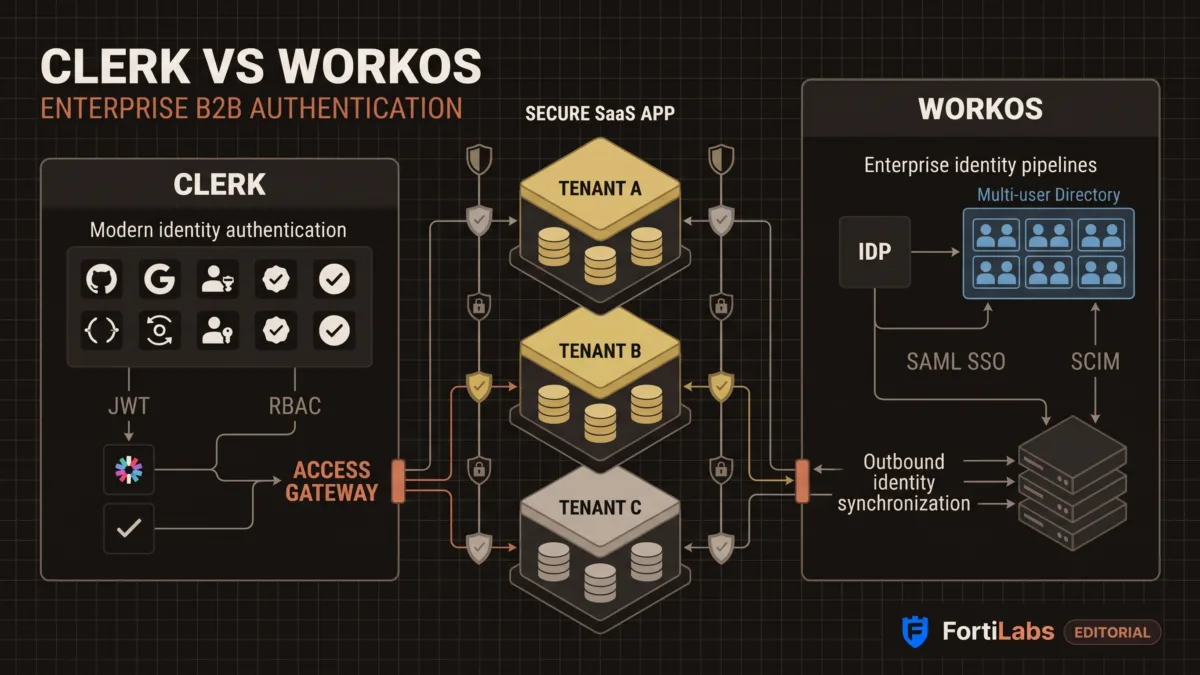
Short answer: Clerk and WorkOS AuthKit both support modern authentication and enterprise B2B requirements, including SAML SSO, SCIM provisioning, organizations, and role-based access control. Clerk is attractive when you want a unified developer-friendly authentication experience with transparent entry-level pricing. WorkOS is particularly compelling when enterprise identity, organization-specific policies, directory synchronization, and customer-managed SSO are central to your product.
Why consumer authentication stops being enough for B2B SaaS
A consumer application can often get away with a relatively simple identity model: a user registers, authenticates through Google or another OAuth provider, and receives access to their personal account.
Enterprise software introduces a different set of requirements. A customer is no longer just an individual account. It is an organization with employees, administrators, security policies, identity providers, and data that must remain isolated from other customers.
That transition changes the responsibilities of your authentication architecture.
For example, a startup might initially support:
- Email and password authentication.
- Google and GitHub OAuth.
- Passkeys for passwordless sign-in.
- Individual user profiles and sessions.
When its first enterprise customer arrives, the requirements can expand to include:
- SAML SSO: Employees authenticate through their company’s identity provider, such as Microsoft Entra ID or Okta.
- SCIM provisioning: IT administrators automatically create, update, and deactivate employee accounts.
- Organization RBAC: Administrators assign permissions based on organizational membership and job responsibilities.
- Tenant isolation: Every request is restricted to the correct customer’s data.
- Organization-specific policies: Different customers can require different authentication methods and security controls.
- Custom authentication domains: Enterprise users authenticate through a domain that matches the SaaS product’s branding and configuration.
These are not simply additional login buttons. They introduce an organization-aware identity and authorization architecture.
Clerk and WorkOS approach this problem with overlapping capabilities, but their product models and commercial structures differ enough to affect long-term architecture decisions.
Clerk vs WorkOS: the architectural difference
Clerk provides an integrated authentication and user-management platform with Organizations, memberships, roles, permissions, and enterprise connections. Its development experience makes it particularly convenient when authentication is an important part of the application but not the entire product’s identity infrastructure.
WorkOS AuthKit combines user authentication, organization management, sessions, RBAC, and enterprise identity capabilities. WorkOS also offers dedicated enterprise identity products, making it attractive when SSO, directory synchronization, and customer-managed identity integrations are central to the product.
| Capability | Clerk | WorkOS AuthKit |
|---|---|---|
| Consumer authentication | Yes | Yes |
| OAuth and social login | Yes | Yes |
| Passkeys | Supported | Supported |
| Organization management | Built-in Organizations | Built-in organizations |
| SAML SSO | Enterprise connections | Enterprise SSO |
| OIDC SSO | Supported | Supported |
| SCIM provisioning | Directory Sync | Directory Sync |
| Custom roles | B2B Authentication add-on required for production | Organization-level custom roles |
| Permission management | Custom permissions | Role-based permissions |
| Session authorization claims | Organization and permission claims, subject to configuration | Organization, role, and permission claims |
| Custom domains | Production domain and satellite-domain configuration | Paid custom-domain options |
Sources: Clerk Organizations documentation, WorkOS AuthKit, and WorkOS RBAC documentation.
SAML SSO: supporting enterprise identity providers
Security Assertion Markup Language (SAML) is an authentication protocol that allows an organization to authenticate employees through an external identity provider (IdP).
Instead of requiring employees to maintain another password for your SaaS application, the application trusts a configured identity provider to authenticate them.
Common enterprise identity providers include:
- Microsoft Entra ID.
- Okta Workforce Identity.
- Google Workspace.
- Other SAML 2.0-compatible identity providers.
For a B2B SaaS product, SAML SSO typically involves an organization-specific connection, identity-provider metadata, service-provider configuration, certificate management, and a user-provisioning strategy.
How Clerk handles SAML SSO
Clerk supports enterprise connections using SAML and OIDC. Its documentation identifies Microsoft Azure AD (now Microsoft Entra ID), Google Workspace, and Okta as supported identity providers, while also allowing connections to other SAML-compatible providers.
Enterprise connections can be associated with Organizations, allowing different customers to configure their own identity providers within the application.
One implementation detail deserves attention: Clerk’s default SAML domain matching requires the user’s email domain to match the configured connection domain. Subdomains are not automatically accepted. For example, an identity using sales.example.com does not automatically match a connection configured for example.com.
This matters when enterprise customers use multiple email domains or have complex identity-provider configurations.
How WorkOS handles SAML SSO
WorkOS treats enterprise SSO as a core part of its identity offering. AuthKit supports SAML and OIDC connections, with organization-specific authentication configuration.
Its self-service Admin Portal allows customers to configure their identity-provider connections without requiring your engineering team to manually handle every configuration exchange.
The general onboarding process includes:
- The customer opens the enterprise SSO configuration flow.
- The administrator selects or configures an identity provider.
- The administrator supplies the required identity-provider information.
- The service-provider details are configured on the identity-provider side.
- Attributes and user applications are configured.
- The connection is tested and enabled.
This is particularly useful when selling to enterprises that want control over their own identity configuration.
Architecture recommendation: Do not treat successful SAML authentication as automatic authorization. A valid SAML response proves that an identity provider authenticated the user. Your application must still resolve the correct organization, verify membership, and authorize access to the requested resource.
Documentation: Clerk Enterprise SSO and WorkOS AuthKit enterprise authentication.
SCIM provisioning: managing employee lifecycle automatically
System for Cross-domain Identity Management (SCIM) standardizes how identity systems provision and manage user accounts in external applications.
Without SCIM, an enterprise administrator may need to invite employees manually, update their roles individually, and remember to deactivate accounts when employees leave.
That creates operational risk, especially when an organization has hundreds or thousands of employees.
SCIM automates much of this lifecycle:
- Create: A new employee receives an application account through directory provisioning.
- Update: Changes to employee attributes or group membership are synchronized.
- Deactivate: When an employee leaves, the directory can deactivate their application access.
- Role mapping: Directory groups can be mapped to application permissions or roles where supported.
Clerk Directory Sync
Clerk provides Directory Sync for provisioning and deprovisioning users from an organization’s directory.
For Microsoft Entra ID, Okta, and custom providers, Clerk uses SCIM 2.0. Google Workspace is handled through the Google Admin SDK rather than SCIM.
Directory Sync is associated with enterprise connections and is billed separately from SSO connections under Clerk’s production pricing model.
For a SaaS application, this reduces the amount of custom provisioning infrastructure the development team must maintain.
WorkOS Directory Sync
WorkOS Directory Sync provides an enterprise-oriented provisioning integration. It supports synchronization of user lifecycle information and can participate in role-assignment workflows.
One useful capability is mapping identity-provider groups to application roles. This means an enterprise administrator can manage group membership in their existing directory while the application receives corresponding authorization information.
However, provisioning should not be treated as an instantaneous security guarantee. Your application should define how quickly account deactivation must take effect, how synchronization failures are detected, and how existing sessions are invalidated or restricted.
Important: SCIM provisioning and SAML authentication solve different problems. SAML establishes identity during authentication. SCIM synchronizes user lifecycle information. A production B2B architecture often needs both.
Sources: Clerk Directory Sync and WorkOS developer documentation.
Organization RBAC: controlling access across tenants
Role-based access control (RBAC) determines which actions an authenticated user can perform.
In a consumer application, authorization might be as simple as checking whether a user owns a particular resource. In B2B software, authorization must account for organizational membership, roles, permissions, and the active tenant.
Consider a project-management platform with these roles:
| Role | Typical permissions | Scope |
|---|---|---|
| Owner | Manage organization, billing, members, and settings | Organization |
| Administrator | Manage members, projects, and configuration | Organization |
| Manager | Create projects and manage assigned teams | Organization or assigned resources |
| Member | Access permitted projects and collaborate | Membership and resource |
| Viewer | Read permitted resources | Read-only |
This is an illustrative application-specific role model, not a list of roles supplied identically by both providers.
Clerk Organizations and RBAC
Clerk provides Organizations, memberships, an active-organization context, and role and permission management.
Its default organization roles are:
org:admin— organization administration and system permissions.org:member— a more limited default permission set.
Developers can create custom roles and permissions for application-specific requirements. Clerk also supports Role Sets, which determine which roles are available to an organization.
There are two important commercial and implementation considerations:
- Custom roles in production require Clerk’s B2B Authentication add-on.
- Clerk’s system permissions are not included in session claims. Server-side authorization requiring those permissions needs an appropriate application-side strategy.
Clerk’s organization model works well when multiple business customers share an application instance and user pool.
WorkOS AuthKit RBAC
WorkOS offers roles and permissions that can be assigned to organization memberships. It also supports custom organization-level roles and role assignment from identity-provider groups.
One useful distinction is that WorkOS supports both single-role and multiple-role membership configurations.
With multiple roles enabled, a user’s permissions can be combined across assigned roles. This can reduce the need to create numerous hybrid roles for employees who work across departments.
For example, an employee might receive both Designer and Engineer roles instead of requiring a separate Designer-Engineer role.
WorkOS can include organization, role, and permission information in session JWTs. This gives application services a convenient way to make authorization decisions without requesting role information from a separate API on every request.
Practical decision: Clerk is a strong choice for conventional organization membership and application-defined RBAC. WorkOS deserves closer consideration when organization-specific custom roles, IdP group mapping, and more flexible role assignment are important enterprise requirements.
Documentation: Clerk Roles and Permissions and WorkOS AuthKit Roles and Permissions.
Multi-tenant data isolation: the responsibility neither provider removes
One of the most dangerous assumptions in B2B application architecture is that using an authentication provider with Organizations automatically isolates customer data.
It does not.
Clerk and WorkOS can establish identity, organization membership, and authorization context. Your application remains responsible for ensuring that database queries and resource operations cannot cross tenant boundaries.
Consider a database containing projects belonging to different organizations:
CREATE TABLE projects (
    id BIGINT PRIMARY KEY,
    organization_id VARCHAR(100) NOT NULL,
    name VARCHAR(255) NOT NULL,
    created_at TIMESTAMP NOT NULL DEFAULT CURRENT_TIMESTAMP,
    UNIQUE (organization_id, name)
);

CREATE INDEX idx_projects_organization
ON projects (organization_id);
The critical field is organization_id. Every organization-owned resource needs a reliable tenant association.
When a user requests a project, the application should:
- Validate the authentication token.
- Resolve the active organization from trusted session or application context.
- Verify that the user is an active member of that organization.
- Check the user’s required permission.
- Query the resource using both its identifier and organization identifier.
An illustrative parameterized query looks like this:
SELECT id, name, created_at
FROM projects
WHERE id = ?
  AND organization_id = ?
LIMIT 1;
The organization identifier must come from validated server-side identity and membership context, not from an untrusted form field or client-controlled request parameter.
Shared database versus separate databases
Most SaaS products start with a shared database and tenant-scoped rows. This is operationally efficient, but it requires consistent tenant enforcement throughout the application.
| Model | Advantages | Trade-offs |
|---|---|---|
| Shared database and tables | Simple operations and efficient resource usage | Requires strict tenant-scoped queries |
| Shared database, separate schemas | Stronger logical separation | More migration and schema-management complexity |
| Separate databases | Greater infrastructure-level isolation | Higher operational and maintenance costs |
For sensitive enterprise workloads, database-level controls such as row-level security (RLS), restricted database roles, and tenant-aware connection handling can provide additional protection.
Regardless of the model, authorization checks should be applied to background jobs, exports, webhooks, file downloads, administrative APIs, and other non-interactive access paths as well as ordinary web requests.
Security warning: Never trust an organization ID simply because it appears in a URL, request body, or frontend state. A user who changes an identifier must not gain access to another customer’s resources.
Clerk vs WorkOS pricing: what enterprise readiness actually costs
Authentication pricing becomes more complicated when a product moves from individual users to enterprise organizations. Monthly active users, monthly retained users, SSO connections, directory connections, custom domains, and premium capabilities can all affect the total.
The following comparison uses the providers’ published pricing information available in November 2026. Prices are USD and should be rechecked before procurement.
Clerk pricing
Clerk’s published Pro plan starts at $20 per month when billed annually.
Its pricing structure includes:
- 50,000 monthly retained users (MRUs) included per application.
- One SSO connection included per application.
- Additional SSO connections priced at $75 per month each for the first additional tier.
- One Directory Sync connection included, with published additional-connection pricing scheduled to begin January 1, 2027.
- Additional retained-organization charges after the included monthly retained organization allowance.
- Custom roles and other advanced B2B capabilities subject to the B2B Authentication add-on.
Clerk also offers a Business plan starting at $250 per month when billed annually. It adds capabilities such as enhanced dashboard roles, compliance-related features, and enterprise workspace SSO.
Importantly, the base Pro subscription does not mean every advanced enterprise feature is included. Organization limits, custom roles, additional SSO connections, and directory synchronization must be evaluated separately.
WorkOS AuthKit pricing
WorkOS publishes a different pricing model.
- AuthKit includes up to 1 million monthly active users (MAUs) at no monthly charge.
- Each additional 1 million MAUs costs $2,500 per month.
- SSO connections cost $125 each for the first 15 connections.
- Directory Sync connections cost $125 each for the first 15 connections.
- Custom domains are listed at $99 per month.
- Audit Logs have a free entry-level offering, while certain log-streaming and retention capabilities are separately priced.
The published SSO and Directory Sync pricing includes volume discounts at higher connection counts. WorkOS also offers commercial arrangements for larger customers.
| Pricing component | Clerk | WorkOS |
|---|---|---|
| Base authentication | Pro: $20/month, annual billing | AuthKit: $0/month |
| Included user allowance | 50,000 MRUs per app on Pro | 1 million MAUs |
| Additional user allowance | $0.02 per additional MRU/month at the published initial tier | $2,500 per additional 1 million MAUs/month |
| SSO connections | One included; additional connections from $75/month | $125 per connection for connections 1–15 |
| Directory Sync | One included; additional billing scheduled from January 2027 | $125 per connection for connections 1–15 |
| Custom domain | Domain features depend on plan and configuration | $99/month published price |
| Business tier | $250/month, annual billing | Custom commercial arrangements available |
Sources: Clerk pricing and WorkOS pricing.
Example: estimating the cost of 20 enterprise customers
Assume a SaaS application has 20 enterprise customers. Each customer requires one SSO connection and one Directory Sync connection. Assume the application has 100,000 monthly active users, and the 20 connections are all billable.
For WorkOS, the published connection pricing gives this illustrative estimate:
SSO:
15 × $125 = $1,875
5 × $100 = $500

Directory Sync:
15 × $125 = $1,875
5 × $100 = $500

Custom domain:
$99

Total:
$1,875 + $500 + $1,875 + $500 + $99
= $4,849/month
The estimate uses the published 16–30 connection discount tier of $100 per connection. It assumes one billable custom domain and excludes taxes, negotiated terms, and other optional services.
The example also demonstrates why comparing only the advertised base authentication price is misleading.
For Clerk, the same 20-customer scenario requires checking the applicable B2B Authentication add-on, retained-organization usage, custom-role requirements, and the production Directory Sync billing schedule. The $20 Pro subscription alone is not a complete enterprise deployment estimate.
Pricing methodology: MRUs and MAUs are different billing metrics. They should not be treated as interchangeable. The example is a published-rate calculation, not a quote or a measured customer bill.
Session token verification latency and runtime performance
Authentication latency matters when an application verifies sessions on every request, especially when APIs serve high traffic or run close to users at edge locations.
However, comparing Clerk and WorkOS using a single token-verification latency figure would be misleading without a controlled benchmark.
Neither provider’s documentation establishes an apples-to-apples public benchmark showing that one provider’s JWT signature verification is consistently faster than the other’s across identical runtimes, regions, libraries, and network conditions.
Clerk session verification
Clerk issues short-lived session tokens and uses a hybrid session architecture. Its production session token is documented with a 60-second lifetime, while the frontend SDK refreshes it approximately every 50 seconds.
For server-side verification, developers can use Clerk’s request-authentication utilities or verify JWT signatures manually using the instance’s public key.
When a valid public key is cached, signature verification can take place locally without making a remote request for every API call.
The main performance considerations are:
- JWT signature verification and claim validation.
- Public-key retrieval and JWKS cache behavior.
- Session-token refresh traffic.
- Additional database lookups for application-specific membership or resource checks.
WorkOS session verification
WorkOS AuthKit returns access and refresh tokens. Its access token is a JWT containing claims such as the user identifier, session identifier, organization ID, role, permissions, and expiry information when applicable.
WorkOS documents JWT validation using a standard library such as jose and a WorkOS JWKS endpoint.
As with Clerk, an application can validate the JWT signature locally using cached public keys rather than calling the identity provider for every request.
Additional latency can come from session refresh operations, organization membership lookups, application database queries, and any external authorization services.
What actually affects verification speed?
| Factor | Local verification | Remote operation |
|---|---|---|
| JWT signature verification | Cryptographic work on the current runtime | Not inherently required for each request |
| JWKS retrieval | Cached key lookup | Required when a key is missing or needs refreshing |
| Session refresh | Not part of ordinary signature verification | May require a network round trip |
| Membership verification | Possible with trusted, sufficiently current claims | May require an application database lookup |
| Resource authorization | Possible with trusted claims and local policy | May require a database or policy service |
For a meaningful comparison, test both implementations under the same conditions:
- Use the same runtime and deployment region.
- Verify equivalent JWT algorithms and key sizes where applicable.
- Warm the JWKS cache before measuring steady-state requests.
- Measure cold-start and warm-request performance separately.
- Include token refresh and key-rotation scenarios.
- Measure p50, p95, and p99 latency rather than relying only on averages.
- Measure application database authorization separately from token verification.
Do not assume that faster cryptographic verification automatically produces faster application responses. A database query that checks tenant membership can cost more than local JWT validation.
Performance recommendation: Cache JWKS keys safely, validate issuer, audience or authorized-party constraints where applicable, check expiry, and avoid unnecessary identity-provider API calls on ordinary authenticated requests. Build a refresh and key-rotation strategy rather than caching keys indefinitely.
Documentation: Clerk session architecture, Clerk manual JWT verification, and WorkOS session management.
Edge runtime compatibility: what developers should evaluate
Edge deployments introduce another architectural consideration. A conventional Node.js application may have access to runtime APIs and dependencies that are not available in every edge environment.
This is particularly important when authentication middleware runs before application routes and every request passes through it.
Clerk and edge authentication
Clerk provides server-side request authentication utilities and framework integrations. Developers can also verify Clerk session JWTs manually using public keys.
The manual JWT approach can be useful when an application needs a lightweight verification layer in a runtime with limited server capabilities.
However, compatibility should be checked against the exact Clerk SDK version, framework adapter, and edge platform being deployed. The existence of a JWT verification method does not establish that every SDK feature works in every runtime.
WorkOS and edge authentication
WorkOS provides framework integrations such as its AuthKit Next.js SDK, including proxy or middleware functionality for session management and refresh.
Its documented JWT verification approach uses standard JWT libraries such as jose. This provides a path for environments where a portable cryptographic verification implementation is preferable to a runtime-specific authentication client.
Nevertheless, the full AuthKit integration and a standalone JWT verifier are not interchangeable. Refresh operations, session management, and administrative API calls can still require network access and supported server-side functionality.
Edge deployment checklist
- Confirm that the SDK and its dependencies support the target runtime.
- Test cryptographic verification using the runtime’s supported Web Crypto APIs.
- Check JWKS caching, key rotation, and cold-start behavior.
- Verify cookie parsing and secure cookie handling.
- Test refresh operations and network timeouts.
- Confirm that authorization claims are available where middleware executes.
- Prevent authenticated responses from being shared through public CDN caches.
For a Next.js deployment, both providers offer relevant integration paths, but the actual runtime compatibility depends on the SDK version, deployment adapter, and features used.
For Cloudflare Workers or other non-Node environments, validate the exact integration instead of assuming that a framework’s generic middleware support guarantees compatibility.
Custom domains: DNS, authentication and enterprise branding
Custom domains can introduce unexpected implementation work because authentication involves more than changing the URL displayed on a login page.
Depending on the architecture, a custom authentication domain may affect:
- Authentication endpoints and redirects.
- Cookie scope and cross-subdomain behavior.
- OAuth callback configuration.
- Issuer values and JWT validation.
- DNS records and certificate issuance.
- Enterprise SSO callback and assertion-consumer URLs.
Clerk custom-domain configuration
Clerk uses a production Frontend API domain that is configured through the dashboard and DNS records.
Its production deployment process requires a domain that you own and access to its DNS configuration. Clerk documents that DNS propagation can take up to 48 hours.
Clerk also supports authentication across subdomains when the production root domain is configured appropriately. For example, an application and dashboard can share authentication across subdomains of the same root domain.
There are important details to consider:
- Cross-subdomain authentication expands the set of origins that must be secured.
- Clerk recommends configuring an appropriate subdomain allowlist.
- Passkey behavior has additional domain restrictions.
- Satellite domains may incur additional charges.
Clerk also supports proxying its Frontend API, but documents this as an advanced configuration rather than the normal recommended setup.
WorkOS custom-domain configuration
WorkOS supports custom domains for AuthKit, the Admin Portal, email, and its Authentication API.
Production custom-domain configuration involves adding the desired domain in the dashboard and creating the required DNS CNAME records.
WorkOS continues to verify DNS changes for up to 72 hours after an unsuccessful initial verification attempt.
Cloudflare users should initially configure the CNAME as DNS-only while verification takes place. WorkOS also documents an optional Cloudflare proxy configuration, including certificate-validation, cache, and routing requirements.
Custom domains are a paid service. WorkOS lists a $99 monthly price on its published pricing page.
| Consideration | Clerk | WorkOS |
|---|---|---|
| DNS configuration | Production domain records | Production CNAME records |
| Verification window | Propagation can take up to 48 hours | Verification retries can continue for 72 hours |
| Subdomain authentication | Supported with production root-domain configuration | Cookie and authentication-domain configuration required |
| Cloudflare proxy | Advanced Frontend API proxy option | Documented proxying for supported custom domains |
| Published custom-domain price | Depends on the applicable domain feature and plan | $99/month |
Sources: Clerk production deployment, Clerk Frontend API proxying, WorkOS AuthKit domains, and WorkOS custom-domain documentation.
Moving from consumer authentication to enterprise B2B
Replacing an existing consumer authentication system with an enterprise-ready identity platform is not just an SDK migration. It can affect user identifiers, sessions, organization membership, permissions, database relationships, and account recovery.
A staged migration reduces the risk of disrupting existing users.
Phase 1: introduce the organization data model
Create organization records, memberships, and tenant associations before introducing enterprise SSO.
Existing individual accounts should continue working while the application learns to associate users with organizations.
Phase 2: centralize authorization
Move authorization decisions into reusable server-side services or policies.
Instead of scattering role checks throughout controllers and frontend components, define permission checks around application actions such as:
projects:readprojects:createprojects:deletemembers:managebilling:manage
This creates a stable authorization model even if the underlying identity provider changes later.
Phase 3: add enterprise SSO
Introduce SAML or OIDC connections for customers who require corporate authentication.
Define how the application maps an authenticated identity to an existing user and organization membership. Do not automatically merge accounts based only on matching email addresses without an explicit, secure account-linking policy.
Phase 4: introduce SCIM provisioning
Enable directory synchronization after organization membership and lifecycle rules are established.
Test user creation, updates, group changes, deactivation, duplicate identities, and failed synchronization events.
Phase 5: strengthen tenant isolation
Audit every tenant-owned database query and background process. Introduce database constraints and additional isolation controls where appropriate.
Test for cross-tenant access using deliberately modified resource identifiers, organization IDs, API tokens, and administrative operations.
Phase 6: validate operational readiness
Before offering enterprise authentication commercially, verify:
- SSO onboarding and certificate rotation procedures.
- SCIM provisioning and deprovisioning behavior.
- Session revocation and access-removal timelines.
- Organization role changes and permission propagation.
- Audit logging and administrative activity tracking.
- Custom-domain DNS and certificate renewal.
- Incident response and customer support procedures.
Which should you choose?
The right choice depends on the complexity of your enterprise customers, the type of identity infrastructure you need, and how much control you want over organization-specific authentication and authorization.
Clerk strengths
- Integrated authentication and user-management experience.
- Developer-friendly Organizations and membership APIs.
- Built-in SAML and OIDC enterprise connections.
- Directory Sync and organization-aware RBAC.
- Published entry-level pricing and additional connection rates.
Clerk trade-offs
- Advanced B2B functionality can require additional billing.
- Custom production roles require the B2B Authentication add-on.
- Organization limits and retained-organization charges need attention.
- Domain and session configuration requires careful planning.
- Platform-style isolated identity pools may require a different architecture.
WorkOS strengths
- Strong focus on enterprise identity infrastructure.
- SAML, OIDC, and Directory Sync support.
- Organization-specific authentication policies.
- Flexible RBAC and IdP group-to-role mapping.
- Self-service enterprise identity configuration.
WorkOS trade-offs
- SSO and Directory Sync connections add per-customer costs.
- Custom domains carry a published monthly fee.
- Full session and refresh workflows require runtime-specific integration work.
- Higher connection counts need careful cost modeling.
- Enterprise features still require application-side authorization and tenant isolation.
Choose Clerk when…
- You want an integrated authentication and organization-management platform.
- Your product needs conventional multi-tenant workspaces and memberships.
- Developer experience and rapid implementation are important.
- Your enterprise connection count is manageable under the published pricing tiers.
- You want consumer and B2B authentication in one integrated product.
Choose WorkOS when…
- Enterprise SSO is central to your product’s sales strategy.
- You expect customers to manage their own identity-provider configurations.
- SCIM and identity-provider group mapping are important onboarding requirements.
- You need organization-specific roles and flexible permission assignment.
- You prefer to evaluate identity infrastructure around enterprise connections rather than only consumer authentication usage.
When neither provider is enough
Some SaaS platforms require each business customer to have an independently managed identity environment, isolated user pools, separate authentication policies, and extensive white-label control.
That is different from a conventional multi-tenant application in which all customers share one user pool and organizations separate access to resources.
Clerk’s documentation distinguishes these architectures and describes platform-style identity requirements separately from ordinary Organizations. WorkOS also provides enterprise identity capabilities, but the exact architecture should be evaluated against its current product and commercial offering.
If independent customer identity environments are mandatory, evaluate the provider’s platform capabilities and API limits before committing to a shared-user-pool architecture.
Enterprise B2B authentication implementation checklist
Before moving an application into enterprise production, use this checklist to identify missing capabilities.
- Every user has a stable identity independent of their organization membership.
- Users can belong to multiple organizations when the business model permits it.
- Every organization-owned resource has a tenant identifier.
- Every protected API validates authentication and authorization server-side.
- Organization membership is checked before accessing tenant resources.
- Roles and permissions are defined around actual application actions.
- SAML and OIDC connections are tested with the target enterprise IdPs.
- SCIM provisioning and deprovisioning are tested end to end.
- Role changes and account deactivation have a documented propagation strategy.
- JWT verification checks signature, issuer, expiry, and relevant audience or authorized-party claims.
- JWKS caching and key rotation have been tested.
- Custom domains, cookies, redirects, and certificates work in production.
- Tenant isolation is tested across APIs, jobs, exports, files, and administrative workflows.
- Audit events and incident-response procedures are defined.
- Monthly costs are estimated using actual users, organizations, SSO connections, Directory Sync connections, and domain requirements.
Frequently asked questions
Is Clerk or WorkOS better for B2B SaaS authentication?
Both support B2B authentication, SAML SSO, organization management, and role-based access control. Clerk is attractive for integrated authentication and conventional organization workflows. WorkOS is particularly relevant when enterprise identity integrations, customer-managed SSO, SCIM, and flexible organization-specific authorization are central requirements. The better choice depends on your architecture and expected enterprise connection costs.
Do Clerk and WorkOS both support SAML SSO?
Yes. Both support enterprise SSO using SAML. They also support OIDC-based enterprise authentication. Clerk provides enterprise connections associated with Organizations, while WorkOS provides dedicated enterprise SSO capabilities and self-service configuration workflows through its enterprise identity tooling.
Does SCIM automatically deactivate users in an application?
SCIM can synchronize account deactivation from a customer’s identity directory, but your application must define how deactivation affects existing sessions, API tokens, background jobs, and active connections. A provisioning event should trigger the appropriate application-side access restrictions rather than assuming every existing session disappears immediately.
Does Clerk or WorkOS automatically isolate tenant database records?
No. Organization membership and JWT claims provide identity and authorization context, but database isolation remains the application’s responsibility. Every tenant-owned query must enforce the correct organization boundary. Database constraints, row-level security, and centralized authorization checks can provide additional protection.
Which provider has faster JWT verification?
There is no sufficiently comparable public benchmark establishing that one provider’s JWT signature verification is consistently faster. Both support local verification using public signing keys and appropriate JWT libraries. Actual latency depends on runtime, cryptographic implementation, JWKS caching, cold starts, token refreshes, and application database operations.
Can Clerk and WorkOS run authentication at the edge?
Both offer authentication approaches that can be integrated into modern server-side application architectures. Clerk provides request-authentication utilities and manual JWT verification, while WorkOS provides framework integrations and documented JWT validation using libraries such as jose. Compatibility with a specific edge runtime must be checked against the SDK version and features being used.
Does WorkOS charge separately for custom authentication domains?
Yes. WorkOS lists custom domains at $99 per month on its published pricing page. Its custom-domain offering covers services such as AuthKit, the Admin Portal, email, and the Authentication API. Check the current pricing and the specific domain configuration required for your deployment.
Should a startup implement SAML and SCIM before getting its first enterprise customer?
Not necessarily. A startup should design its user, organization, membership, and authorization models so enterprise capabilities can be introduced without a major database redesign. It can then prioritize SAML and SCIM based on actual customer requirements, procurement expectations, and implementation costs.
The architectural decision
Moving from consumer authentication to enterprise B2B readiness requires more than supporting another sign-in protocol. It requires an organization-aware identity model, reliable provisioning, permission management, tenant isolation, and operational processes that enterprise customers can trust.
Clerk provides an integrated path for teams that want authentication and organization management together. WorkOS AuthKit is a strong candidate when enterprise identity workflows, SSO onboarding, directory synchronization, and flexible organization authorization are major parts of the product strategy.
The most important architectural decision is to keep authentication, authorization, and data isolation as distinct responsibilities. Let the identity provider establish who the user is and which organization they represent. Let your application enforce what that user can do and which customer data they can access.
That separation makes your B2B architecture easier to secure, audit, scale, and evolve as enterprise requirements become more demanding.
Sources and verification
The following primary sources were consulted for this comparison. Product capabilities, billing terms, and domain requirements can change, so verify the live documentation before implementation or procurement.
- Clerk pricing — November 2026.
- Clerk Organizations — November 2026.
- Clerk Roles and Permissions — November 2026.
- Clerk Enterprise SSO — November 2026.
- Clerk Directory Sync — November 2026.
- Clerk Manual JWT Verification — November 2026.
- WorkOS pricing — November 2026.
- WorkOS AuthKit — November 2026.
- WorkOS Session Management — November 2026.
- WorkOS Roles and Permissions — November 2026.
- WorkOS Custom Domains — November 2026.