A serverless function can respond to a request in milliseconds, but what happens when the work behind that request takes several minutes, requires multiple external services, or must survive an unexpected deployment or network failure?
This is where ordinary background jobs become a workflow orchestration problem. AI generation, PDF rendering, large data imports, and external API synchronization all need more than a queue that simply says a job has started.
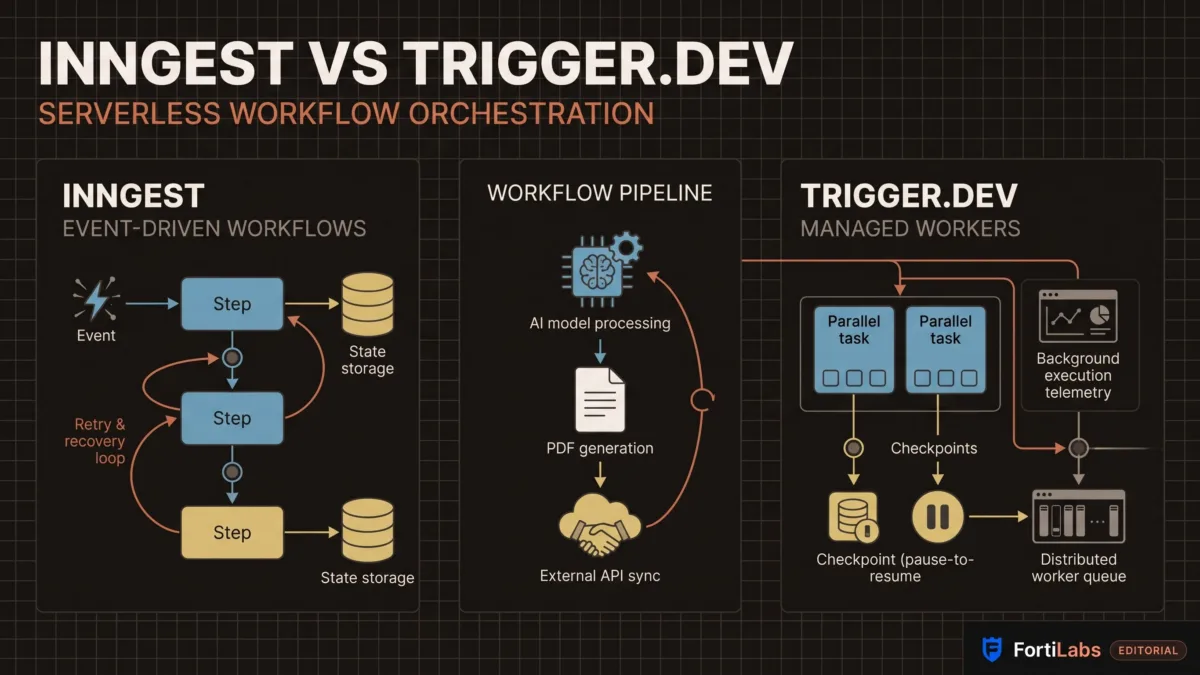
Inngest and Trigger.dev both address this problem with durable execution, automatic retries, workflow coordination, and execution observability. However, their execution models, developer experiences, infrastructure choices, and pricing structures differ in ways that can materially affect a production application.
Inngest is particularly attractive when workflows should remain close to an existing application, use event-driven orchestration, and execute individual steps on the application’s infrastructure. Trigger.dev is compelling when teams want managed worker execution, configurable compute, long-running TypeScript tasks, and checkpointed waits.
Neither platform automatically makes every operation reliable or eliminates the need for idempotency, resource limits, and failure handling.
- Platforms
- Inngest vs Trigger.dev
- Architecture
- Durable workflows
- Primary workloads
- AI, PDFs, API sync
- Deployment context
- Serverless and managed workers
1. Why serverless functions time out during long-running tasks
Serverless functions are designed to handle independent requests without requiring developers to operate persistent application servers. They work extremely well for authentication callbacks, API endpoints, lightweight database operations, and short-running business logic.
The problem begins when a single request becomes responsible for an extended sequence of operations.
Consider a document-generation workflow:
- Accept a document-generation request.
- Retrieve customer data from several APIs.
- Send content to an AI model.
- Wait for the model to finish processing.
- Render a PDF with images and custom fonts.
- Upload the generated file to object storage.
- Update the database and notify the customer.
If these operations run inside one HTTP request, a slow model response, rendering bottleneck, or temporary API failure can cause the entire operation to exceed the hosting platform’s execution limit.
Vercel’s execution limits are not a fixed universal number
It is important not to rely on outdated assumptions about serverless timeouts. Vercel’s maximum function duration depends on the plan, runtime, Fluid Compute configuration, and individual function settings.
As of November 2026, Vercel announced support for function durations of up to 30 minutes for Node.js and Python runtimes on Pro and Enterprise plans, with durations above 800 seconds in beta and requiring Fluid Compute. The actual available duration must still be checked against the deployed project’s configuration.
Increasing a function’s maximum duration can help with bounded workloads. It does not, by itself, provide durable checkpoints, independent retries, workflow state recovery, or protection against duplicate external operations.
A longer timeout gives a function more time to execute. Durable orchestration gives a workflow a mechanism to preserve progress, coordinate separate operations, and recover from failures. These are different engineering capabilities.
Why a larger timeout is not always the right solution
- Failure recovery: A function can terminate after completing several expensive operations.
- External dependencies: APIs, databases, and AI providers can become temporarily unavailable.
- Resource consumption: PDF rendering and image processing can consume substantial memory and CPU.
- Request lifecycle: The original browser connection should not need to remain open until a long workflow finishes.
- Observability: A single execution log may not provide a useful view of every operation and its individual failure history.
The more appropriate architecture is often to accept a request quickly, create a durable job, return a tracking identifier, and let an orchestration system coordinate the remaining work.
2. What durable execution actually means
Durable execution is a programming model in which a workflow’s completed operations and progress can be preserved so that temporary failures do not necessarily require repeating the entire process.
Instead of treating a background task as one uninterrupted function, the application divides it into identifiable operations.
For example, a workflow might contain:
workflow: generate-report

  step 1: validate request
  step 2: collect source data
  step 3: generate AI content
  step 4: render PDF
  step 5: upload document
  step 6: update database
  step 7: notify customer
If PDF rendering fails temporarily, a durable execution system can retry that operation without necessarily repeating the already completed data collection and AI generation steps.
Both Inngest and Trigger.dev provide durable execution capabilities, but they implement persistence and recovery differently.
Durability does not mean exactly-once external side effects
This distinction is essential. Suppose a payment API successfully processes a charge, but the response is lost before the workflow records the successful result. A retry may send the same request again.
A durable step can preserve a recorded result, but it cannot guarantee that an external provider performed an operation exactly once when the acknowledgement was lost.
Use provider-supported idempotency keys, database uniqueness constraints, and carefully designed retry behavior for payments, email delivery, uploads, and other operations that must not be duplicated.
3. Inngest vs Trigger.dev: architecture comparison
The biggest architectural difference is where application code executes and how the orchestration platform coordinates it.
How Inngest works
Inngest is an event-driven durable execution platform. Developers define functions in their application and divide important operations into durable steps.
Inngest coordinates function execution, persists completed step results, manages retries and waits, and provides execution traces. Application code can execute through an HTTP-served endpoint or a connected worker, depending on the deployment architecture.
This means Inngest does not require every application to move its business logic into a separate proprietary worker environment.
Inngest is especially useful when the application already has an established deployment environment and developers want to introduce orchestration without operating a separate task-compute fleet.
How Trigger.dev works
Trigger.dev uses a code-first task model. Developers define tasks in their project, deploy them to Trigger.dev, and execute them on its managed infrastructure or a self-hosted deployment.
Each task can use configurable compute resources. Trigger.dev provides durable execution, checkpointed waits, retries, concurrency management, logging, and run-level observability.
This approach is particularly attractive when tasks require dedicated compute resources, longer execution windows, or a deployment lifecycle independent of the primary web application.
Side-by-side architecture comparison
| Capability | Inngest | Trigger.dev |
|---|---|---|
| Core model | Event-driven durable functions | Code-first durable tasks |
| Execution location | Application infrastructure or connected workers | Managed or self-hosted workers |
| Progress persistence | Saved durable step results | Checkpointed execution and persisted task state |
| Wait operations | Durable sleep and event waits | Checkpointed wait and resume |
| Infrastructure control | More control over where application steps execute | Configurable managed compute or self-hosting |
| Primary language ecosystem | TypeScript, Python and Go | TypeScript-centric task development |
| Observability | Workflow and step traces | Task runs, logs and tracing |
4. Workflow steps, composition and execution models
Both platforms support multi-step workflows, but the way developers express those workflows is an important selection factor.
Inngest: explicit durable steps
Inngest uses named step primitives. A completed step’s result is saved and reused when a function resumes.
A simplified TypeScript example:
import { Inngest } from "inngest";

const inngest = new Inngest({
  id: "report-service",
});

export const generateReport = inngest.createFunction(
  {
    id: "generate-report",
    retries: 4,
  },
  async ({ event, step }) => {
    const data = await step.run(
      "collect-data",
      async () => fetchReportData(event.data.reportId)
    );

    const content = await step.run(
      "generate-content",
      async () => generateAIContent(data)
    );

    const pdf = await step.run(
      "render-pdf",
      async () => renderPDF(content)
    );

    await step.run(
      "save-report",
      async () => saveReport(event.data.reportId, pdf)
    );

    return { status: "completed" };
  }
);
This is an illustrative example. Production code must define the event trigger, validate the payload, handle external API failures, and use appropriate storage references rather than passing large binary files between durable steps.
Named steps also need stable identifiers. Changing step names in deployed workflows can affect how existing runs resolve previously persisted progress.
Trigger.dev: task-based execution
Trigger.dev allows developers to write ordinary asynchronous TypeScript inside a task. Its runtime handles task execution and checkpointing around supported durable operations.
import { task } from "@trigger.dev/sdk";

export const generateReport = task({
  id: "generate-report",

  run: async (payload: {
    reportId: string;
  }) => {
    const data = await fetchReportData(
      payload.reportId
    );

    const content = await generateAIContent(
      data
    );

    const pdf = await renderPDF(content);

    await saveReport(
      payload.reportId,
      pdf
    );

    return {
      status: "completed",
    };
  },
});
This example demonstrates the task structure, not a claim that every arbitrary JavaScript operation is automatically checkpointed. Durable waits, task boundaries, retry behavior, and idempotency must be designed according to the SDK’s execution model.
What about parallel operations?
Some workflows contain independent operations that do not need to wait for one another.
For example, an application may retrieve customer records, billing information, and analytics data simultaneously before generating a report.
Inngest supports parallel steps, allowing independent operations to execute concurrently. Trigger.dev supports task composition and triggering multiple tasks, including waiting for child task results.
The correct design depends on whether the parent workflow needs every child result, how failures should propagate, and whether each child needs independent retry and monitoring.
Use parallel execution for independent work, sequential execution for dependent operations, and separate child workflows when individual jobs need independent scaling, ownership, or failure handling.
5. Automatic retries and exponential backoff
A background workflow will eventually encounter failures. An external API might return HTTP 429, a database connection might temporarily disappear, or an AI provider might return a transient server error.
A reliable orchestration system should distinguish temporary failures from permanent errors instead of repeatedly executing every operation without considering the cause.
Inngest retry behavior
Inngest retries failed durable steps independently. Its TypeScript SDK documents four retries after the initial attempt by default, with configurable retry counts.
Its retry behavior uses exponential backoff with jitter by default. Developers can also use specialized errors to respect retry instructions from external services or prevent retries for permanent failures.
const fn = inngest.createFunction(
  {
    id: "sync-external-data",
    retries: 4,
  },
  async ({ step }) => {
    return await step.run(
      "fetch-external-data",
      async () => {
        const response = await fetch(
          "https://api.example.com/data"
        );

        if (!response.ok) {
          throw new Error(
            `API returned ${response.status}`
          );
        }

        return response.json();
      }
    );
  }
);
A production implementation should classify HTTP status codes and use the provider’s Retry-After instructions when applicable. Not every non-successful HTTP response is retryable.
Trigger.dev retry behavior
Trigger.dev provides configurable task retries, including retry settings for failed executions. Its task execution model also supports retrying work after failures, while durable waits allow a task to resume from supported checkpoints.
A typical configuration can define a retry policy with a maximum number of attempts and exponential backoff.
import { task } from "@trigger.dev/sdk";

export const syncExternalData = task({
  id: "sync-external-data",

  retry: {
    maxAttempts: 5,
    factor: 2,
    minTimeoutInMs: 1000,
    maxTimeoutInMs: 30000,
    randomize: true,
  },

  run: async (payload: {
    customerId: string;
  }) => {
    return await syncCustomer(
      payload.customerId
    );
  },
});
This illustrates the retry configuration pattern. Confirm the exact options against the installed Trigger.dev SDK version before copying it into a production project.
Why exponential backoff matters
Immediately retrying a failed request can make an existing outage worse. If hundreds of workflows retry simultaneously, they can create a second traffic spike against an already struggling provider.
Exponential backoff increases the delay between attempts. Jitter adds controlled randomness so that retries are less likely to happen at exactly the same time.
Attempt 1: immediate
Attempt 2: short delay
Attempt 3: longer delay
Attempt 4: longer delay
Attempt 5: capped delay + jitter
Actual retry intervals depend on the configured policy and platform. This sequence is conceptual, not a fixed timing schedule.
Retry comparison
| Feature | Inngest | Trigger.dev |
|---|---|---|
| Automatic retries | Yes | Yes |
| Retry configuration | Function and step-level behavior | Task retry configuration |
| Backoff | Exponential backoff with jitter by default | Configurable exponential backoff |
| Permanent error handling | Non-retriable errors and failure handlers | Task error handling and retry controls |
| Preserving completed work | Saved durable step results | Checkpoint and recovery model |
| Duplicate side-effect protection | Application-level idempotency required | Application-level idempotency required |
6. Concurrency limiting, queues and API rate limits
Concurrency determines how much work can execute simultaneously. Without appropriate limits, a successful traffic spike can overwhelm an external API, exhaust database connections, or create excessive infrastructure costs.
Inngest concurrency controls
Inngest supports concurrency limits at different scopes. Its configuration can restrict active step execution for a function, environment, or account.
A particularly useful capability is keyed concurrency. A workflow can limit simultaneous operations for a specific customer without necessarily imposing the same limit on every other customer.
export default inngest.createFunction(
  {
    id: "customer-sync",

    concurrency: {
      limit: 5,
      key: "event.data.customerId",
    },
  },
  async ({ event, step }) => {
    await step.run(
      "sync-customer",
      () => syncCustomer(event.data.customerId)
    );
  }
);
Important: Inngest’s concurrency configuration limits active step execution, not simply the number of workflow runs that exist. Workflows waiting or sleeping do not consume an active execution slot.
Trigger.dev concurrency controls
Trigger.dev provides task concurrency limits and queue controls. These help teams manage simultaneous worker execution and protect downstream services.
Concurrency can be configured for different task workloads, allowing resource-intensive PDF jobs to operate with different limits from lightweight API synchronization jobs.
Trigger.dev also offers configurable machine sizes, which can help match compute resources to the actual demands of a task.
Practical concurrency example
Imagine an application importing 10,000 customer records from a third-party service that allows only a limited number of simultaneous requests.
Instead of starting every request at once, the application can create a controlled queue and process a limited number of records at a time.
Concurrency limits simultaneous work. Rate limiting restricts how frequently operations can start over a defined period. An API that permits 100 requests per minute may still require a concurrency limit to prevent too many simultaneous connections.
| Requirement | Inngest | Trigger.dev |
|---|---|---|
| Global execution control | Scoped concurrency | Task and queue concurrency |
| Customer-specific limits | Keyed concurrency | Queue and concurrency configuration |
| Execution isolation | Depends on execution host and deployment | Managed task compute |
| Resource sizing | Application infrastructure and available workers | Configurable task machine sizes |
| Waiting workflow consumption | Paused steps do not consume active step concurrency | Checkpointed waits do not consume active execution concurrency |
7. Which platform handles real-world workloads better?
Feature lists are useful, but the best way to compare orchestration systems is to examine what happens in actual application workloads.
Scenario A: AI model polling and generation
Many AI services provide asynchronous jobs rather than immediately returning a completed result. An application submits a request, receives a job identifier, and checks the provider until processing finishes.
A durable workflow can follow this sequence:
- Submit the AI generation request.
- Persist the provider’s job identifier.
- Wait for a reasonable interval.
- Check the provider’s job status.
- Repeat while the job remains pending.
- Retrieve and store the final result.
Inngest supports durable sleeps and event-based waits, while Trigger.dev provides checkpointed waiting and resumption. Both can implement this pattern without keeping the original HTTP request open.
Prefer provider webhooks when they are reliable and available. Polling should use bounded intervals, a maximum workflow deadline, and appropriate handling for failed or expired provider jobs.
Scenario B: PDF rendering and document generation
PDF rendering can be CPU- and memory-intensive, particularly when the document contains large images, custom fonts, charts, or hundreds of pages.
In this situation, execution infrastructure matters as much as workflow orchestration.
- Inngest: Useful when rendering can execute on suitable application-controlled infrastructure or a dedicated connected worker.
- Trigger.dev: Attractive when developers want configurable managed worker resources and a task environment separate from the web application.
Neither platform automatically guarantees that every PDF library, native dependency, or browser-rendering package will work in every runtime. Build configuration, system dependencies, memory requirements, and execution environment must be verified.
Scenario C: External API synchronization
Data synchronization often involves hundreds or thousands of records, pagination, API quotas, partial failures, and repeated updates.
A production workflow should persist a synchronization cursor, process bounded batches, apply concurrency controls, and make individual writes safe to retry.
Inngest is a strong fit for event-driven synchronization workflows with keyed concurrency and independently retried steps. Trigger.dev is a strong fit when synchronization tasks benefit from managed compute, configurable task execution, and detailed run-level observability.
Workload suitability matrix
| Workload | Inngest | Trigger.dev |
|---|---|---|
| Multi-step AI pipelines | Excellent fit | Excellent fit |
| Long-running AI agents | Strong fit | Strong fit |
| Asynchronous AI polling | Strong fit | Strong fit |
| Heavy PDF rendering | Depends on execution infrastructure | Strong managed-compute option |
| Event-driven API synchronization | Strong fit | Strong fit |
| Customer-specific workflow limits | Keyed concurrency | Queue and concurrency configuration |
| Long waiting periods | Durable waits | Checkpointed waits |
| Custom compute requirements | Application or worker infrastructure | Configurable machine sizes |
8. Local development, debugging and telemetry
A workflow platform should not only work in production. Developers need to reproduce failures, inspect individual steps, test retries, and understand how a change affects existing workflows.
Inngest Dev Server
Inngest offers an open-source local Dev Server that allows developers to run and test their functions locally.
It records local events and function runs, provides a tracing interface, and allows developers to inspect completed steps, waits, retries, and errors before deploying.
This is particularly useful when developing event-driven workflows because developers can test the orchestration logic without relying entirely on production infrastructure.
Trigger.dev local development
Trigger.dev provides a local development CLI with task execution, hot reloading, and access to run information through its development workflow.
Developers can trigger tasks locally and inspect their logs and execution details in the development environment. Its dashboard, run history, and tracing capabilities help investigate production behavior.
Telemetry and observability
Both platforms provide more useful execution visibility than a basic fire-and-forget queue. However, teams should evaluate the information they actually need.
- Workflow execution status.
- Individual step or task duration.
- Retry count and failure reasons.
- External API response errors.
- Queue delay and concurrency saturation.
- Correlation between application requests and background runs.
- Workflow-level success and failure rates.
Include a stable business identifier, such as customerId, documentId, or importId, in workflow metadata. Avoid placing passwords, API keys, sensitive customer information, or complete private documents in logs and event payloads.
| Development feature | Inngest | Trigger.dev |
|---|---|---|
| Local development | Open-source Dev Server | Local development CLI |
| Hot reload | App-driven local development | Supported by development CLI |
| Local execution history | Local runs and event traces | Local task execution and logs |
| Production observability | Run and step tracing | Run history, logs and tracing |
| Preview environments | Environment-based workflow deployment | Dedicated preview branch support |
| Telemetry ecosystem | Platform tracing and observability integrations | OpenTelemetry instrumentation support |
9. Inngest vs Trigger.dev pricing
Pricing is one of the most important differences between these platforms. A workflow that performs many small operations can have a very different cost profile from a task that spends several minutes rendering a document.
Their billing models should not be compared using a single metric. Inngest’s published plans emphasize executions, events, concurrent steps, workers, and observability allowances. Trigger.dev explicitly combines task-run invocation charges with managed compute usage.
Inngest pricing model
Inngest Cloud publishes tiered plans with included execution allowances and platform limits.
| Plan | Published starting price | Included executions |
|---|---|---|
| Free | $0/month | 50,000 |
| Pro | $99/month | 1 million |
| Business | $499/month | 10 million |
| Enterprise | Custom | Custom |
These are published starting prices and allowances, not a guarantee that every workload will fit within the base plan.
Inngest’s pricing calculator defines executions using function runs and durable step calls. Its example uses the relationship:
Executions = runs × (step.run calls + 1)This makes workflow structure important. Adding more durable operations can increase execution consumption even when the number of incoming business events stays unchanged.
Other relevant limits include event ingestion, concurrent steps, queue depth, trace data, retention, and additional platform features. Inngest also publishes separate per-second compute pricing for its Sandboxes feature; that should not be confused with the standard durable-function execution model.
Trigger.dev pricing model
Trigger.dev publishes a usage-based model consisting of a monthly plan, included credits, run invocation charges, and compute costs based on the selected machine.
| Plan | Monthly price | Included credits |
|---|---|---|
| Free | $0 | $5 |
| Hobby | $10 | $10 |
| Pro | $50 | $50 |
| Enterprise | Custom | Contract-dependent |
Its published Small 1x machine has 0.5 vCPU and 0.5 GB RAM, with a compute rate of $0.0000338 per second.
Each run that starts executing on managed workers also incurs an invocation charge of $0.000025. Development-environment runs are excluded from this invocation charge.
Example: estimating a Trigger.dev workload
Consider 10,000 task runs per month, each executing for 60 seconds on the Small 1x machine.
Compute per run:
60 × $0.0000338 = $0.002028

Invocation per run:
$0.000025

Total per run:
$0.002053

10,000 runs:
10,000 × $0.002053

Estimated usage:
$20.53/month
This is an illustrative managed-compute calculation before applying plan credits, taxes, additional services, or any other applicable charges.
Why the pricing models are not directly interchangeable
A 60-second task and a workflow containing six short durable steps do not necessarily have comparable costs across the two providers.
Trigger.dev makes compute duration and machine size explicit billing variables. Inngest’s durable execution pricing emphasizes executions and platform allowances, while application infrastructure costs remain relevant when functions execute on infrastructure you operate.
In both cases, waiting should be distinguished from active computation. Trigger.dev documents checkpointed waits that do not incur compute charges during supported idle periods. Inngest’s durable sleep and event-wait operations also avoid keeping an application execution actively running simply to wait for time or an external event.
Which pricing model is more predictable?
- Inngest: Easier to estimate when execution volume, workflow step counts, event ingestion, and included allowances are known.
- Trigger.dev: Easier to estimate when average task duration, machine size, and monthly run count are measurable.
Model a representative month using real workflow counts, average execution time, step counts, retries, peak concurrency, compute requirements, retention needs, and included credits. Then compare total cost at the same workload volume.
10. Which platform should you choose?
Both products can solve long-running background workflow problems. The better choice depends on how much control you want over execution infrastructure, how you structure workflows, and how your workload consumes resources.
Inngest advantages
- Event-driven durable workflow model.
- Application-controlled execution options.
- Independently retried durable steps.
- Durable waits and event-driven resumption.
- Keyed concurrency controls.
- Open-source local Dev Server.
- TypeScript, Python and Go SDKs.
Inngest considerations
- Execution allowances require careful modeling.
- Heavy compute depends on worker infrastructure.
- Durable step boundaries require deliberate design.
- Application-side deployment and worker capacity remain relevant.
Trigger.dev advantages
- Managed worker infrastructure.
- Configurable compute sizes.
- Long-running task execution.
- Checkpointed waits and recovery.
- Task-oriented TypeScript development.
- Local development CLI.
- Detailed run monitoring and telemetry.
Trigger.dev considerations
- Managed compute and run charges both affect costs.
- Machine selection affects execution economics.
- Task deployment becomes another release concern.
- Runtime and build dependencies need validation.
Choose Inngest if…
- Your architecture is event-driven.
- You want durable steps to execute within your existing application infrastructure.
- You need keyed concurrency for customer-specific workloads.
- Your workflows contain many independent API calls and waits.
- You value the local Dev Server and its execution tracing.
- You use TypeScript, Python, or Go.
Choose Trigger.dev if…
- You want to run background tasks on managed infrastructure.
- Your workload needs configurable CPU and memory resources.
- You build long-running TypeScript workflows and AI agents.
- You want checkpointed waits without keeping compute active.
- You prefer a task-centric developer experience.
- You want to separate background task deployment from the primary application.
When neither should be your automatic first choice
If your application needs a sophisticated distributed workflow system with complex human approvals, cross-service coordination, extensive workflow versioning, or strict control over infrastructure, evaluate other solutions as well.
Temporal may be worth evaluating for complex workflow systems requiring deterministic workflow execution and extensive control. AWS Step Functions may be suitable when an application is already deeply integrated into AWS services.
The objective should be to choose the simplest architecture that satisfies the application’s durability, scaling, operational, and financial requirements.
11. Production implementation checklist
Selecting a workflow platform is only one part of building reliable background processing. The implementation must also protect against duplicate operations, unbounded retries, resource exhaustion, and incomplete workflow state.
Reliability and recovery
- Define stable identifiers for every business operation.
- Use idempotency keys for external writes and payments.
- Classify permanent errors separately from temporary failures.
- Set a maximum retry count and sensible backoff policy.
- Define a maximum workflow lifetime.
- Implement failure notifications and recovery procedures.
- Persist references to large files rather than unnecessarily passing binary data between steps.
Performance and resource management
- Set concurrency limits based on actual downstream capacity.
- Respect API quotas and Retry-After headers.
- Use separate queues or functions for different workload classes when appropriate.
- Set timeouts for external network requests.
- Measure CPU and memory consumption for rendering tasks.
- Use parallel execution only for genuinely independent operations.
Security and observability
- Validate all incoming events and task payloads.
- Keep secrets in managed environment variables.
- Restrict access to workflow dashboards and logs.
- Avoid storing sensitive customer data in event payloads.
- Track workflow status using stable business identifiers.
- Configure alerts for repeated failures and unusual execution volume.
- Review retention policies and operational audit requirements.
Migration from ordinary serverless functions
Teams do not need to migrate every API endpoint into a workflow engine. Start with operations that have a genuine need for asynchronous, retryable, or long-running execution.
- Identify the existing functions that regularly time out or perform expensive work.
- Separate the initial HTTP request from the background operation.
- Define the workflow states and failure boundaries.
- Move independent external operations into durable steps or tasks.
- Add idempotency and bounded retry policies.
- Return a job identifier to the application frontend.
- Expose progress and final status through an authenticated API or realtime updates.
- Test deployment changes, failed steps, retries, and recovery before production rollout.
12. Final verdict
Inngest and Trigger.dev are both capable choices for applications that have outgrown simple fire-and-forget background jobs.
Inngest stands out for event-driven orchestration, explicit durable steps, application-controlled execution, and flexible concurrency management.
Trigger.dev stands out for managed task execution, configurable compute, checkpointed waits, and a developer experience centered around long-running TypeScript tasks.
The deciding factor should not be which platform advertises the longest execution duration. It should be which execution model best matches your application’s workload, deployment architecture, recovery requirements, and total operating cost.
For an existing application that wants event-driven durable functions without moving all its business logic into a separate managed worker environment, start by evaluating Inngest. For a TypeScript application that needs managed background compute and independent task execution, start by evaluating Trigger.dev.
Test both against the same representative workflow before committing to a production architecture.
Frequently asked questions
Can Inngest and Trigger.dev eliminate Vercel function timeouts?
They can move long-running work away from the original HTTP request and provide durable execution mechanisms. Inngest can coordinate steps executed on application infrastructure, while Trigger.dev can execute tasks on its managed workers. Neither changes the timeout limits of unrelated Vercel functions.
Which is better for long-running AI agents?
Both support long-running AI workflows. Inngest is attractive for event-driven, step-oriented orchestration. Trigger.dev is attractive for managed task execution, configurable compute, and checkpointed waiting. Test your model provider’s latency, memory usage, and recovery behavior before choosing.
Does Inngest charge for every workflow step?
Its published pricing calculator counts executions using function runs and durable step calls. The exact allowance and any additional charges depend on the selected plan and current pricing terms.
Does Trigger.dev charge for time spent waiting?
Supported checkpointed waits do not consume active compute during idle periods. Trigger.dev charges for task-run invocations and active compute according to the selected machine and pricing plan.
Can both platforms handle PDF generation?
Yes, provided the chosen execution environment supports the required PDF libraries, native dependencies, memory, and processing time. Trigger.dev offers configurable managed compute. Inngest can coordinate rendering on suitable application infrastructure or connected workers.
Can I use both platforms in the same application?
Technically, yes. However, using two orchestration platforms adds operational complexity, duplicated monitoring, and additional integration work. Use both only when clearly separated workloads justify that complexity.
Are durable retries enough to prevent duplicate payments?
No. A retry can repeat an external side effect if the original operation succeeded but its acknowledgement was lost. Use provider-supported idempotency keys and database constraints to prevent duplicate business operations.
Which platform is cheaper?
There is no universal winner. Inngest pricing emphasizes execution allowances and platform usage, while Trigger.dev combines invocation fees and compute-second billing. Compare both using actual workflow volume, step count, execution time, concurrency, and resource requirements.
Do I need to migrate my entire application to use either platform?
No. Both can be introduced incrementally. Keep ordinary short-running requests in the application and move only workloads that benefit from durable background execution into the orchestration system.
Official documentation and further reading
The following primary sources are useful for verifying product capabilities, implementation details, and current pricing.