Disclosure: Some links in this article are affiliate links. If you buy through them, FortiLabs may earn a commission at no extra cost to you.
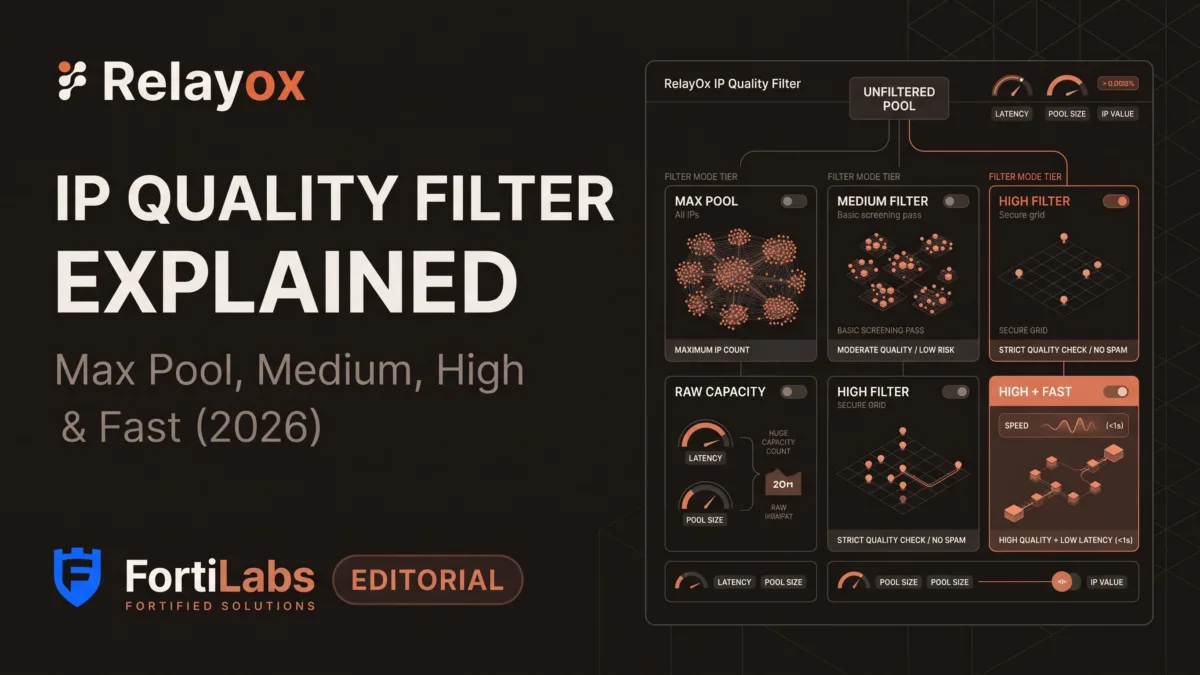
Short answer: RelayOx runs every proxy through one Quality System and lets you choose how strictly IPs are picked: Max Pool, Medium (recommended), High, or High + Fast. Stricter levels shrink the pool in exchange for stronger quality signals. The published criteria are fraud score under 10, performance under 0.6 seconds, 99.5% stability and 95%+ availability. They are claims to verify, and no proxy tier can prevent account suspensions.
- Filter levels
- Max Pool, Medium, High, High + Fast
- Recommended start
- Medium
- Published criteria
- Fraud score under 10, under 0.6 s, 99.5% stability, 95%+ availability
- Checked
- November 2026
How we verified this: this article is based on RelayOx’s public site, FAQ and legal pages, and on the official Google Ads and Meta advertising policies, checked in November 2026. It reports no measurements. Where a number is a vendor claim, we say so, and the test plan below shows how to measure it yourself.
What the Quality System Is
RelayOx describes one system underneath every filter level. Per its site, the Relayox Quality System checks IP reputation and network performance over time, with continuous evaluation and monitoring. The four numbers it publishes are the criteria: an IP fraud score below 10, performance under 0.6 seconds, 99.5% stability and 95% or better availability. Separately, every plan lists a “95% IP Clean Rate”, and every filter level is backed by what the site calls sub-second latency and a 99.5% uptime SLA.
The Quality Filter is the control on top. It does not change the system, only how strictly RelayOx narrows the pool before it hands you an IP. A broad setting gives you more eligible IPs. A strict setting prioritizes stronger quality signals and, as RelayOx’s own FAQ says, may reduce the available pool. The same FAQ adds a limit worth remembering: the filter does not guarantee that every website will accept every request.
The Four Filter Levels
The homepage illustrates three levels, and the FAQ lists a fourth. That is the full extent of the official description, so this table separates what is published from what is not:
| Level | What RelayOx says | Pool size | Strictness |
|---|---|---|---|
| Max Pool | Best for high-volume workflows where availability is more important than stricter filtering | Largest | Lowest |
| Medium | Recommended and balanced: balances pool availability and IP selection | Large | Moderate |
| High | Maximum quality: narrows the available pool by applying stricter filtering criteria | Smaller | Highest of the three illustrated |
| High + Fast | Named in the FAQ. The site does not describe its criteria | Not published | Not published |
Two details matter. First, “Fast” is not defined, so treat High + Fast as something to test, not something to assume. Second, the pool-size and strictness columns are inferred from the site’s descriptions of each level, not from published counts. RelayOx does publish per-country pool sizes, for example 5.8 million in the United States and 1.6 million in Germany, but it does not publish how many IPs survive each filter level.
What the Published Numbers Mean
These figures are often called benchmarks. They are not. A benchmark is a measurement with a method, and these are targets the provider states. Here is what each one tells you, and what it leaves out:
| Published figure | What it tells you | What it leaves out | How to verify |
|---|---|---|---|
| Fraud score under 10 | RelayOx screens against a reputation score | Which scoring service, which scale, and when it is checked | Check a sample of exit IPs in one independent tool and report the share under your threshold |
| Performance under 0.6 s | A responsiveness target for IPs | Where it is measured, which percentile, and to which test site | Measure p50 and p95 time to first byte from your own region to your own target |
| Stability 99.5% | A target for connections staying up | How stability is defined and over what window | Track failed and reset connections across a long session |
| Availability 95%+ | A target for IPs being reachable | Whether it applies per level or to the whole pool | Count timeouts and connection errors per level |
| 95% IP Clean Rate | A share of IPs the provider considers clean | The definition of “clean” | Compare against your own pass rate on a clean-IP test |
| 99.5% uptime SLA | A service-level commitment | Remedies and exclusions, which sit in the terms | Read the terms of service and monitor the gateway |
The fraud-score row deserves extra care. Fraud scores are not a universal unit. Different services use different data and scales, so “under 10” means little until you know which score it refers to. The only safe use of any score is comparison: run the same tool over IPs from each filter level and see which level produces the lowest scores on your sample.
What IP Quality Can and Cannot Do
This is the part that vendor pages skip. IP quality is one input among many. It can reduce friction such as CAPTCHA loops, extra verification prompts and blocks that come purely from a poor IP reputation. It cannot decide whether an account is suspended.
- CAPTCHA loops usually come from a mix of IP reputation, request rate, session behavior and a browser fingerprint that disagrees with the IP location or language. A cleaner IP fixes one of those causes.
- Account suspensions on advertising platforms are driven by policy compliance, account and payment verification, business identity and behavior across accounts. IP address is a minor part of that picture.
Warning: do not use proxies to get around a platform’s enforcement. Google’s advertising policies prohibit practices that circumvent or interfere with its advertising systems, and that policy covers multiple account abuse (Google Ads policy on abusing the ad network). Meta’s advertising standards separately prohibit tactics that circumvent its ad review process (Meta’s circumventing systems policy). No filter level changes that, and a stricter level does not make a policy violation safe.
Legitimate cases where IP quality helps are practical ones: an agency managing client accounts with permission from stable regional IPs, ad and landing-page verification in different countries, QA from real consumer networks, and data collection that a site’s terms allow. The goal in each case is fewer false alarms for authorized work, and nothing more.
Which Level to Use
Pick the cheapest level that meets your success target on your own workload. These starting points follow RelayOx’s own descriptions:
| Workload | Start with | Why | Watch for |
|---|---|---|---|
| Bulk collection of public pages | Max Pool | Availability matters most, and the pool is largest | A higher share of blocked or challenged requests |
| General browsing, QA and SEO checks | Medium | RelayOx’s recommended balance | Whether results change when you move up or down a level |
| Authorized logins and account-sensitive tasks | High | Stricter selection favors stronger quality signals | Fewer available IPs, so check your city and ISP options first |
| Latency-sensitive work | High + Fast | The name suggests a speed preference | Undocumented criteria, so measure p95 latency before relying on it |
Budget versus risk. RelayOx’s pricing page shows one per-GB price ladder and does not describe a separate price for each filter level, so confirm in the dashboard before assuming a level is free to switch. Even at one price, the level you pick changes your real cost, because you pay for failed attempts too. Cost per successful page is the per-GB price times the page weight, divided by your success rate. At $3.00 per GB and 120 KB pages, a million successful pages cost about $400 at 90% success and about $480 at 75%. If moving from Medium to High lifts your success rate from 75% to 90%, cost per successful page falls by about 17%, even though the price per GB did not change. That is the only way to decide a tier: by your own success rate, not by the label.
Test the filter levels from $1
How to Test the Filter Yourself
RelayOx lists a $1 trial of 200 MB per account, crypto only per its site, which is enough for a fair comparison. At about 120 KB per page, 200 MB is roughly 1,600 requests, so split it evenly. The plan:
- Create one proxy per level. Generate Max Pool, Medium, High and High + Fast with the same country and the same session type. Change nothing else.
- Run the same requests through each. Use 300 requests per level against your real target. That uses about 144 MB at 120 KB per page and keeps you inside the trial. Our proxy benchmark harness reports success rate and latency percentiles per pool, and you can add each level as its own pool.
- Record these metrics per level: success rate, challenge or block rate, p50 and p95 time to first byte, and unique IPs divided by requests.
- Score a sample of IPs. Run 50 exit IPs per level through the same independent IP reputation tool and compare the share under your chosen threshold.
- Judge with confidence limits. At 300 requests, a measured 20% block rate carries about plus or minus 4.5 points of uncertainty. Do not call a winner when the ranges overlap.
- Choose by cost per successful page, using the formula above, and re-test when your target changes.
Check the FortiLabs coupon page for the current RelayOx promo code before you pick a plan. Confirm at checkout that the discount applies to the plan you choose. More guides on proxy testing are in the Web Lab archive.
Limits and Open Questions
What is good
- A user-controlled trade-off between pool size and strictness
- Published criteria you can test against
- A $1 trial and a seven-day refund window on unused traffic
- FAQ that admits the limits of any filter
What to watch
- Criteria are vendor-defined, and the scoring source is not named
- High + Fast is not described
- Per-level pool sizes are not published
- The service launched in 2026, so independent track record is short
- Mobile, ISP and API features are still listed on the roadmap
Directory listings elsewhere on the web describe platform-specific checks, for example against Google or Meta reputation data. RelayOx’s own site does not make that claim, so this article does not rely on it. If platform-specific screening matters to your decision, ask RelayOx support to describe it in writing and test the result.
Frequently Asked Questions
What is the RelayOx Quality Filter?
It is a setting that controls how strictly RelayOx selects IPs from its pool. Every level uses the same Quality System. The levels are Max Pool, Medium, High and High + Fast, and they trade pool size against filtering strictness.
Which RelayOx Quality Filter level should I use?
Start with Medium, which RelayOx recommends, then test others on your own workload. Use Max Pool for tolerant, high-volume collection and High when you need stronger quality signals and can accept a smaller pool. Choose by cost per successful page.
What does a fraud score under 10 mean?
RelayOx publishes it as a quality criterion but does not name the scoring service or scale. Fraud scores differ between vendors, so verify with one independent tool and compare levels using the same tool.
What is High + Fast?
It is named in the RelayOx FAQ as a fourth filter option. The site does not describe its criteria, so test its latency and success rate before relying on it.
Does RelayOx pre-screen IPs for Google or Meta?
RelayOx’s official pages describe a general IP reputation and performance system. They do not describe Google-specific or Meta-specific screening. Ask support for details in writing if it matters to you.
Will the High filter stop my accounts from being suspended?
No. Suspensions on advertising platforms depend mainly on policy compliance, verification, payment and account behavior. A better IP can reduce IP-related friction like CAPTCHAs, but it cannot make a policy violation safe.
Does a stricter filter level cost more?
RelayOx’s pricing page lists one per-GB price ladder and does not describe separate prices by filter level. Confirm in the dashboard. Your effective cost still changes with success rate, because failed attempts use traffic.
Sources
- RelayOx official site, Quality Filter section, pricing, FAQ and legal pages (relayox.com), checked November 2026.
- Google Ads Help, “Abusing the ad network” and circumventing systems policy (support.google.com/adspolicy).
- Meta Transparency Center, advertising standards: circumventing systems.