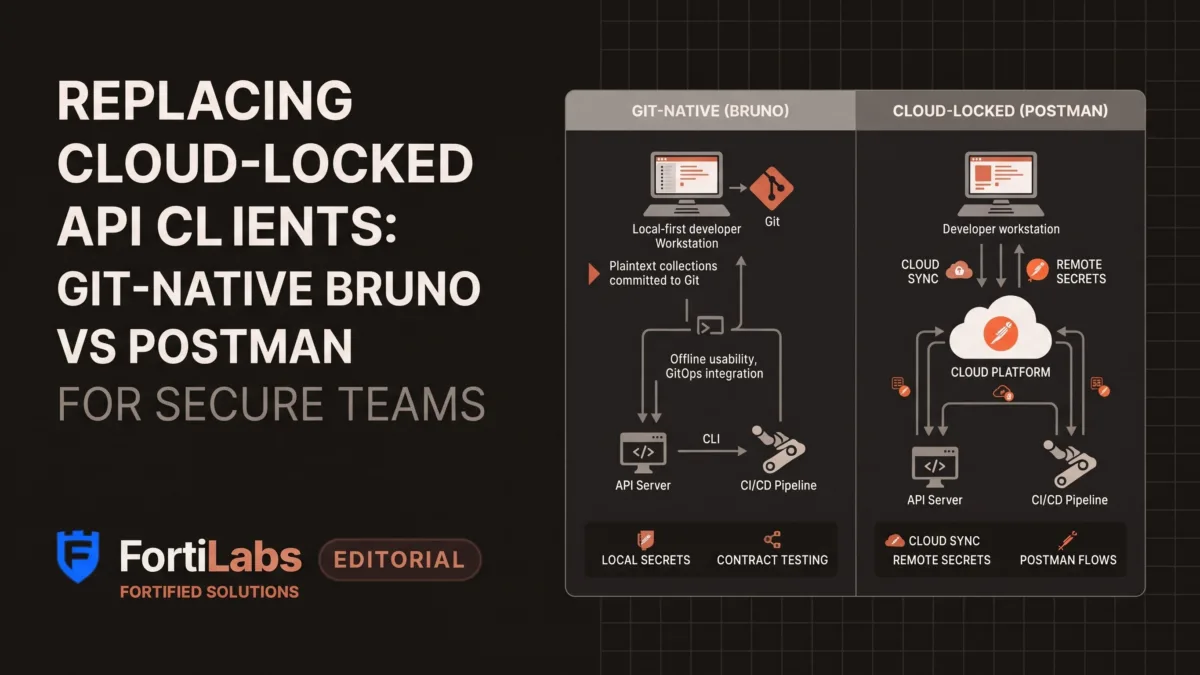
Short answer: Bruno is the stronger fit for engineering teams that want API collections stored as readable files, reviewed through Git, executed locally, and tested in CI/CD without depending on a vendor cloud. Postman remains compelling for organizations that need centralized API collaboration, governance, documentation, and monitoring. Insomnia offers a third option with local vaults, Git Sync, and cloud collaboration.
The API client you choose determines more than how quickly developers can send HTTP requests. It also influences where authentication tokens are stored, how test collections enter source control, who can access sensitive environments, and whether automated tests can run without external workspace dependencies.
For engineering teams working with private staging environments, production APIs, internal Kubernetes services, and customer data, these decisions have direct security and operational consequences.
The Bruno vs Postman API testing comparison is therefore best understood as a choice between different collaboration and data-management architectures, not simply two interfaces for sending requests.
Why cloud-dependent API clients create friction
API collections frequently contain more operational context than developers initially realize. They can include internal endpoint names, authentication workflows, request payloads, customer identifiers, test fixtures, and environment configuration.
When these collections depend on a centralized workspace, organizations must account for another external system in their development and security architecture.
Data exposure and compliance boundaries
Cloud synchronization introduces an additional location where API-related information may be stored, processed, accessed, or retained. The exact exposure depends on the vendor’s architecture, encryption, account controls, retention policies, and configuration.
Potentially sensitive information includes:
- Internal API hostnames and private service routes.
- Request and response examples containing personal information.
- Authentication configurations and environment variables.
- Customer identifiers, account references, and test fixtures.
- Internal API schemas and implementation details.
Cloud storage does not automatically mean an application is insecure or non-compliant. However, security teams must evaluate the vendor’s data processing terms, access controls, retention, regional requirements, and audit capabilities before approving it.
Developer friction and offline access
Cloud-dependent workflows can introduce account requirements, workspace permissions, synchronization delays, and connectivity dependencies. These become particularly inconvenient when developers work inside restricted networks or isolated development environments.
A local-first client reduces those dependencies, but it also changes the collaboration model. Instead of relying on a shared hosted workspace, the team must manage distribution, review, and access through its existing development infrastructure.
Architecture principle: Keep API definitions and non-secret test configuration in version control. Retrieve credentials from approved secret stores at runtime. Treat request and response data as potentially sensitive even when the collection itself contains no passwords.
Bruno vs Postman vs Insomnia: architectural comparison
All three tools support API development and testing, but their storage and collaboration models differ considerably.
| Capability | Bruno | Postman | Insomnia |
|---|---|---|---|
| Primary workflow | Local-first | Cloud and local Git | Local, Git, or cloud |
| Collection storage | Plain-text files | Cloud or local project files | Local YAML or cloud projects |
| Version control | Native Git workflow | Native Git | Git Sync |
| Account required | No for core local use | Account for platform workspaces | Local workflows available without login |
| Offline development | Yes | Lightweight local client | Local Vault and Scratch Pad |
| CLI automation | bru run | Postman CLI | Inso CLI |
| Team collaboration | Git-based | Shared workspaces | Git Sync or Cloud Sync |
| Secret management | Local secrets and external managers | Local and managed options | Local Vault and external vaults |
| Best fit | Git-first engineering | Cross-functional API platforms | Flexible local-first teams |
The important correction to the traditional comparison is that Postman is no longer exclusively cloud-centric. Its Native Git functionality supports local project files, Git-based development, and synchronization with Postman Cloud. The distinction is that Bruno makes local collections and Git collaboration its fundamental operating model, while Postman combines that workflow with a broader hosted platform.
Bruno: Git-native API testing without mandatory cloud synchronization
Bruno is an open-source API client designed around local files and developer-controlled workflows.
Instead of making a hosted workspace the primary location for collections, Bruno stores requests in a collection directory using its readable Bru format. Developers can keep that directory inside an application repository and manage changes through ordinary Git operations.
Plain-text collections and meaningful Git history
Consider a backend repository with the following structure:
orders-api/
  src/
  tests/
  api-tests/
    bruno.json
    environments/
      local.bru
      staging.bru
    authentication/
    orders/
      create-order.bru
      get-order.bru
      update-order.bru
      delete-order.bru
The API testing collection can evolve alongside the application code. A developer changing an endpoint can update its request, expected response, and authorization tests in the same feature branch.
This creates several practical advantages:
- Pull requests show exactly which requests and assertions changed.
- Developers can review API test changes alongside application changes.
- Branch protection and repository permissions govern collection contributions.
- Git history provides traceability and rollback capabilities.
- Collections remain portable without depending on a proprietary cloud export.
Git also introduces familiar problems. Concurrent edits can create merge conflicts, binary or generated files require deliberate handling, and access to the repository becomes the access boundary for the collection.
Offline usability and local ownership
Bruno’s local-first approach means developers can open collections, inspect requests, edit scripts, and execute tests without signing into a Bruno-hosted workspace.
Network connectivity is still required to reach remote APIs. Local-first does not mean a developer can access a private staging service while disconnected from the network that hosts it.
The distinction matters for regulated environments: the API client does not need to synchronize collection data with a vendor workspace, but Git remotes, CI systems, and external secret managers remain separate data flows that must be governed.
Secret handling: local storage is not the same as safe storage
Bruno provides secret variables, environment files, and external secret-manager integrations. Its documentation describes local secret storage protected through operating-system encryption when available, with AES-256 encryption as a fallback.
There is an important distinction between a normal environment variable and a secret variable.
- Normal variables: Suitable for non-sensitive configuration such as base URLs and feature flags.
- Secret variables: Intended for credentials that should not be included in shared collection files.
- Runtime injection: Suitable for supplying CI credentials without committing their values.
- External secret managers: Appropriate when credentials must be centrally governed and rotated.
Bruno’s CLI documentation specifically states that variables marked as secrets in the application are not persisted to disk for CLI execution. CI pipelines should inject those values at runtime using the supported environment-variable flags.
Security warning: Never commit production API tokens, passwords, private keys, or populated secret environment files. A Git repository’s private visibility does not make committed credentials safe. Rotate any credential that has already been exposed.
Postman: centralized API collaboration and a broader platform
Postman offers a more extensive API development platform that connects request testing with shared workspaces, documentation, mock servers, monitoring, and governance capabilities.
Native Git changes the comparison
Postman’s Native Git workflow allows developers to work with collections, environments, specifications, and other project resources in a local Git repository.
Developers can make changes in Local View, commit them through Git, and synchronize the resulting project state with Postman Cloud when it is ready to share.
A practical workflow looks like this:
Developer workstation
        |
        v
Postman Local View
        |
        v
Feature branch
        |
        v
Git pull request
        |
        v
Automated CI tests
        |
        v
Approved integration branch
        |
        v
Postman Cloud View
        |
        v
Shared API collaboration
This is materially different from older Postman workflows that relied primarily on cloud-hosted collections. It also means that the claim that Postman cannot work with Git is outdated.
However, Native Git does not eliminate the hosted platform. Postman still offers cloud-based collaboration and additional platform capabilities that organizations may choose to use.
When centralized collaboration is valuable
Postman’s strongest advantage becomes apparent when API testing involves more than backend developers.
QA engineers, product managers, technical writers, API consumers, and platform teams may need to inspect or use the same API resources without participating in every application repository workflow.
Shared workspaces and centralized permissions can simplify that coordination. API documentation, mock servers, and monitoring also provide functionality beyond the core request-and-assertion workflow.
For organizations with established Postman governance and integration processes, replacing the platform with a lightweight client may create more operational work than it removes.
Pricing and collaboration considerations
Postman’s published pricing distinguishes individual plans from collaborative team and enterprise plans. Its Free and Solo offerings are positioned for individuals, while Team and Enterprise provide additional collaboration and organizational capabilities.
As checked on November 12, 2026, the published annual-billing prices include $19 per user per month for Team and $49 per user per month for Enterprise. These are published list prices, not a complete estimate of total ownership cost.
For example, a five-person team using the published Team rate would calculate its annual subscription as:
5 users × $19/month × 12 months
= $1,140 per year
This calculation excludes taxes, add-ons, usage-based charges, and any negotiated discounts.
See the official Postman pricing page before budgeting or purchasing.
Insomnia: the local-first alternative between Bruno and Postman
Insomnia, maintained by Kong, deserves consideration because it offers multiple storage architectures rather than forcing every team into one collaboration model.
Its storage options include Local Vault, Scratch Pad, Cloud Sync, and Git Sync.
Local Vault and Git Sync
Local Vault keeps project data on the developer’s device. Kong documents it as an option for organizations with strict privacy requirements, restricted internet access, and projects that must remain local.
Git Sync adds repository-based collaboration. Insomnia stores project resources as YAML files, allowing developers to branch, commit, push, pull, and resolve conflicts using their existing Git provider.
This makes Insomnia a credible alternative for teams that want local ownership but prefer a graphical Git workflow inside their API client.
Cloud Sync remains available
Teams that prefer centralized collaboration can choose Cloud Sync. Kong documents encrypted synchronization and collaboration features for that storage model.
Therefore, Insomnia is not simply a cloud-based or local-only alternative. Its suitability depends on which storage mode the organization selects and how that mode is governed.
Inso CLI for automated testing
Insomnia provides Inso CLI for executing collections and tests from terminal sessions and CI/CD environments.
It also supports API specification linting and automated test execution. For new testing workflows, Kong recommends pre-request and after-response scripts rather than relying on its legacy unit-test interface.
Its external vault integrations include AWS Secrets Manager, Google Cloud Secret Manager, HashiCorp Vault, and Azure Key Vault, subject to the applicable configuration and plan requirements.
Automated API contract testing in CI/CD pipelines
Manual API testing is useful during development, but it cannot provide continuous validation for every code change.
Automated API testing moves request execution and response assertions into the software delivery pipeline. A pull request can then fail when a change breaks an established API contract.
What should a contract test validate?
A useful API test suite checks more than whether the server returns HTTP 200.
- HTTP behavior: Expected status codes, headers, and content types.
- Response structure: Required fields, data types, and schema constraints.
- Business rules: Valid state transitions and application-specific behavior.
- Authorization: Access permitted only to the correct user and role.
- Negative cases: Invalid input, expired tokens, missing permissions, and nonexistent resources.
- Regression behavior: Existing endpoints continue to work after application changes.
One distinction is important: response assertions provide functional and contract checks, but full OpenAPI contract conformance requires validating responses against the applicable specification. Do not assume that every API client automatically performs comprehensive schema validation simply because it supports assertions.
Example: automated testing with Bruno
The following example uses a Bruno collection stored in the repository and executes it in a headless GitHub Actions runner.
First, install the CLI as a project dependency and commit the resulting lockfile:
npm install --save-dev @usebruno/cliNext, create a collection environment containing only non-sensitive configuration:
vars {
  baseUrl: https://staging-api.example.com
}
The actual environment file format and request syntax must follow the collection format generated by your installed Bruno version.
For example, a request can reference the base URL and an injected authentication token:
meta {
  name: Get current user
  type: http
  seq: 1
}

get {
  url: {{baseUrl}}/api/v1/me
  body: none
  auth: bearer
}

auth:bearer {
  token: {{API_TOKEN}}
}

assert {
  res.status: 200
}

tests {
  test("response contains a user identifier", function() {
    const body = res.getBody();
    expect(body.id).to.be.a("string");
  });
}
Then create the following workflow at .github/workflows/api-tests.yml:
name: API regression tests

on:
  pull_request:
  push:
    branches:
      - main

permissions:
  contents: read

jobs:
  api-tests:
    runs-on: ubuntu-latest

    steps:
      - name: Checkout repository
        uses: actions/checkout@v4

      - name: Set up Node.js
        uses: actions/setup-node@v4
        with:
          node-version: 20
          cache: npm

      - name: Install dependencies
        run: npm ci

      - name: Run Bruno collection
        working-directory: api-tests
        env:
          API_TOKEN: ${{ secrets.STAGING_API_TOKEN }}
        run: |
          set +x
          bru run \
            --env ci \
            --env-var "API_TOKEN=$API_TOKEN" \
            --reporter-junit results.xml

      - name: Upload test report
        if: always()
        uses: actions/upload-artifact@v4
        with:
          name: api-test-results
          path: api-tests/results.xml
          if-no-files-found: ignore
Important implementation details:
- Commit
package.jsonandpackage-lock.jsonso CI installs a reproducible CLI dependency. Pin and update the dependency deliberately. - Define the
cienvironment in the collection. Keep the staging URL there, not the production URL. - Store
STAGING_API_TOKENin GitHub Actions Secrets rather than the repository. - Use an isolated runner and short-lived, least-privilege credentials. Protect deployment environments and prevent untrusted pull requests from accessing secrets.
- Publish test reports even when a test fails so developers can inspect the failure.
- Verify the workflow against the exact Bruno CLI version used by the repository before making it a required merge check.
Version-specific detail: Bruno CLI 3.0.0 changed its default JavaScript runtime to Safe Mode. Collections requiring external npm packages or filesystem access need the explicitly enabled Developer Mode sandbox. Prefer Safe Mode unless the collection has a documented reason to require additional permissions.
Testing OWASP API Top 10 vulnerabilities
API clients can execute repeatable security regression tests, but they are not substitutes for a dedicated vulnerability scanner or security-testing framework.
The OWASP API Security Project identifies ten major API security risk categories in its 2023 edition. Several are especially suitable for targeted automated regression checks.
1. Broken Object Level Authorization (BOLA/IDOR)
Broken Object Level Authorization occurs when an authenticated user can access an object belonging to another user by manipulating an object identifier.
Consider an API with the following endpoint:
GET /api/v1/orders/1001
Authorization: Bearer USER_A_TOKEN
A basic authorization regression suite should create two independent test accounts and verify object ownership:
Test scenario:
  1. Authenticate as User A.
  2. Retrieve an order belonging to User A.
  3. Verify the expected authorized response.
  4. Retrieve an order belonging to User B.
  5. Verify access is denied according to API policy.
  6. Repeat with a second user and different object identifiers.
The important assertion is not that the application rejects every unfamiliar identifier. It is that the server checks authorization against the authenticated user’s actual permissions and the requested object.
Depending on the API’s disclosure policy, unauthorized access might return HTTP 403 or HTTP 404. Tests should validate the intended policy rather than assume one status code fits every application.
2. Broken Authentication
Test missing credentials, invalid tokens, expired tokens, and malformed authorization headers.
Expected behavior should include rejecting unauthenticated access, avoiding sensitive response details, and ensuring that expired or revoked credentials cannot continue accessing protected resources.
3. Broken Object Property Level Authorization
Test whether users can retrieve or modify properties they are not authorized to access.
For example, a normal customer should not be able to modify fields such as role, accountStatus, or isAdmin through an otherwise valid profile update request.
4. Unrestricted Resource Consumption
Check pagination limits, upload-size restrictions, request timeouts, and rate-limit enforcement.
Use controlled, bounded test cases in staging. Do not create unrestricted request loops or intentionally overwhelm production services.
5. Broken Function Level Authorization
Verify that a lower-privileged user cannot access administrative endpoints or perform privileged actions simply by changing an HTTP method or URL.
6–10. Additional API security checks
- API6 – Unrestricted Access to Sensitive Business Flows: Validate abuse controls around sensitive operations such as account creation and transaction workflows.
- API7 – Server Side Request Forgery: Test approved URL validation and network-boundary controls using isolated test infrastructure.
- API8 – Security Misconfiguration: Check security headers, debug responses, CORS rules, and unintended information disclosure.
- API9 – Improper Inventory Management: Compare documented endpoints against deployed API routes and verify deprecated versions are handled correctly.
- API10 – Unsafe Consumption of APIs: Test validation of responses received from third-party services and reject unexpected or malicious input.
Where automated fuzzing fits
Parameterized API collections are useful for repeatable negative tests. However, automated fuzzing is a different testing activity.
A collection can iterate through a controlled dataset of malformed identifiers, boundary values, missing fields, unexpected types, and authorization combinations. This is useful for regression coverage, but it does not automatically explore the full input space or discover every vulnerability.
For deeper testing, combine API client collections with dedicated tools:
- Schemathesis – Generates property-based API tests from OpenAPI or GraphQL schemas.
- RESTler – Performs stateful REST API fuzzing using API specifications and dependency-aware request sequences.
- OWASP ZAP – Provides automated security testing and API-oriented scanning capabilities.
A practical security pipeline separates these responsibilities:
Pull request
    |
    v
API contract tests
    |
    v
Authentication and authorization regression
    |
    v
Controlled negative-input tests
    |
    v
OpenAPI-driven fuzzing
    |
    v
Security findings and review
    |
    v
Approved deployment
Run active fuzzing against systems you own or have explicit authorization to test. Apply request limits, isolate test data, and avoid destructive operations.
Team collaboration: Git reviews versus shared workspaces
Local-first does not mean collaboration-free. It means the collaboration mechanism moves closer to the development workflow.
| Workflow | Git-first approach | Shared workspace approach |
|---|---|---|
| Sharing changes | Commit and push | Workspace synchronization |
| Code review | Pull requests | Workspace collaboration |
| Permissions | Repository permissions | Workspace and organization roles |
| Version history | Git commits | Platform history and Git |
| Non-developer access | Requires repository workflow | More accessible through shared tools |
| Offline collaboration | Local work with later Git synchronization | Depends on local features and workspace access |
For engineering teams already comfortable with Git, the first model is natural. API changes become reviewable artifacts rather than updates made exclusively inside a shared workspace.
For cross-functional teams, the second model can reduce coordination overhead. QA, product, support, and documentation teams may need access without requiring them to participate in repository management.
There is no universal winner. The correct model depends on who owns the API tests and who needs to consume them.
Which API client should your team choose?
Choose Bruno if
- Your collections belong beside application code.
- Git is already your primary collaboration system.
- Offline operation and local ownership are important.
- You want lightweight CI execution.
- You prefer fewer mandatory hosted dependencies.
Consider the trade-offs
- Repository access becomes essential for collaboration.
- Non-technical stakeholders may need additional tooling.
- Hosted documentation and monitoring may require other services.
- Git conflicts and secret hygiene remain your responsibility.
Choose Postman when centralized API collaboration, documentation, monitoring, organizational governance, and cross-functional access are important enough to justify its broader platform model.
Choose Insomnia when you want a flexible combination of local storage, Git Sync, optional Cloud Sync, and an independent CLI workflow.
A practical decision matrix
| Requirement | Recommended tool | Reason |
|---|---|---|
| Git-first engineering | Bruno | File-based collections |
| Centralized API governance | Postman | Broader platform controls |
| Offline local testing | Bruno or Insomnia | Local-first operation |
| Mixed storage preferences | Insomnia | Multiple storage modes |
| Headless CI testing | All three | Dedicated CLI support |
| Dedicated API fuzzing | Specialized tools | Deeper input exploration |
How to migrate from Postman to Bruno safely
A migration should preserve test behavior and security controls, not just transfer request definitions.
- Inventory existing collections. Identify production endpoints, private hostnames, authentication methods, scripts, request dependencies, and environment configurations.
- Export and import a representative collection. Bruno supports importing Postman collections. Begin with a smaller regression suite before migrating the entire workspace.
- Separate configuration from credentials. Keep non-sensitive environment values in version control and move sensitive values into secret variables or an approved secret manager.
- Validate request behavior. Compare HTTP methods, headers, authentication, payloads, pre-request scripts, response assertions, and request chaining.
- Build CI execution. Run the imported collection with Bruno CLI against an isolated staging environment.
- Compare test coverage. Ensure important authorization, negative-input, and regression tests have not disappeared during conversion.
- Make Git the source of truth. Establish ownership, branch protections, review requirements, and secret-scanning policies before retiring the old workflow.
Migration warning: Do not operate two independently edited copies of the same collection indefinitely. Decide which repository or platform is authoritative, then establish a controlled transition period to avoid test drift.
How we evaluated these tools
This comparison is based on official product documentation, current public feature descriptions, published pricing pages, CLI references, and OWASP guidance checked in November 2026.
No independent performance benchmarks, penetration tests, or hands-on comparative measurements were supplied for this article. The CI example is a reproducible implementation pattern, not a claim that the workflow was executed in a live environment.
Feature availability, pricing, CLI flags, licensing, and external secret-manager integrations can change. Confirm the current vendor documentation before making procurement or security architecture decisions.
Frequently asked questions
Is Bruno more secure than Postman?
Neither tool is automatically more secure in every deployment. Bruno reduces mandatory cloud dependencies by keeping collections local, while Postman provides centralized platform controls and a Native Git workflow. Actual security depends on credential handling, permissions, endpoint exposure, logging, CI isolation, and organizational configuration.
Can Bruno replace Postman for professional API testing?
Yes, Bruno can replace many Postman workflows involving request collections, JavaScript assertions, environments, Git collaboration, and automated CI execution. However, organizations relying on Postman’s wider platform features, such as centralized collaboration, monitoring, and documentation, should map those dependencies before switching.
Does Postman support offline API testing?
Yes. Postman’s desktop application includes a lightweight API Client that allows users to create and send requests while disconnected from Postman servers. This local mode has limitations: shared collections, environments, and other workspace features are unavailable until users sign in and move their work into a workspace.
Can Bruno run API tests without a graphical interface?
Yes. Bruno CLI executes collections from a terminal and supports headless CI/CD workflows. Teams can select environments, inject runtime variables, run data-driven tests, and generate JUnit, JSON, and HTML reports without opening the desktop application.
Can Bruno detect BOLA and IDOR vulnerabilities?
Bruno can execute repeatable authorization tests that manipulate object identifiers and compare responses for different authenticated users. This is useful for regression testing, but it does not automatically discover every BOLA vulnerability. Comprehensive assessment requires testing authorization boundaries across relevant endpoints, identities, roles, and object relationships.
Is Insomnia a cloud-based API client?
Insomnia supports multiple storage modes. Local Vault and Scratch Pad keep project data local, Git Sync stores project resources in a team’s Git repository, and Cloud Sync supports hosted collaboration. Teams can select a storage model according to their privacy and collaboration requirements.
Are API client collections sufficient for automated security fuzzing?
No. Collections are useful for deterministic regression tests, negative-input validation, and controlled authorization checks. Dedicated fuzzing tools explore larger input spaces and API behavior more systematically. Combine API collections with schema-driven fuzzing and authorized security testing for broader coverage.
Should API credentials be committed to Git?
No. Store non-sensitive configuration in collection files, but inject API keys, passwords, and authentication tokens at runtime through CI secrets or approved external secret managers. Use least-privilege credentials, short expiration periods, and rotation procedures. Never rely on a private repository as the only protection for credentials.
The practical verdict
Bruno makes the most sense when API testing is part of the software repository rather than a separate hosted workspace. Its local-first architecture, readable collection files, Git workflows, and CLI execution provide a straightforward path from development to automated regression testing.
Postman remains a strong option for teams that need API collaboration across departments, centralized governance, monitoring, and documentation. Its Native Git support also makes it a more credible option for Git-oriented developers than older comparisons suggest.
Insomnia provides a useful middle ground for teams that want local ownership and Git collaboration without giving up the option of cloud synchronization.
For security-conscious engineering teams, the strongest architecture is not simply choosing the client with the fewest cloud features. It is keeping API definitions reviewable, protecting credentials at runtime, testing authorization boundaries automatically, and treating security validation as part of every release.
Start with a representative API collection, move it into Git, and run the same regression tests locally and in CI. That provides a measurable migration path without forcing the entire organization to change tools at once.
Sources and further reading
- Bruno – API Client and architecture (November 2026).
- Bruno – CLI documentation (November 2026).
- Bruno – Secret management (November 2026).
- Postman – Native Git documentation (November 2026).
- Postman – CLI collection execution (November 2026).
- Kong – Insomnia storage options (November 2026).
- Kong – Insomnia Git Sync (November 2026).
- OWASP – API Security Top 10 (2023) (November 2026).
- OWASP – Broken Object Level Authorization (November 2026).