FORTILABS AI LAB · SELF-HOSTED INFERENCE
Running an open-weight language model on a server is easy to demonstrate and considerably harder to operate well. A model may load successfully, answer a test prompt, and still become impractical when several users submit long requests at the same time.
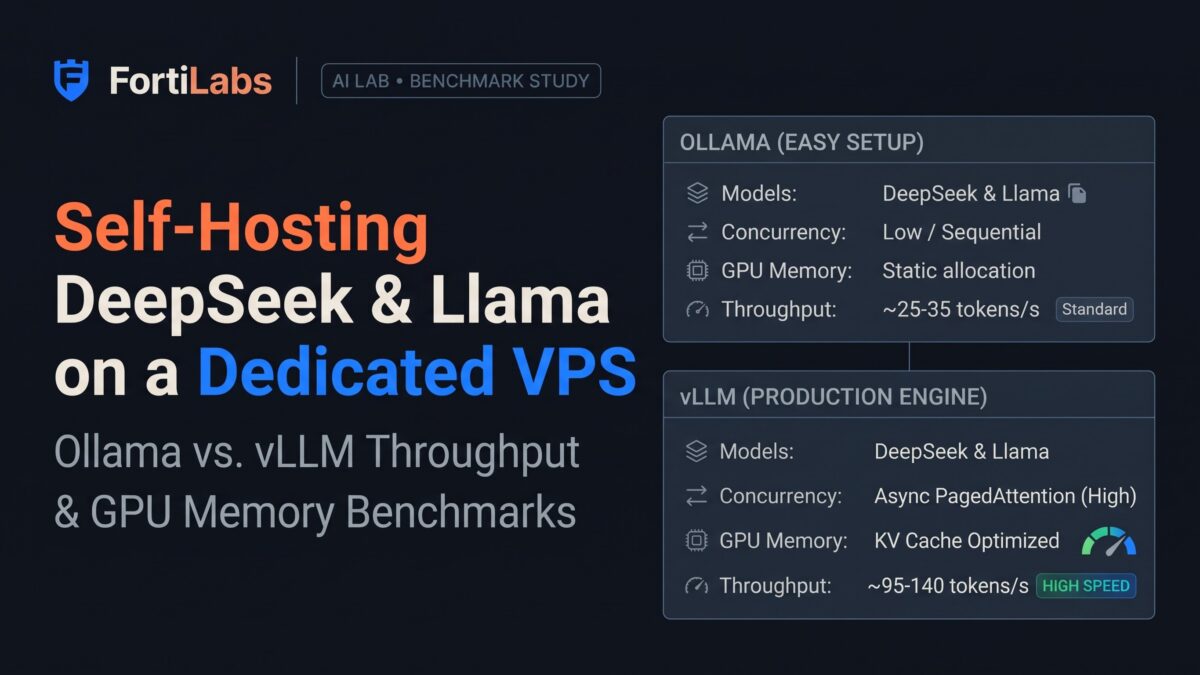
That distinction matters when choosing between Ollama and vLLM. Ollama prioritizes a straightforward model-management and inference experience. vLLM is built around high-throughput serving techniques such as continuous batching and efficient KV-cache management.
Both can serve open models, including suitable DeepSeek and Llama variants. But the right choice depends on more than the model name. GPU memory, quantization, context length, concurrency, prompt size, output length, and the serving engine all affect real performance.
TL;DR
- Choose Ollama when simple deployment, model downloads, experimentation, and a small number of simultaneous users matter more than maximum aggregate throughput.
- Choose vLLM when serving multiple concurrent clients, maximizing GPU utilization, and controlling production inference performance are priorities.
- Do not confuse a CPU VPS with a GPU VPS. A large system-RAM allocation does not substitute for adequate GPU memory and bandwidth.
- Start with a model that fits. DeepSeek-R1-Distill-Llama-8B and smaller Llama variants are more realistic entry points than full DeepSeek-R1 or a 70B model on a modest server.
- Benchmark the same model and precision. Comparing different model variants, quantization levels, or context lengths produces misleading results.
1. What a dedicated VPS actually needs
The term dedicated VPS can be misleading in AI infrastructure discussions. A VPS may have dedicated virtual CPU resources and reserved system memory without having any GPU at all.
That distinction is critical. Modern LLM inference benefits substantially from GPU compute, high memory bandwidth, and enough VRAM to hold model weights and the KV cache. A server advertised with 64 GB of RAM is not automatically capable of serving a 70-billion-parameter model efficiently.
Three infrastructure categories
| Server type | What it provides | Practical use |
|---|---|---|
| CPU VPS | Virtual CPU cores and system RAM, usually without an attached accelerator. | Small quantized models, testing, low-volume inference, and development. |
| GPU VPS | Virtualized or allocated GPU access with a defined VRAM allocation. | GPU-accelerated inference for models that fit the assigned hardware. |
| Dedicated GPU server | Physical GPU hardware reserved for one customer, potentially with multiple accelerators. | Higher-throughput serving, larger models, and workloads requiring predictable hardware access. |
A GPU VPS can be perfectly suitable for production, provided its GPU allocation, isolation model, memory capacity, and performance guarantees are clear. The word dedicated alone does not establish any of those properties.
What to verify before renting a server
- GPU model: Identify the actual accelerator, not just the provider’s performance tier.
- VRAM: Confirm usable GPU memory and whether it is exclusive or shared.
- GPU access: Check that CUDA, ROCm, or the relevant accelerator runtime is supported.
- CPU: Ensure enough CPU capacity for tokenization, request handling, preprocessing, and supporting services.
- System RAM: Allow room for the operating system, model loading, caches, and any CPU offloading.
- Storage: Model files can consume tens of gigabytes. Check SSD capacity, throughput, and download limits.
- Network: Evaluate bandwidth, transfer allowances, and latency to the applications using the model.
- Administration: Confirm root access, driver support, firewall controls, and the ability to run persistent services.
Important: If the provider offers only a CPU VPS, installing vLLM or Ollama will not create GPU acceleration. Both can support CPU-oriented or alternative execution paths in certain configurations, but performance and supported model combinations differ substantially. Check the specific backend before purchasing.
2. Choosing DeepSeek and Llama models
DeepSeek and Llama are model families, not single interchangeable downloads. A practical deployment begins by selecting a specific checkpoint and precision, then selecting an inference engine that supports it.
DeepSeek: distinguish the original model from distilled variants
The original DeepSeek-R1 is a 671-billion-parameter mixture-of-experts model with approximately 37 billion activated parameters. The activated parameter count describes the experts used for a token; it does not mean the server needs memory for only 37 billion parameters.
Its full weights are much larger than what an ordinary single-GPU VPS can accommodate. The more practical deployment choices are the distilled checkpoints:
| Model | Base model | Practical deployment profile |
|---|---|---|
| DeepSeek-R1-Distill-Qwen-1.5B | Qwen2.5-1.5B | Very small footprint; constrained tasks and experimentation. |
| DeepSeek-R1-Distill-Qwen-7B | Qwen2.5-7B | Small deployments with modest memory budgets. |
| DeepSeek-R1-Distill-Llama-8B | Llama 3.1 8B | A practical starting point for GPU VPS experiments. |
| DeepSeek-R1-Distill-Qwen-14B | Qwen2.5-14B | Higher memory requirement; potentially stronger task capability. |
| DeepSeek-R1-Distill-Qwen-32B | Qwen2.5-32B | Requires substantially more accelerator memory. |
| DeepSeek-R1-Distill-Llama-70B | Llama 3.3 70B | Multi-GPU or large-memory deployment, depending on precision. |
The official DeepSeek-R1 repository lists the distilled checkpoints and their base models. The distinction matters when selecting a model for a serving engine, particularly when model-specific tokenizer, chat-template, and reasoning support are involved.
Llama: choose a size that matches the workload
Meta’s Llama family includes smaller models suited to constrained hardware and larger models intended for more demanding applications. Llama 3.3 70B Instruct is a useful example of a large dense model: it has 70 billion parameters and a documented 128K context length.
A 70B model is not automatically the best choice for a VPS. A smaller model that responds quickly and reliably can be more useful than a larger model that constantly queues requests or runs out of memory.
Useful starting references include the Meta Llama model repository and the Ollama model library.
Model choice is also a licensing decision
Open weights do not mean every model is released under identical terms. Check the license, acceptable-use policy, redistribution requirements, and any commercial-use conditions for the exact checkpoint being deployed.
For Meta models, review the relevant Llama license and terms. For DeepSeek, check the license attached to the exact model repository rather than assuming every derivative has identical terms.
3. GPU memory and model sizing
Model sizing is where many self-hosting deployments go wrong. The size of a downloaded model file is not the complete memory requirement for inference.
At a simplified level, weight memory can be estimated as:
Weight memory (bytes) ≈
Parameter count × bytes per parameter
Common theoretical weight-storage estimates are:
| Precision | Approximate bytes per parameter | Example: 8B parameters | Example: 70B parameters |
|---|---|---|---|
| FP16 / BF16 | 2 | 16 GB | 140 GB |
| FP8 | 1 | 8 GB | 70 GB |
| 4-bit | Approximately 0.5 | 4 GB | 35 GB |
These are arithmetic estimates for parameter storage, not guaranteed GPU requirements. Real quantized formats include metadata and packing overhead. Runtime memory also includes the KV cache, activations, temporary buffers, and framework overhead.
The KV cache changes the equation
During generation, the inference engine stores key and value tensors from previous tokens. This is the KV cache. Its memory requirement grows with the context length and the number of active sequences.
A server that can load a model for one short prompt may fail when several users submit long conversations simultaneously. The model weights have not changed; the active KV-cache demand has.
A useful planning model is:
Total accelerator memory =
    model weights
  + KV cache
  + runtime / activation memory
  + temporary buffers
  + safety margin
The NVIDIA memory guidance provides a similar weight-memory calculation and explains why KV cache and runtime allocations must be considered separately.
Practical starting points
| Hardware class | Possible starting model | Important limitation |
|---|---|---|
| CPU-only VPS with substantial RAM | Small quantized 1.5B–7B model | Expect lower token generation speed; RAM does not provide GPU bandwidth. |
| GPU with 16 GB VRAM | Quantized 7B–8B model | Context length and concurrency need careful limits. |
| GPU with 24 GB VRAM | Quantized 8B–14B model | Exact fit depends on quantization, context, and runtime overhead. |
| GPU with 48 GB VRAM | Quantized 14B–32B model | Large contexts and parallel requests can still exceed memory. |
| Multi-GPU or high-memory accelerator server | 70B-class models | Inter-GPU bandwidth, parallelism configuration, and total memory matter. |
These are planning categories, not compatibility guarantees. Before renting hardware, check the exact model’s weight format and the engine’s memory requirements. Leave room for the KV cache instead of allocating every available byte to model weights.
4. Ollama vs. vLLM architecture
Ollama: simple model management and serving
Ollama provides a convenient interface for downloading, running, and serving models. It packages model management and inference behind a straightforward CLI and HTTP API.
Its design makes it attractive for:
- Local development and experimentation.
- Small internal AI services.
- Single-user or low-concurrency applications.
- Quick testing of different quantized model variants.
- Applications that benefit from a simple local model API.
Ollama is not restricted to one request at a time. It supports parallel request processing, model scheduling, and configurable queue behavior. However, the amount of parallel work depends on available memory and its serving configuration.
vLLM: high-throughput inference serving
vLLM is an inference and serving engine designed to make efficient use of accelerator hardware under concurrent workloads.
Its key techniques include:
- PagedAttention: More efficient management of KV-cache memory.
- Continuous batching: New requests can join ongoing batches instead of waiting for a static batch to finish.
- Optimized kernels: Hardware-specific execution paths for supported platforms.
- Quantization support: Multiple formats, depending on the model and hardware.
- Parallelism: Tensor, pipeline, data, and expert parallelism for supported deployments.
- API serving: An OpenAI-compatible HTTP interface for supported endpoints.
These features are particularly relevant when the server needs to process many requests without allowing every request to reserve a separate, inefficient execution window.
Architecture comparison
| Dimension | Ollama | vLLM |
|---|---|---|
| Primary emphasis | Simplicity and model management. | High-throughput inference serving. |
| Model workflow | Convenient CLI and model library. | Model loading and serving through supported model formats and repositories. |
| Scheduling | Parallel request handling and queue controls. | Continuous batching and dynamic scheduling. |
| KV-cache management | Runtime-managed cache and configurable options. | PagedAttention and related serving optimizations. |
| Quantization | Common quantized model packages. | Several supported quantization methods depending on hardware and model. |
| Deployment complexity | Usually simpler to get started. | More configuration and compatibility checks. |
| Typical fit | Development, small services, and simpler deployments. | Concurrent production serving and throughput-sensitive workloads. |
This is a difference in engineering emphasis, not a rule that Ollama cannot serve production traffic or that vLLM is always faster for every single request. Hardware, model format, workload, and configuration determine the actual outcome.
5. Published throughput benchmarks
There is no responsible way to give one universal tokens-per-second number for Ollama or vLLM. A model running at FP16 on an A100 is not comparable to a 4-bit model running on a consumer GPU. Even the same model and GPU can produce different results when the context length or concurrency changes.
Published benchmarks are still useful, provided their hardware and methodology are reported alongside the numbers.
Red Hat’s controlled Ollama vs. vLLM benchmark
Red Hat published a head-to-head benchmark on August 8, 2025. It used:
- One NVIDIA A100 PCIe GPU with 40 GB VRAM.
- Llama 3.1 8B Instruct on both serving stacks.
- Ollama 0.9.2 and vLLM 0.9.1.
- FP16 model weights rather than compressed weights.
- GuideLLM with a fixed prompt/response dataset.
- Concurrency tests ranging from 1 to 256 virtual users.
- 300-second test windows for each concurrency level.
Red Hat reported peak output throughput of approximately 793 tokens per second for vLLM versus 41 tokens per second for Ollama in its benchmark. It also reported P99 latency of approximately 80 ms versus 673 ms at the compared peak-throughput operating point.
| Reported metric | vLLM | Ollama |
|---|---|---|
| Peak output throughput | ~793 tokens/s | ~41 tokens/s |
| P99 latency at reported peak point | ~80 ms | ~673 ms |
The result demonstrates how a throughput-oriented serving engine can perform under concurrent demand. It does not mean vLLM will generate 793 tokens per second on every VPS, or that Ollama will always be limited to 41.
Red Hat also tested Ollama with its parallel request limit raised to 32. vLLM remained ahead in that experiment, while Ollama’s latency and inter-token behavior became less predictable under heavier load.
Read the full methodology and results in Red Hat’s Ollama vs. vLLM benchmark.
A newer multi-scenario study
A 2026 study in Applied Sciences compared Ollama and vLLM using Qwen3-4B on a single NVIDIA H100 80 GB GPU. It examined baseline question answering, reasoning, streaming, and stress workloads.
The authors reported substantially higher aggregate throughput and lower P95 latency for vLLM under their tested concurrent workloads. They also reported that Ollama’s queue and timeout behavior became a limiting factor at higher concurrency.
This is useful corroborating evidence, but its Qwen3-4B test is not a direct DeepSeek or Llama VPS benchmark. The results should not be transferred numerically to another model, GPU, or server configuration.
Read the 2026 multi-scenario Ollama and vLLM study.
FortiLabs benchmark disclosure: These figures come from published third-party studies. They are not measurements performed on FortiLabs infrastructure. This article does not invent DeepSeek or Llama tokens-per-second results where a directly comparable test has not been established.
6. How to benchmark your own server
A benchmark should answer a practical question: how many useful requests can this exact deployment serve at an acceptable latency and error rate?
Measuring a single prompt with one user is not enough. A production service may receive short requests, long prompts, large outputs, and simultaneous requests from different clients.
Keep the comparison controlled
To compare Ollama and vLLM fairly, keep these variables identical:
- Exact model checkpoint and revision.
- Weight precision or quantization level.
- Prompt text and input token count.
- Maximum output tokens.
- Sampling settings and stop sequences.
- Context window.
- GPU, driver, and hardware allocation.
- Warm-up procedure and test duration.
- Client location and network path.
If Ollama uses a 4-bit GGUF model while vLLM uses FP16 weights, the benchmark measures two different model configurations. It cannot isolate the serving engine’s performance.
Measure more than tokens per second
| Metric | What it tells you | Why it matters |
|---|---|---|
| Time to first token (TTFT) | Time from request submission until the first generated token. | Measures perceived responsiveness. |
| Output tokens/s | Generation speed per request or aggregate server throughput. | Shows how quickly responses are produced. |
| Requests/s | Completed requests per second. | Shows request-serving capacity. |
| Inter-token latency | Time between generated tokens. | Measures streaming smoothness. |
| P95 and P99 latency | Tail latency for slower requests. | Shows whether a minority of users experience severe delays. |
| Error rate | Failed, timed-out, or incomplete requests. | Prevents a fast but unreliable server from appearing successful. |
| GPU memory usage | Model and runtime memory consumption. | Helps identify memory pressure and concurrency limits. |
Use a repeatable test matrix
A useful first test matrix might look like this:
| Test | Input length | Output limit | Concurrent requests |
|---|---|---|---|
| Short prompt | 256 tokens | 128 tokens | 1, 2, 4, 8 |
| Normal chat | 1,024 tokens | 256 tokens | 1, 2, 4, 8 |
| Long context | 8,192 tokens | 512 tokens | 1, 2, 4 |
| Long generation | 1,024 tokens | 2,048 tokens | 1, 2, 4 |
These are suggested test cases, not benchmark results or recommended production limits. Increase concurrency gradually until latency, memory use, or errors indicate that the server has reached its practical operating boundary.
Do not mix prefill and decode performance
Inference has two important phases:
- Prefill: The model processes the input prompt and builds the initial attention state. Long prompts can make this phase expensive.
- Decode: The model generates output tokens sequentially. This phase is sensitive to model compute, memory bandwidth, and scheduling.
A benchmark using short prompts and long outputs emphasizes decode performance. A document-analysis benchmark with very long prompts emphasizes prefill and KV-cache behavior. Both may be valid, but they describe different workloads.
Use a benchmark client, not a stopwatch
The official vLLM project provides serving benchmark tooling. Start with the vLLM benchmarking documentation and its serving benchmark utilities.
A simplified test workflow is:
1. Record GPU model, VRAM, driver and runtime versions.
2. Load the same model configuration in each engine.
3. Warm up the model and client connection.
4. Run a fixed prompt dataset at concurrency 1.
5. Repeat at concurrency 2, 4 and 8.
6. Record TTFT, output tokens/s, P95, P99 and errors.
7. Repeat with long prompts and longer outputs.
8. Compare GPU memory and total resource consumption.
9. Repeat each test and report the median across runs.
Do not report only the fastest run. A repeatable median and tail-latency distribution are more useful for capacity planning.
7. Deploying with Ollama
Ollama is often the fastest way to get a model serving on a fresh Linux GPU VPS. The official Linux installation instructions and model library should be checked before deployment because supported GPU runtimes and model packages change over time.
Install Ollama
curl -fsSL https://ollama.com/install.sh | shVerify that the service is running:
systemctl status ollamaConfirm that the GPU is visible to the operating system and supported by the installed runtime before downloading a large model. Ollama’s GPU hardware documentation lists supported NVIDIA and AMD hardware and relevant requirements.
Download a DeepSeek model
A smaller distilled model is a sensible starting point:
ollama pull deepseek-r1:8bRun it interactively:
ollama run deepseek-r1:8bThe Ollama library also lists available DeepSeek-R1 variants, their download sizes, and model information. Check the exact tag before deploying it.
Download a Llama model
For example, a smaller Llama model can be tested before attempting a larger checkpoint:
ollama pull llama3.2:3b
ollama run llama3.2:3b
The model size and quantization should be checked against the server’s available memory. Do not assume that a model which downloads successfully will run at the desired context length or concurrency.
Call the local API
Ollama exposes a local HTTP API. A basic chat request looks like this:
curl http://127.0.0.1:11434/api/chat \
  -H "Content-Type: application/json" \
  -d '{
    "model": "deepseek-r1:8b",
    "messages": [
      {
        "role": "user",
        "content": "Explain continuous batching in simple terms."
      }
    ],
    "stream": false
  }'
The same API can be called from a backend application. Keep the inference service on a private interface and place an authenticated application layer in front of it when remote access is needed.
Configure parallel requests carefully
Ollama provides environment variables for concurrency and queue management. For example:
OLLAMA_NUM_PARALLEL=2
OLLAMA_MAX_QUEUE=64
OLLAMA_KEEP_ALIVE=10m
These are example starting values, not universal recommendations. Ollama documents that required memory scales with the number of parallel requests and the context length. Increasing parallelism without enough memory can cause queuing, model-loading pressure, or failures.
Read the current Ollama concurrency and memory guidance before changing service configuration.
8. Deploying with vLLM
vLLM is a stronger candidate when the server needs to handle multiple concurrent requests efficiently. Its deployment is more involved because model compatibility, CUDA or accelerator versions, Python dependencies, memory allocation, and serving parameters must align.
Prepare the GPU environment
Start with the official vLLM installation documentation. Choose the installation method that matches the server’s operating system, GPU, driver, and supported runtime.
For a production server, pin and test the selected vLLM version instead of automatically pulling a new release into a live deployment.
Serve a DeepSeek distilled checkpoint
An example command for a compatible DeepSeek distilled Llama checkpoint is:
vllm serve deepseek-ai/DeepSeek-R1-Distill-Llama-8B \
  --host 127.0.0.1 \
  --port 8000 \
  --dtype auto \
  --max-model-len 8192
This example uses a local-only listening address. The selected maximum context length is a deployment setting, not a statement that the model’s native context is limited to that value. Confirm the model’s supported configuration and available memory before increasing it.
Serve Llama 3.3 70B
A larger Llama deployment requires considerably more memory. The following is an example of the serving command, not a claim that it will fit on a single GPU:
vllm serve meta-llama/Llama-3.3-70B-Instruct \
  --host 127.0.0.1 \
  --port 8000 \
  --dtype auto \
  --max-model-len 8192
Access to gated Meta model repositories may require accepting the relevant terms and configuring a Hugging Face access token. Keep tokens in protected environment variables or a secrets manager; never paste them into public scripts or source repositories.
For multi-GPU deployment, configure tensor parallelism only after confirming the GPU topology and model support. A common pattern is to use the appropriate tensor-parallel size for the number of GPUs:
vllm serve meta-llama/Llama-3.3-70B-Instruct \
  --tensor-parallel-size 2 \
  --max-model-len 8192
The correct value depends on the hardware and the amount of memory required per GPU. More GPUs do not automatically mean better performance; communication overhead and interconnect bandwidth also matter.
Test the OpenAI-compatible endpoint
vLLM exposes an OpenAI-compatible API for supported endpoints. A local test request looks like:
curl http://127.0.0.1:8000/v1/chat/completions \
  -H "Content-Type: application/json" \
  -d '{
    "model": "deepseek-ai/DeepSeek-R1-Distill-Llama-8B",
    "messages": [
      {
        "role": "user",
        "content": "Explain PagedAttention and why it matters."
      }
    ],
    "max_tokens": 256
  }'
Check the model identifier reported by the running server and use the exact identifier expected by that deployment.
9. Production security and reliability
A self-hosted inference endpoint is an application service, not just a command-line tool. If it is reachable from the public internet, it can be abused to consume GPU time, exhaust memory, expose operational information, or disrupt other workloads.
Do not expose inference ports directly
Keep the model server on localhost or a private network whenever possible. Put a reverse proxy or authenticated application gateway in front of it.
For vLLM, there is an important security detail: its API-key option does not authenticate every endpoint exposed by the server. The official documentation explicitly warns against relying on the API key alone. Use firewall rules, endpoint restrictions, and a properly configured reverse proxy.
Apply request limits
- Maximum prompt and context length.
- Maximum output tokens.
- Per-user and per-tenant request quotas.
- Concurrency limits and queue timeouts.
- Request deadlines and cancellation handling.
- Rate limits and authentication.
Without these controls, one client can submit a very long prompt or generate an unusually large response and consume a disproportionate share of the server’s capacity.
Monitor the system, not just the API
A successful HTTP response does not prove the inference service is healthy. Monitor:
- GPU utilization and VRAM allocation.
- System RAM, CPU usage, and disk activity.
- Requests waiting in the queue.
- Time to first token and inter-token latency.
- Input and output token counts.
- Request errors, timeouts, and cancellations.
- Model loading and unloading events.
- Temperature and power behavior under sustained load.
For vLLM, use its documented metrics and monitoring integrations. For Ollama, inspect service logs and the runtime’s available operational information. Alert on sustained memory pressure, repeated timeouts, and rising tail latency.
Plan for restarts and model updates
Model servers should run as managed services with controlled startup, restart behavior, log rotation, and resource limits. Keep model files on persistent storage so a routine service restart does not require downloading the entire model again.
Test upgrades against a staging deployment. A model repository update, runtime change, or quantization change can alter compatibility, response quality, and throughput.
10. Cost and infrastructure decisions
The cheapest server on a monthly invoice is not necessarily the cheapest way to serve a useful answer. A slow CPU deployment may consume more time and deliver fewer successful requests than a more expensive GPU server.
Compare infrastructure using the cost of successful work:
Cost per successful request =
Monthly infrastructure and operating cost
-----------------------------------------
Successful completed requests per month
For a token-based workload, also calculate:
Cost per 1 million output tokens =
Total serving cost
------------------  × 1,000,000
Output tokens generated
Include these costs:
- GPU or dedicated server rental.
- System RAM, CPU, and storage allocation.
- Bandwidth and data-transfer charges.
- Persistent model storage and backups.
- Monitoring and operational overhead.
- Failed requests and unused capacity.
Choose based on workload
| Workload | Likely starting choice | Reason |
|---|---|---|
| Personal AI assistant | Ollama | Simple model management and modest concurrency. |
| Internal development server | Ollama | Fast experimentation and straightforward API access. |
| Small private API | Ollama or vLLM | Choose after measuring request volume and latency requirements. |
| Multi-user AI application | vLLM | Continuous batching and serving-oriented scheduling. |
| High-concurrency inference | vLLM | Designed to improve aggregate serving throughput. |
| Model experimentation across many variants | Ollama | Convenient model discovery and local execution workflow. |
11. Which engine should you choose?
Choose Ollama when simplicity is the requirement
If the goal is to get DeepSeek or Llama running on a private server with minimal operational complexity, Ollama is a sensible starting point. It makes it easy to download models, switch variants, and connect a backend to a local inference API.
It can serve real applications, but its concurrency settings, memory usage, and queue behavior must be measured against the actual workload. Do not assume its defaults are suitable for a public multi-user service.
Choose vLLM when serving efficiency is the requirement
If the server is expected to handle multiple users and sustained traffic, vLLM is generally the stronger starting point. Its continuous batching and KV-cache management are specifically relevant to aggregate throughput and concurrent inference.
That advantage comes with additional deployment responsibility. The model must be supported, the runtime must match the hardware, and the serving configuration must be tuned and monitored.
The practical recommendation
For a first self-hosted deployment, start with a model that comfortably fits the GPU, such as a suitable 7B–8B variant. Establish a working baseline with Ollama if ease of setup is important. Then benchmark the same model configuration with vLLM if concurrency or throughput becomes a requirement.
If the system is intended to serve production users from the beginning, test vLLM early rather than building the entire application around an unmeasured assumption about Ollama’s capacity.
The correct decision is the engine that meets the required latency, reliability, and cost targets on the actual hardware—not the one with the most impressive number in someone else’s benchmark.
12. Deployment checklist
- Confirm whether the server is CPU-only, GPU VPS, or a dedicated GPU server.
- Verify the exact GPU model and usable VRAM allocation.
- Choose a specific DeepSeek or Llama checkpoint.
- Check the model’s license and deployment terms.
- Confirm model, tokenizer, and chat-template compatibility.
- Calculate weight memory and reserve room for KV cache and runtime overhead.
- Pin the serving engine and runtime versions.
- Keep model files on persistent storage.
- Benchmark with identical model weights and precision.
- Measure TTFT, output tokens/s, RPS, P95, P99, and errors.
- Test short prompts, long contexts, long outputs, and concurrency.
- Restrict public access through authentication and firewall controls.
- Set token limits, queue limits, timeouts, and request quotas.
- Monitor GPU memory, utilization, queue depth, and service health.
- Test upgrades and recovery procedures before changing production.
Frequently asked questions
Is Ollama or vLLM faster?
vLLM is generally designed for higher aggregate throughput under concurrent inference workloads. Ollama prioritizes simpler model management and execution. Actual performance depends on hardware, model, quantization, context length, concurrency, and configuration.
Can I run DeepSeek-R1 on a normal VPS?
The full 671B-parameter DeepSeek-R1 model is not a realistic fit for an ordinary VPS. Smaller distilled variants, such as the 7B or 8B class, are much more practical. Even then, available RAM or VRAM and acceptable inference speed must be evaluated.
Can Ollama use a dedicated GPU server?
Yes. Ollama supports compatible NVIDIA and AMD GPU hardware. Confirm the GPU, driver, runtime, and model compatibility using its current hardware documentation.
Does vLLM require a GPU?
No single answer applies to every deployment. vLLM supports several hardware backends and CPU-related configurations, but its most common high-throughput use cases rely on accelerators. Check current support and performance expectations for the specific hardware.
How much VRAM does Llama 3.3 70B need?
The weights alone require approximately 140 GB at FP16/BF16, 70 GB at FP8, or roughly 35 GB at an idealized 4-bit representation. Actual inference requires additional memory for the KV cache and runtime overhead. A quantized deployment may fit on fewer GPUs, but the exact requirement depends on the format and context settings.
Can I run DeepSeek and Llama simultaneously?
Potentially, if the available memory can accommodate both models and their runtime requirements. Loading multiple large models can reduce the memory available for active requests. For many deployments, serving one model at a time or using separate GPU instances is easier to operate.
Is a 64 GB RAM VPS enough for an 8B model?
It may be enough for some quantized CPU inference configurations, but system RAM alone does not guarantee useful speed. For GPU inference, the model must fit within available VRAM or use an appropriate offloading configuration. The model format, context length, and concurrent requests also matter.
Can I use the same OpenAI-compatible API with Ollama and vLLM?
Both can support OpenAI-style integrations, but their endpoint coverage and request compatibility are not identical. Verify the specific API features, model identifiers, streaming behavior, and parameters required by your application.
Should I use a GPU VPS or a dedicated GPU server?
A GPU VPS can be sufficient for a small or moderate deployment when its GPU allocation and performance are clearly defined. A dedicated GPU server is worth considering when predictable accelerator access, larger VRAM capacity, or sustained throughput justifies the additional cost.
Technical references and further reading
- vLLM documentation — inference engine, continuous batching, PagedAttention, and serving.
- Ollama — model management and local inference.
- DeepSeek-R1 repository — original and distilled model information.
- Meta Llama model repository — official model information and model cards.
- Red Hat: Ollama vs. vLLM performance benchmark — controlled A100 comparison.
- Applied Sciences: Benchmarking Ollama and vLLM for Concurrent LLM Serving — 2026 multi-scenario study.
- NVIDIA: GPU memory troubleshooting — weight and KV-cache memory considerations.
- vLLM security guidance — firewall, API authentication, and deployment hardening.