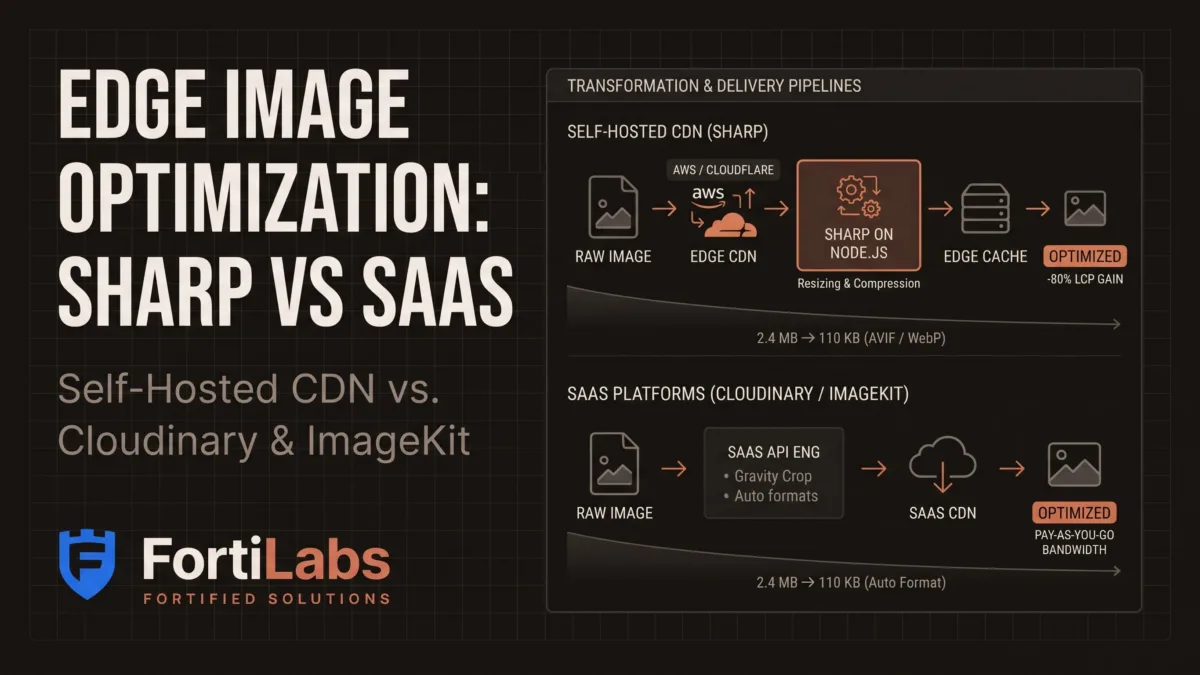
A practical infrastructure comparison for high-traffic websites, publishing platforms, ecommerce applications, and content-heavy web apps. Explore Sharp microservices, CDN caching, Cloudinary, ImageKit, AVIF and WebP delivery, intelligent cropping, LCP optimization, and the real economics of processing tens of millions of images.
1. Why image optimization matters for LCP
Images frequently represent the largest downloadable resources on content-heavy websites. A publishing platform may serve hero images, article thumbnails, author portraits, product photography, category banners, and recommendation cards on a single page.
When those images are oversized, poorly compressed, or delivered at the wrong dimensions, the application transfers unnecessary bytes. That increases network time, consumes mobile data, and can delay the rendering of the page’s largest visible element.
This is especially important for Largest Contentful Paint (LCP), a Core Web Vital that measures when the largest content element in the viewport becomes visible.
What makes an image slow?
- Excessive dimensions: A 3000-pixel source image is delivered to a 360-pixel mobile layout.
- Inefficient formats: Large JPEG or PNG assets are used where AVIF or WebP would be more efficient.
- Unnecessary metadata: Camera metadata and embedded profiles increase file size when they are not needed for delivery.
- Late resource discovery: The browser discovers the hero image only after JavaScript executes or a CSS background loads.
- Low cache efficiency: Repeated requests reach the transformation service or origin instead of being served from cache.
- Excessive image requests: A page downloads more thumbnails and recommendations than users actually see.
Image optimization should therefore address both the file itself and the delivery path. A smaller image cannot compensate for an LCP resource that is discovered too late.
fetchpriority="high" for the primary hero image. Reserve lazy loading for images below the initial viewport.
<img
  src="/images/hero-1200.avif"
  srcset="
    /images/hero-640.avif 640w,
    /images/hero-960.avif 960w,
    /images/hero-1200.avif 1200w
  "
  sizes="(max-width: 600px) 100vw, 1200px"
  width="1200"
  height="675"
  alt="Product dashboard displayed on a laptop"
  fetchpriority="high"
>
The example illustrates responsive delivery and priority hints. The correct image candidates and sizes value must match the actual layout.
2. Three image optimization architectures
There are three practical ways to build an image pipeline for a high-traffic application.
Self-hosted
Managed platform
A third option is a hybrid: store original images in your own object storage, use Cloudflare or another edge transformation service, and deliver the resulting derivatives through a CDN.
| Capability | Sharp + CDN | Cloudinary | ImageKit |
|---|---|---|---|
| Processing control | Full control | Managed transformations | Managed transformations |
| AVIF / WebP | Configure encoders and negotiation | Automatic format selection | Automatic format selection |
| Responsive delivery | Build URL variants and srcset | Managed responsive tools | Managed responsive tools |
| Smart cropping | Entropy / attention or custom AI | Advanced automatic gravity | Face and object-aware cropping options |
| CDN | Configure separately | Included managed delivery | CloudFront-based delivery |
| Infrastructure ownership | High | Low | Low |
| Cost model | Infrastructure, processing, storage, requests, bandwidth, operations | Plan credits / enterprise units and delivery usage | Bandwidth, storage, and plan-specific usage |
4. Cloudinary and ImageKit
Managed image platforms provide transformation APIs, format negotiation, CDN delivery, and other capabilities without requiring you to operate the full processing stack.
Cloudinary
Cloudinary is more than a resizing endpoint. Its image platform combines asset management, URL-driven transformations, automatic optimization, advanced cropping, and CDN delivery.
Its delivery URLs can specify dimensions, quality, output format, gravity, and chained transformations. Cloudinary can select a suitable format and quality based on browser capabilities using automatic format and quality parameters.
https://res.cloudinary.com/ACCOUNT/image/upload/
  c_fill,g_auto,w_1200,h_675,q_auto,f_auto/
  articles/hero-image
The URL is shown across multiple lines for readability. Use a single valid URL in actual markup.
Cloudinary’s advantages include:
- Automatic format and quality selection.
- Responsive image delivery options.
- Advanced crop and resize modes.
- AI-assisted automatic gravity and subject-aware cropping.
- Face detection and focal-point control.
- Transformation chaining, overlays, and image effects.
- Asset management and delivery reporting.
One important billing detail: generating a new derivative consumes transformation usage, but repeat deliveries from cached transformation URLs do not repeatedly count as new transformations. Bandwidth and storage remain separate considerations.
Cloudinary’s Enterprise units can be allocated across resources. Its documentation describes one unit as one million transformations, one terabyte of storage, or one terabyte of bandwidth. Actual contracts can use alternative delivery metrics, so confirm the applicable unit definitions with the vendor.
Best fit: image-heavy businesses that need sophisticated transformation features, intelligent cropping, centralized asset management, and a managed delivery ecosystem.
ImageKit
ImageKit focuses on making image optimization and delivery relatively straightforward. It supports URL-based transformations, automatic format conversion, quality optimization, responsive delivery, and CDN caching.
https://ik.imagekit.io/ACCOUNT/
  tr:w-1200,h-675,fo-auto,q-80,f-auto/
  articles/hero-image.jpg
The example illustrates a transformation URL. Verify the exact focus and format parameters against the ImageKit configuration and supported source asset.
ImageKit’s main advantages include:
- Automatic image format selection based on browser support.
- WebP and AVIF output options.
- Quality controls for lossy formats.
- Responsive image delivery.
- Face and object-aware cropping.
- Global CDN delivery through CloudFront.
- Media storage and asset management capabilities.
ImageKit documents a default CDN cache lifetime of up to one year. A previously requested file can therefore be delivered from the CDN instead of being processed and retrieved again on every request.
ImageKit’s current public pricing lists a Lite plan at $9 per month with 40 GB of included bandwidth and $0.50 per additional GB. Its Pro plan is $89 per month with 225 GB included and $0.45 per additional GB. Enterprise pricing is custom.
These are published self-service prices, not a quote for a high-volume Enterprise deployment. Confirm the current plan, AVIF availability, usage limits, and negotiated bandwidth pricing before committing.
Best fit: teams looking for managed optimization and CDN delivery without building their own transformation infrastructure.
| Area | Cloudinary | ImageKit |
|---|---|---|
| Primary strength | Advanced media transformation and management | Accessible optimization and delivery workflow |
| Automatic formats | f_auto | f-auto / automatic format settings |
| Automatic quality | q_auto | Quality optimization and configurable quality |
| Intelligent cropping | Auto gravity, face and subject-aware options | Face and supported object-aware cropping |
| Asset management | Advanced media management capabilities | Integrated media library and DAM features |
| Delivery network | Managed multi-CDN delivery | Amazon CloudFront |
| Usage model | Credits / Enterprise units, storage and bandwidth | Bandwidth, storage, and additional plan-specific usage |
5. AVIF, WebP, and automatic format negotiation
Modern image formats can significantly reduce file size, but choosing one format for every image is not always optimal.
AVIF
AVIF can provide excellent compression efficiency, particularly for photographic content. It is useful when bandwidth is a priority, but encoding can be more computationally expensive than other formats.
WebP
WebP offers broad modern browser support and is a practical default for many image-delivery systems. It supports lossy and lossless compression as well as transparency and animation.
JPEG and PNG fallbacks
JPEG remains useful for compatibility and certain image workloads. PNG is appropriate where lossless image data or transparency requirements justify its larger output.
The goal should be to choose the smallest acceptable image format for the actual browser and content, not to force every asset into AVIF.
How automatic format selection works
A browser sends an Accept request header indicating which image formats it can process. A delivery service can inspect this header and select an appropriate output.
For a custom Sharp pipeline, you need to implement this logic yourself. A simplified approach is:
function chooseImageFormat(acceptHeader = "") {
  if (acceptHeader.includes("image/avif")) {
    return "avif";
  }

  if (acceptHeader.includes("image/webp")) {
    return "webp";
  }

  return "jpeg";
}
This is only a simplified negotiation example. Production implementations should use proper content negotiation, handle quality values and header variations, and ensure that the selected format is actually supported by the encoder and source image.
When the response varies according to the Accept header, the cache must account for that variation. Otherwise, a cached AVIF response could be incorrectly delivered to a client that does not support AVIF.
Do not create unnecessary format variants
Every combination of source image, width, height, crop, quality, and output format can create another derivative.
If a site generates ten sizes, three formats, and four crop modes for each source image, the theoretical variant space can grow rapidly.
Use a controlled size ladder and a small number of approved crop profiles. Automatic format selection should not become an excuse to generate unlimited derivatives.
6. Responsive image delivery
Delivering the same full-size image to every screen wastes bandwidth. A mobile user viewing a 360-pixel card should not need a 2000-pixel image unless the layout genuinely requires that resolution.
Responsive delivery uses srcset and sizes so the browser can select an appropriate image candidate.
<img
  src="https://images.example.com/article-640.webp"
  srcset="
    https://images.example.com/article-320.webp 320w,
    https://images.example.com/article-640.webp 640w,
    https://images.example.com/article-960.webp 960w,
    https://images.example.com/article-1280.webp 1280w
  "
  sizes="
    (max-width: 600px) 100vw,
    (max-width: 1024px) 50vw,
    800px
  "
  width="1280"
  height="720"
  alt="Example article image"
>
With a managed platform, these variants can be generated through URL transformations. With Sharp, you need to define the size ladder and produce the corresponding files or generate them on demand.
Use art direction where necessary
Responsive images are not always just smaller versions of the same crop. A wide desktop hero may need a different focal area or aspect ratio on mobile.
The HTML picture element can provide different crops for different viewport ranges:
<picture>
  <source
    media="(max-width: 600px)"
    srcset="/images/hero-mobile.avif"
    type="image/avif"
  >

  <source
    srcset="/images/hero-desktop.avif"
    type="image/avif"
  >

  <img
    src="/images/hero-desktop.jpg"
    width="1600"
    height="900"
    alt="Marketing website hero"
    fetchpriority="high"
  >
</picture>
Do not use the same generic image-size strategy for hero banners, article thumbnails, product images, and avatars. Their visual requirements are different.
7. Smart cropping and image gravity
Resizing an image is easy. Cropping it without cutting off the important subject is more difficult.
A center crop works for some images, but it can remove a person’s face, a product, or the important subject in a marketing photograph.
Sharp: entropy and attention strategies
Sharp provides several cropping strategies. Its entropy strategy favors regions with higher information content, while attention considers factors such as luminance frequency, color saturation, and skin tones.
sharp(input)
  .resize(600, 600, {
    fit: "cover",
    position: sharp.strategy.attention
  })
  .webp({ quality: 80 })
  .toBuffer();
These strategies are useful for general-purpose automated cropping, but they are not equivalent to a full AI subject-recognition system. Test them on your own images.
Cloudinary: automatic gravity
Cloudinary provides g_auto, which analyzes image content to identify visually important regions. It can use face detection and subject-aware algorithms to improve crop selection.
It also supports focal-point preferences, custom coordinates, and additional analysis options for specialized use cases.
ImageKit: face and object-aware cropping
ImageKit supports face cropping through fo-face and object-aware cropping through supported focus parameters. These capabilities can improve profile thumbnails and content cards when the relevant subject is recognized.
For editorial platforms, consider storing manual focal-point coordinates alongside the original asset. An editor-selected focal point can be more reliable than an automated algorithm for important hero images.
8. Cache hit ratios and origin protection
At high traffic, caching is one of the largest determinants of image infrastructure cost.
A CDN cache hit means the requested derivative is already available at the edge. A cache miss means the CDN must retrieve the asset from another cache layer or the origin, potentially triggering a transformation.
The cache hit ratio is:
Cache hit ratio = cache hits ÷ total cache requests × 100
For example, suppose a system receives 50 million image requests in one month:
- 45 million requests are served from cache.
- 5 million requests are cache misses.
- The cache hit ratio is 90%.
That does not necessarily mean five million new image transformations. Some misses may reach a regional cache, a stored derivative, or another upstream cache. The exact transformation count depends on the architecture and billing model.
Why cache keys matter
A poorly designed image URL can create thousands of unnecessary variants. For example, these may represent visually identical requests but produce separate cache entries:
/image.jpg?w=800&q=80
/image.jpg?q=80&w=800
/image.jpg?w=0800&q=80
Normalize parameters before generating URLs. Keep a fixed order and a limited number of allowed values.
CloudFront caching and Origin Shield
Amazon CloudFront provides edge caching and regional cache layers. CloudFront Origin Shield adds an additional centralized cache layer in front of the origin.
Origin Shield can improve cache efficiency, consolidate simultaneous requests for the same uncached object, and reduce the number of requests that reach the origin.
However, Origin Shield has additional charges. Its value depends on the volume of cache misses, the origin architecture, and the cost of processing and transferring source images.
Cloudflare edge transformation caching
Cloudflare’s image transformation service checks its edge cache before processing a request. On a cache hit, it serves the optimized asset directly. On a miss, it fetches the source image, transforms it, and caches the result.
Cloudflare also bills unique source-and-parameter combinations as transformations. Repeated requests for the same transformation within the billing period do not incur another unique transformation charge.
Managed CDN caching
ImageKit uses CloudFront for delivery and documents a default maximum CDN cache lifetime of up to one year. Cloudinary uses managed CDN delivery and caches transformed assets for subsequent requests.
The exact cache behavior depends on the asset URL, cache headers, invalidation strategy, and service configuration. A long cache lifetime is most effective when asset URLs are versioned and immutable.
How to improve cache efficiency
- Use immutable, versioned derivative URLs.
- Normalize transformation parameters.
- Limit the number of supported image dimensions.
- Avoid unnecessary query-string variations.
- Cache original images and generated derivatives appropriately.
- Use request coalescing to prevent duplicate transformations.
- Warm frequently requested derivatives before major campaigns.
- Monitor cache hits and misses by asset category and transformation profile.
9. Bandwidth economics at scale
Transformation costs are only part of the equation. A system can generate images efficiently and still become expensive if it delivers too many gigabytes every month.
Consider a publishing application serving 10 million image deliveries per month. If the average delivered file is 180 KB, total monthly delivery is approximately:
10,000,000 × 180 KB = 1.8 TB
If optimization reduces the average delivered image to 100 KB, monthly delivery becomes approximately 1 TB. That is a reduction of roughly 800 GB per month, before accounting for other changes in traffic.
The benefit compounds across mobile users, recommendation feeds, search pages, and article archives.
Calculate actual delivered bandwidth
A useful starting formula is:
Monthly bandwidth = image deliveries × average delivered size
For a more complete model, account for cache behavior, image mix, and the actual billing metric used by your provider.
Why the CDN cache changes the economics
A cache hit generally avoids another request to the transformation origin. However, it does not eliminate bandwidth delivery to the visitor. CDN delivery bandwidth and origin transfer are separate cost categories.
Similarly, a high cache hit ratio can reduce processing demand while leaving total visitor bandwidth unchanged.
Origin protection matters too
Without a caching layer, a popular image can trigger many simultaneous requests to your storage and transformation infrastructure. This can increase origin traffic, CPU usage, and request costs.
Origin Shield, regional caches, request coalescing, and pre-generated derivatives can reduce this pressure. But each additional infrastructure layer should be justified against its operating cost.
10. A realistic monthly cost model
To compare these architectures properly, separate the workload into unique transformations, repeated deliveries, storage, and bandwidth.
Example workload
Assume a content platform has the following monthly workload. These numbers are illustrative assumptions, not measured vendor performance.
| Metric | Assumption |
|---|---|
| Image delivery requests | 50 million |
| Unique derivative variants generated | 10 million |
| Cache hit ratio | 90% |
| Average delivered file size | 100 KB |
| Monthly visitor delivery | Approximately 5 TB |
| Source image storage | 500 GB |
The 10 million unique derivatives are a separate assumption from the 50 million delivery requests. The 90% cache hit ratio describes delivery behavior; it should not be used as a direct substitute for a provider’s billable transformation count.
Self-hosted Sharp cost model
A self-hosted deployment has no managed transformation credit charge, but it still incurs infrastructure costs.
Monthly self-hosted cost =
- Transformation compute and worker capacity.
- Object storage for original images and derivatives.
- CDN delivery bandwidth and request charges.
- Origin transfer and regional data transfer.
- Queueing, monitoring, and logging.
- Engineering and operational maintenance.
- Redundancy, backup, and incident recovery.
The cost advantage improves when derivative reuse is high, transformation profiles are limited, and the engineering team can operate the system efficiently.
Cloudinary cost model
Cloudinary’s public pricing uses credits for its self-service plans. Its published pricing explains that one credit can represent 1,000 transformations, 1 GB of managed storage, or 1 GB of image bandwidth, subject to the plan’s accounting rules.
Enterprise plans can use units instead. The documentation describes one Enterprise unit as one million transformations, one terabyte of storage, or one terabyte of bandwidth.
For the example workload, the platform should be evaluated against:
- 10 million newly generated derivative transformations.
- Approximately 5 TB of image delivery.
- 500 GB of source storage plus derived-asset storage.
- Any additional AI analysis, advanced cropping, or add-on usage.
Do not assume that 50 million image requests equal 50 million billable transformations. Cached derivative deliveries and generated variants are accounted for differently.
ImageKit cost model
ImageKit’s public self-service plans primarily expose bandwidth and storage allowances, with additional usage billed according to the plan. Its current Pro pricing lists $89 per month, including 225 GB of bandwidth and 225 GB of storage, with additional bandwidth listed at $0.45 per GB.
At an illustrative 5 TB of monthly delivery, the workload is far beyond the included bandwidth. A simple calculation using the published Pro overage rate is:
(5,000 GB − 225 GB) × $0.45 = $2,148.75
Adding the $89 base subscription gives approximately $2,237.75 before storage overages, taxes, discounts, or other applicable charges.
This is a mathematical illustration using the public Pro allowance and rate, not an Enterprise quote. ImageKit’s Enterprise plan uses custom pricing and should be evaluated for high-volume delivery.
Compare total cost of ownership, not just the subscription
| Cost category | Sharp + CDN | Cloudinary | ImageKit |
|---|---|---|---|
| Transformation compute | Owned infrastructure | Plan / unit usage | Included service capability |
| Image storage | Object storage | Managed storage usage | Plan storage allowance and overage |
| Delivery bandwidth | CDN bandwidth billing | Plan / delivery metric | Plan bandwidth and overage |
| CDN infrastructure | Configured and billed separately | Managed delivery | Managed CloudFront delivery |
| Operations | Engineering responsibility | Mostly managed | Mostly managed |
| Advanced processing | Build or integrate separately | Extensive built-in features and add-ons | Platform-supported features |
11. Which architecture should you choose?
Choose Sharp + CDN when…
- You have a capable infrastructure and backend engineering team.
- You want complete control over image processing and derivative storage.
- Your image transformations are relatively standardized.
- You can achieve strong cache reuse through immutable URLs.
- You want to optimize compute and delivery spending independently.
- You have the capacity to operate and monitor a custom image service.
Choose Cloudinary when…
- You need advanced image transformations and intelligent cropping.
- Marketing teams need asset-management capabilities.
- You have complex media workflows and multiple content formats.
- You prefer a managed transformation and CDN platform.
- You can justify the credit or Enterprise unit model.
Choose ImageKit when…
- You want managed optimization without operating image-processing infrastructure.
- Your main requirements are resizing, quality optimization, format conversion, and CDN delivery.
- You want a straightforward integration using transformation URLs.
- Your bandwidth and storage requirements fit an acceptable subscription or Enterprise quote.
Consider Cloudflare as a hybrid option
Cloudflare Images transformations can optimize images from external origins and cache generated variants at the edge. Its Images binding can also process image bytes from sources such as R2 or a Worker request.
This can be an attractive middle ground if you already use Cloudflare and want to reduce the number of systems involved.
However, Cloudflare’s transformation billing is based on unique source-and-parameter combinations, so an application with a very large number of distinct image variants still needs a controlled transformation strategy.
Final recommendation
For a high-volume publishing platform with a mature engineering team, start by evaluating Sharp with object storage, immutable derivative URLs, and a CDN. This gives you control over the largest infrastructure cost variables.
For a business where engineering time is more valuable than operating a custom image stack, Cloudinary or ImageKit may offer better total value. Cloudinary has a stronger case when sophisticated content-aware transformations and asset management are central requirements. ImageKit is a compelling option for straightforward managed optimization and delivery.
The most important decision is not which service can convert JPEG to AVIF. All three approaches can do that. The real decision is who should own processing, caching, delivery, operational reliability, and the financial risk of scaling image traffic.
12. Implementation and optimization checklist
Image processing
- Store original images separately from optimized derivatives.
- Strip unnecessary metadata while preserving required color information.
- Use AVIF and WebP where they produce a worthwhile quality-to-size improvement.
- Choose compression quality by image type and visual requirements.
- Limit maximum source dimensions and decoded pixel counts.
- Define approved width, height, and crop profiles.
- Preserve transparency where the design requires it.
Frontend delivery
- Use responsive srcset and sizes attributes.
- Set width and height to reserve layout space.
- Make the LCP image discoverable in the initial HTML.
- Use fetchpriority high only for the primary important image.
- Do not lazy-load the LCP image.
- Lazy-load genuinely below-the-fold images.
- Use separate mobile art direction where it improves composition.
Infrastructure and caching
- Use immutable, versioned derivative URLs.
- Normalize transformation parameters and cache keys.
- Cache both source assets and generated derivatives appropriately.
- Implement request coalescing and origin protection.
- Warm high-demand image variants before major campaigns.
- Monitor cache-hit ratios, origin traffic, and transformation latency.
- Monitor bandwidth by asset type, format, and device category.
- Test cold-cache behavior and sudden traffic spikes.
Operational security
- Do not expose unrestricted source-URL transformation endpoints.
- Validate upload types and actual image content.
- Restrict transformation dimensions and output formats.
- Protect private assets using signed URLs or authenticated delivery.
- Apply timeouts and resource limits to processing workers.
- Keep original files and derivatives backed up according to business requirements.
For related engineering topics, explore the FortiLabs Web Lab, including our guides to production INP debugging, production error and log monitoring, and automated secret management.
Frequently asked questions
Is Sharp cheaper than Cloudinary or ImageKit?
It can be, particularly when image workloads are predictable, transformations are reused, and the team operates infrastructure efficiently. However, Sharp requires you to pay for compute, storage, CDN delivery, monitoring, and engineering operations. Compare total cost of ownership rather than transformation costs alone.
Can Sharp generate AVIF and WebP images?
Yes. Sharp supports both AVIF and WebP output, along with JPEG and PNG. Your application must implement the appropriate format negotiation, caching, and fallback behavior.
Does Cloudinary charge for every image request?
Not in the same way it counts generated transformations. Cloudinary’s billing documentation states that cached transformation URLs do not repeatedly consume transformation credits. Delivered bandwidth and storage are separate usage dimensions.
Does ImageKit automatically convert images to AVIF and WebP?
ImageKit supports automatic format optimization based on browser capabilities and account settings. You can also specify formats through transformation parameters. Check the selected plan and account configuration for specific format availability.
Is AVIF always better than WebP?
No. AVIF can produce smaller images in many situations, but the best result depends on image content, encoding settings, browser support, and processing cost. Compare visual quality and file size for your actual assets rather than forcing one format everywhere.
What is the difference between image transformation requests and image deliveries?
A transformation generates a derivative from a source image and a set of parameters. A delivery request retrieves an image for a visitor. Many deliveries can reuse the same cached derivative, so the two counts can differ substantially.
How does CloudFront Origin Shield help image optimization?
Origin Shield provides an additional cache layer between CloudFront edge and regional caches and the origin. It can improve cache efficiency, consolidate requests for the same uncached object, and reduce origin load. It has an additional charge, so evaluate the savings against the extra cost.
Does a high CDN cache hit ratio reduce bandwidth charges?
It usually reduces origin requests and transformation work, but it does not eliminate bandwidth delivered to visitors. CDN delivery bandwidth and origin transfer are separate cost categories.
Should the LCP hero image be lazy-loaded?
No. The primary LCP image should normally be discoverable in the initial HTML and should not be lazy-loaded. Consider fetchpriority=”high” when appropriate, while lazy-loading images that are genuinely below the fold.
Is Cloudflare a replacement for Cloudinary or ImageKit?
Cloudflare offers image transformation and caching features that can cover many common delivery needs. However, its asset management, transformation capabilities, and operational model differ from the dedicated media platforms. The right choice depends on the features and workflow your application requires.
Technical references
Official documentation and engineering references used for this comparison:
- Sharp: High-performance Node.js image processing
- Sharp: Resize and crop API
- Cloudinary: Image optimization
- Cloudinary: Automatic gravity and smart cropping
- Cloudinary: Billing and plans
- ImageKit: Image optimization
- ImageKit: CDN caching
- ImageKit: Image resizing and cropping
- ImageKit: Pricing plans
- AWS CloudFront: Origin Shield
- AWS CloudFront: Cache hit ratio
- Cloudflare: Image transformations
- web.dev: Optimize Largest Contentful Paint
- web.dev: Serve responsive images