
WEB LAB · FRONTEND ARCHITECTURE
Eliminating Client-Side Hydration Overhead: Astro Island Architecture vs Next.js RSC
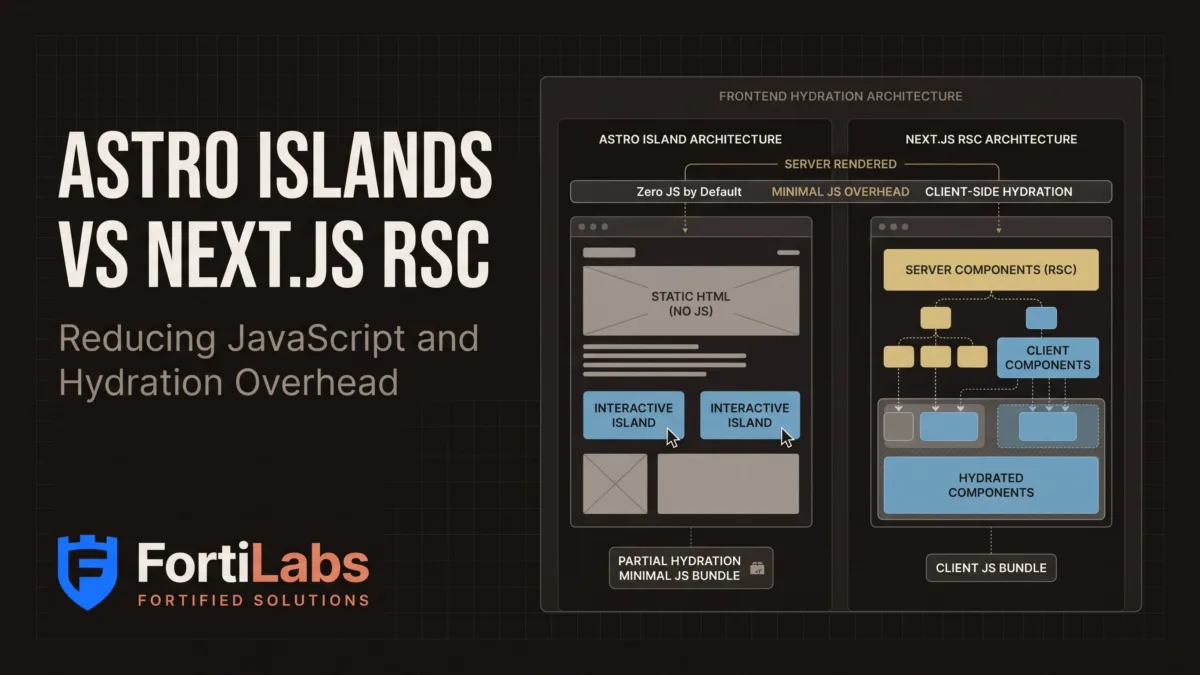
Modern websites do not need to ship an entire JavaScript application just to display a product description, article, pricing table, or navigation menu. Astro Islands and Next.js React Server Components take different approaches to reducing browser-side work. This comparison examines their JavaScript delivery models, hydration costs, state coordination, performance measurement, and deployment trade-offs to help you choose the right architecture for production content and e-commerce websites.
Why client-side hydration becomes expensive
A typical content or e-commerce page contains far more static information than interactive functionality. Consider a product detail page: its title, description, specifications, images, breadcrumbs, and reviews can often be rendered into HTML before the browser receives the response. Only a handful of features genuinely need JavaScript, such as variant selection, an image gallery, quantity controls, and the add-to-cart action.
The problem appears when an application treats the entire page as one large client-side interface. The browser may need to download JavaScript, parse dependencies, compile code, execute application logic, and hydrate components before interactive behavior becomes available.
This work is particularly expensive on mid-range mobile devices and slower networks. A relatively small JavaScript payload can still consume significant main-thread time if it contains expensive initialization, large dependencies, or unnecessary component rendering.
The goal is not to eliminate JavaScript altogether. It is to send only the JavaScript that provides meaningful functionality, at the point where that functionality is needed.
What actually contributes to client-side overhead?
- Download: JavaScript must travel over the network before it can be executed.
- Parsing and compilation: The browser processes the downloaded code.
- Execution: Initialization, event registration, state setup, and rendering consume CPU time.
- Hydration: Frameworks attach interactive behavior to server-rendered markup.
- Dependencies: A single interactive component can pull a substantial library into the client dependency graph.
- Third-party scripts: Analytics, advertising, chat widgets, and personalization tools can create additional main-thread work.
This is why reducing the number of JavaScript files is not enough. The more meaningful objective is reducing the total JavaScript downloaded, parsed, compiled, and executed during the user’s critical loading period.
How Astro Islands and Next.js RSC work
Astro: interactive islands inside mostly static HTML
Astro follows an islands architecture. Pages are primarily rendered as HTML, and interactive framework components are hydrated independently when the developer explicitly requests client-side behavior.
An Astro component without a client directive renders HTML without hydrating a browser-side component runtime. When a React, Vue, Svelte, Preact, or other supported UI component needs interactivity, the developer selects a hydration strategy using a client directive.
---
import ProductGallery from "../components/ProductGallery";
import AddToCart from "../components/AddToCart";
import Reviews from "../components/Reviews";
---

<main>
  <h1>Product Name</h1>

  <p>Product description and specifications...</p>

  <ProductGallery client:load />

  <AddToCart client:load />

  <Reviews client:visible />
</main>
The page’s static content remains HTML. The gallery and purchase controls hydrate immediately, while reviews can wait until their component approaches the viewport.
Understanding Astro’s hydration directives
| Directive | Hydration behavior | Appropriate use |
|---|---|---|
client:load |
Loads and hydrates immediately. | Critical navigation, purchase controls, immediately usable search. |
client:idle |
Waits until the browser is idle before hydrating. | Secondary widgets and non-critical interactive features. |
client:visible |
Hydrates when the component enters the viewport. | Below-the-fold reviews, charts, and secondary galleries. |
These directives control when client-side code is activated; they do not make an expensive component intrinsically lightweight. A large charting library still needs to download and execute when its island hydrates.
Another important distinction: client:visible is not a substitute for lazy-loading images or other media. It controls component hydration, not every resource associated with that component.
Next.js: React Server Components with selective client boundaries
Next.js App Router uses React Server Components by default. Pages and layouts are Server Components unless a client boundary is introduced.
Server Components can fetch data, access server-side resources, and render UI without sending their component implementation and dependencies to the browser. When a component needs state, event handlers, effects, or browser APIs, it becomes a Client Component using the "use client" directive.
// app/products/[slug]/page.tsx
import ProductGallery from "./ProductGallery";
import AddToCart from "./AddToCart";

export default async function ProductPage() {
  const product = await getProduct();

  return (
    <main>
      <h1>{product.name}</h1>

      <p>{product.description}</p>

      <ProductGallery images={product.images} />

      <AddToCart productId={product.id} />
    </main>
  );
}
// app/products/[slug]/AddToCart.tsx
"use client";
import { useState } from "react";
export default function AddToCart({
productId
}: {
productId: string;
}) {
const [quantity, setQuantity] = useState(1);
return (
<div>
<button
onClick={() => setQuantity(q => Math.max(1, q - 1))}
>
-
</button>
<span>{quantity}</span>
<button
onClick={() => setQuantity(q => q + 1)}
>
+
</button>
<button onClick={() => addToCart(productId, quantity)}>
Add to cart
</button>
</div>
);
}The page can remain a Server Component while the purchase control handles browser-side interaction. This is the fundamental optimization opportunity in the App Router.
On the initial request, Next.js generates HTML using the Server Component output and Client Component instructions. The browser receives the HTML and React Server Component (RSC) payload, then hydrates the Client Components. On subsequent navigations, Next.js can use prefetched and cached RSC payloads to update the interface without a traditional full-page reload.
What is the actual architectural difference?
| Architecture | Astro Islands | Next.js RSC |
|---|---|---|
| Default approach | HTML-first, no framework hydration by default. | Server Components by default. |
| Interactive boundary | Component-level client directives. | Client module boundary using "use client". |
| Hydration strategy | Independent islands with configurable timing. | React hydrates Client Components. |
| Navigation | Traditional document navigation by default, with optional client-side navigation. | Integrated App Router navigation with RSC payloads and prefetching. |
| Primary strength | Minimizing unnecessary client-side application code. | Combining server-rendered application logic with interactive React interfaces. |
JavaScript delivery: which framework ships less code?
Astro has a particularly strong default for content-heavy websites: static Astro components do not require client-side framework hydration. A page containing articles, headings, images, and ordinary links can therefore deliver its core content without a client-side React application.
Next.js achieves a similar outcome for Server Components. Their implementation stays on the server, and their code does not contribute to the client-side JavaScript bundle. However, the RSC architecture also introduces its own transport and reconciliation model, and any Client Components still require browser-side JavaScript.
The important detail is that RSC does not mean zero JavaScript. The React runtime, interactive component dependencies, navigation functionality, and other required client code remain part of the application.
The hidden cost of broad client boundaries
One common Next.js mistake is placing "use client" at the top of a large layout or page component because one small section needs state. The directive establishes a client module boundary. Imported dependencies beneath that boundary can become part of the client bundle.
For example, an entire product page does not need to become a Client Component simply because its quantity selector uses useState. Isolating that control keeps the product description, specifications, and server-side data processing outside the browser’s client dependency graph.
Astro has a different failure mode: developers can accidentally create too many islands, hydrate them all with client:load, or introduce several framework runtimes. This reduces the practical benefit of the architecture.
Where the JavaScript budget actually goes
| Page functionality | Astro approach | Next.js approach |
|---|---|---|
| Article text and headings | Static HTML; no island required. | Server Component; no client component code required. |
| Search interaction | Small island or lightweight browser script. | Small Client Component. |
| Product gallery | Hydrated island when necessary. | Client Component for interactive behavior. |
| Personalized account menu | Server-rendered content or interactive island. | Server-rendered data with a Client Component for interaction. |
| Complex shopping interface | Potentially multiple coordinated islands or an embedded application. | Client Component tree composed with Server Components. |
There is no reliable universal bundle-size winner. A well-structured Next.js application can ship less JavaScript than an Astro project that hydrates multiple large components. Conversely, a mostly static Astro site can ship substantially less JavaScript than a Next.js application with broad client boundaries.
Measure the production build, not the number of source files or the framework’s marketing claims. Inspect route-specific chunks, compressed transfer sizes, third-party scripts, and the JavaScript actually executed during the critical loading period.
TBT, hydration, and browser responsiveness
Total Blocking Time (TBT) measures how much time the browser’s main thread is blocked by long tasks after First Contentful Paint during the measurement window. A task longer than 50 milliseconds is considered a long task, and its blocking contribution is the time exceeding that 50-millisecond threshold.
For example, a 120-millisecond long task contributes 70 milliseconds of blocking time. TBT is useful in laboratory testing because it helps identify periods when a page may be unable to respond promptly to user input.
TBT is not a direct measurement of hydration duration, nor does it prove that one framework is inherently faster. A large client bundle can increase parsing and execution work, but server rendering, image decoding, third-party scripts, layout calculations, and other tasks also affect the result.
Why Astro can reduce blocking work
- Static content does not require framework hydration.
- Low-priority islands can defer initialization using
client:idle. - Below-the-fold islands can wait for viewport visibility.
- Independent islands can hydrate without requiring a single page-wide component tree.
Why Next.js RSC can also reduce blocking work
- Server Components do not ship their component implementation to the browser.
- Large server-only dependencies can remain outside the client bundle.
- Small Client Component boundaries can isolate interactive features.
- Dynamic imports and code splitting can defer expensive browser-side dependencies.
The important distinction is that Astro provides explicit hydration scheduling at the component level, while Next.js provides a server/client execution boundary and integrated route-level loading. Both can reduce browser work, but neither automatically makes an expensive interactive component cheap.
Do not optimize TBT in isolation
A page could have excellent laboratory TBT while still delivering a poor experience because its main image is slow, its layout shifts, or its server response is delayed. Production optimization should evaluate:
- Largest Contentful Paint (LCP): How quickly the main visible content appears.
- Interaction to Next Paint (INP): How responsive the page is to real user interactions.
- Total Blocking Time (TBT): How much main-thread blocking occurs in a laboratory measurement.
- JavaScript transfer size: How much code is downloaded.
- Long-task duration: Which browser operations are actually consuming CPU time.
For a deeper look at production interaction performance, see our guide to debugging INP with production RUM and Long Animation Frame profiling.
State coordination between isolated components
This is one of the most important practical differences between the two architectures.
Independent components are useful because they reduce unnecessary coupling. However, e-commerce interfaces often contain multiple components that need to agree on the same state: product variants, selected images, inventory availability, cart quantity, pricing, and checkout status.
Astro: independent islands need an explicit communication strategy
Astro islands are isolated by design. A product gallery, variant selector, and shopping cart can each be separate hydrated components. However, they do not automatically share a single React component tree or framework context merely because they appear on the same page.
If the selected variant changes the gallery image, price, inventory message, and add-to-cart payload, the application needs an explicit state coordination strategy.
Common options include:
- Shared browser stores: A lightweight state library or custom store can synchronize independent islands.
- Custom DOM events: Components can publish and subscribe to events using the browser event system.
- URL state: Search parameters can represent shareable selections, filters, and navigation state.
- Server-backed state: Cart and account data can be persisted through server endpoints or authenticated sessions.
- Shared framework runtime: A larger coordinated interactive area can be implemented as one island when the coupling justifies it.
The trade-off is architectural discipline. Astro makes it easy to isolate components, but developers must deliberately design how related components communicate.
Next.js: shared React state inside a client subtree
Next.js Client Components can share familiar React state patterns, including Context, reducers, custom hooks, and external stores. This makes complex interfaces easier to coordinate when several components depend on the same state.
A provider can own the shopping cart state and expose it to nested interactive components. Server Components can still provide product information and render the surrounding page.
"use client";

import {
  createContext,
  useContext,
  useState
} from "react";

const CartContext = createContext(null);

export function CartProvider({ children }) {
  const [items, setItems] = useState([]);

  function addItem(product) {
    setItems(current => [...current, product]);
  }

  return (
    <CartContext.Provider value={{ items, addItem }}>
      {children}
    </CartContext.Provider>
  );
}

export function useCart() {
  return useContext(CartContext);
}
This provider belongs within a Client Component subtree. It should not force the entire application layout to become a Client Component. A common approach is to place the provider as low in the component hierarchy as practical and pass server-rendered content through its children.
State management comparison
| Requirement | Astro Islands | Next.js RSC |
|---|---|---|
| Independent widgets | Natural architectural fit. | Supported through separate Client Components. |
| Shared React Context | Requires components to participate in a compatible shared React tree. | Available within the client subtree. |
| Cross-framework components | Supported through separate framework integrations. | React-centric architecture. |
| Global cart state | Requires a shared store, events, or server-backed coordination. | Context, reducer, external store, or server-backed state. |
| Complex interconnected UI | May benefit from a larger application island. | Usually more straightforward within a coordinated React subtree. |
An important security consideration applies to both frameworks: client-side cart state is not authoritative. Prices, discounts, stock availability, authorization, and checkout totals must be validated on the server. Browser state is an interface convenience, not a trusted source of commercial truth.
Deployment flexibility: Cloudflare Workers vs Netlify
Choosing a rendering architecture also means choosing how it runs in production. Static generation, request-time rendering, personalization, caching, and runtime compatibility can matter as much as the framework’s browser-side performance.
Astro on Cloudflare Workers
Astro has a documented Cloudflare integration. Static pages can be generated at build time, while dynamic routes can execute through Cloudflare Workers when server-side rendering is required.
This creates a practical deployment model for content-heavy sites: cache the majority of the content aggressively and reserve request-time execution for genuinely dynamic functionality.
- Static content can be deployed as assets.
- Dynamic server-rendered routes can execute in the Workers environment.
- Interactive islands remain separate browser-side components.
- Cloudflare’s platform provides additional options for caching and edge-oriented infrastructure.
The official Cloudflare Astro deployment guide documents the framework setup and deployment workflow.
Next.js on Cloudflare Workers
Next.js App Router applications can run on Cloudflare through adapter-based deployment paths. Cloudflare documents OpenNext support for major Next.js functionality, including App Router, React Server Components, server-side rendering, static generation, and streaming.
There is an important current distinction: Cloudflare’s November 2026 guidance recommends vinext for new Next.js applications on Workers. OpenNext remains documented for maintaining existing applications and migration scenarios. These deployment paths should not be assumed to have identical compatibility or production maturity.
Teams should validate their specific Next.js version, application features, caching requirements, middleware, server actions, and runtime dependencies against the selected adapter before committing to production.
Official references:
Astro on Netlify
Astro has a maintained Netlify adapter. It supports static deployment, on-demand server rendering, and Netlify platform integrations. Astro middleware for on-demand pages uses Netlify Edge Functions behind the scenes.
This is useful when a content site needs a mostly static delivery model with selected dynamic functionality. Server islands can also isolate personalized content from the main page response.
See the official Astro on Netlify guide.
Next.js on Netlify
Netlify supports Next.js through its OpenNext-based adapter. The platform provisions serverless functions for application rendering and server-side features, while Netlify Edge Functions handle supported Next.js middleware functionality.
This distinction matters: using Netlify does not mean every Next.js Server Component executes inside an edge runtime. Server-side rendering and other application functions can run through Netlify Functions, while middleware is handled separately.
See Netlify’s Next.js deployment documentation.
Deployment comparison
| Platform | Astro | Next.js |
|---|---|---|
| Cloudflare Workers | Documented Astro integration and Workers deployment. | Cloudflare documents OpenNext; currently recommends vinext for new Workers deployments. |
| Netlify | Maintained Astro adapter with static and on-demand rendering. | OpenNext-based adapter with serverless functions and edge middleware. |
| Static delivery | Strong fit for pre-rendered content and hybrid pages. | Static generation supported alongside dynamic application routes. |
| Runtime considerations | Check adapter compatibility for server dependencies and integrations. | Check adapter compatibility for the required Next.js features and server dependencies. |
Edge deployment is not automatically faster or cheaper. A workload that depends on Node.js-specific libraries, long-running tasks, or database connections may be better suited to a conventional serverless or regional runtime. Evaluate runtime compatibility, network latency to your database, caching behavior, execution limits, and platform pricing together.
When is full SPA routing genuinely necessary?
Client-side routing is useful, but it is not a default requirement for every modern website. A common architectural mistake is introducing a full SPA experience when the majority of users simply read content, browse product pages, follow links, and submit occasional forms.
When traditional navigation is enough
- Blogs, editorial publications, and documentation websites.
- Marketing websites with product and pricing pages.
- Catalogs where users browse products and use conventional filters.
- Storefronts where most page content can be rendered on the server.
- Landing pages with a few interactive widgets.
These experiences generally benefit more from fast HTML delivery, predictable URLs, caching, and small interactive controls than from maintaining a large client-side routing state.
When SPA-like navigation is justified
- Collaborative editing interfaces with frequent updates.
- Complex dashboards where users move between highly interactive views.
- Browser-based design tools, workflow builders, and visual editors.
- Applications with persistent client-side state that should survive navigation.
- Interfaces where route transitions must preserve complex in-memory workflows.
Examples include an online spreadsheet, a project management workspace, a drag-and-drop page builder, or a real-time analytics console. These are closer to application interfaces than conventional content pages.
SPA versus server-first navigation
| Requirement | Server-first navigation | SPA-like navigation |
|---|---|---|
| Reading articles | Excellent fit. | Usually unnecessary. |
| Browsing product pages | Excellent fit. | Useful only when transitions need substantial client state. |
| Multi-step configuration tools | Possible, but may need additional state coordination. | Often a strong fit. |
| Real-time dashboards | Can handle server updates and interactive sections. | Often useful for persistent interactive workflows. |
| Persistent editing sessions | Requires deliberate persistence and navigation design. | Often advantageous. |
Importantly, choosing Next.js does not mean every route needs a full SPA architecture. Its App Router already provides client-side navigation and prefetching where appropriate. Astro also supports client-side navigation through its optional View Transitions integration.
The right question is not whether an application can use SPA routing. It is whether users receive enough practical value from it to justify the additional client-side complexity.
How to benchmark Astro and Next.js fairly
Framework comparisons become misleading when one implementation contains more features, uses different dependencies, or is tested under different network and caching conditions. A useful benchmark needs equivalent pages and equivalent functionality.
Build representative test pages
Use at least three realistic page types:
- Content page: Article text, images, table of contents, and a newsletter form.
- Product page: Product details, image gallery, variant selection, reviews, and add-to-cart functionality.
- Interactive application page: Filters, search, shared state, and frequent client-side updates.
Record the same metrics on both implementations
| Metric | What it reveals |
|---|---|
| Initial JavaScript transfer size | How much browser code must be downloaded. |
| JavaScript parse and execution time | How much CPU work the browser performs. |
| TBT | Main-thread blocking during the laboratory loading window. |
| INP | Real-world responsiveness to user interactions. |
| LCP | How quickly the largest visible content element renders. |
| Hydration and interaction readiness | How quickly each interactive feature becomes usable. |
| RSC payload and document transfer | Additional framework data transfer and navigation costs. |
| Subsequent navigation latency | How quickly users can move between pages or application views. |
Control the test environment
- Use production builds, not development servers.
- Run both frameworks with equivalent content and functionality.
- Use the same hosting region, CDN configuration, and network profile.
- Test both cold and warm cache conditions.
- Test on representative mobile hardware and desktop hardware.
- Repeat measurements and compare medians and higher-percentile results.
- Keep third-party scripts consistent or measure them separately.
- Record framework versions, build settings, and dependency versions.
Use Lighthouse and Chrome DevTools for controlled laboratory measurements. Use field data from real users to understand how performance behaves across different devices, network conditions, and interaction patterns.
For production monitoring, connect the measurements to a real-user monitoring workflow rather than treating a single Lighthouse score as a final verdict. Our guide to production error and log monitoring provides additional context for building that operational feedback loop.
A practical benchmark report template
Record the following values separately for each page type and device profile:
Framework:
Framework version:
Page type:
Hosting platform:
Build mode:
Device profile:
Network profile:

Initial JS transferred:
Total JS parsed:
JS execution time:
TBT:
LCP:
INP:
Hydration readiness:
RSC/document payload:
Subsequent navigation latency:

Cold cache:
Warm cache:
Number of test runs:
Median:
p75 / p95:
Notes:
Do not insert invented performance numbers into the final comparison. The useful result is a reproducible measurement showing which architecture performs better for your actual workload.
Astro vs Next.js RSC: which should you choose?
Choose Astro when the website is primarily content-driven
Astro is an excellent choice when the majority of the experience consists of content that can be delivered as HTML, with only a few interactive elements. It is particularly attractive for publications, documentation, marketing websites, product catalogs, and storefronts with limited client-side complexity.
Its explicit hydration directives give developers control over when individual components become interactive. This makes the architecture easy to reason about when the page is mostly static.
Choose Next.js RSC when the website is also a substantial React application
Next.js is a strong choice when the project requires a coordinated React ecosystem, complex interactive features, server-side data access, application navigation, and shared state across many components.
RSC helps keep data fetching and rendering on the server while allowing selected client-side regions to provide application-level functionality. This avoids the need to make the entire page a Client Component.
Decision matrix
| Project requirement | Better starting point | Reason |
|---|---|---|
| Editorial blog or publication | Astro | Content-first rendering with minimal hydration. |
| Documentation website | Astro | Mostly static content with selected interactive tools. |
| Marketing website | Astro | Static pages and a small number of interactive elements. |
| Product catalog with simple cart | Astro | Server-rendered product content and isolated purchase controls. |
| Complex e-commerce application | Next.js | Shared state, account features, and coordinated React interfaces. |
| Interactive SaaS dashboard | Next.js | Rich React interactions and integrated application navigation. |
| Collaborative browser-based tool | Next.js | Complex client-side state and persistent application workflows. |
| Mixed framework components | Astro | Framework-agnostic UI integrations and isolated islands. |
These are starting recommendations, not restrictions. Next.js can serve excellent content websites, and Astro can host complex interactive applications. The correct choice depends on the actual client-side workload, team expertise, deployment requirements, and long-term maintenance cost.
The practical recommendation
For a website where 90% of the experience is reading, browsing, or viewing information, start with an HTML-first architecture and introduce interactivity only where it creates measurable value. Astro makes this approach particularly natural.
For a product that behaves like a sophisticated web application, where users frequently manipulate shared state and move through complex interactive workflows, Next.js RSC offers a compelling balance between server-side rendering and React-based interaction.
Do not migrate frameworks solely because a benchmark claims one is faster. First identify the actual bottleneck. A poorly structured Client Component boundary, oversized third-party script, inefficient image delivery, or excessive hydration can often be fixed without replacing the framework.
Production optimization checklist
- Render static content on the server wherever practical.
- Keep Next.js
"use client"boundaries as narrow as possible. - Use Astro
client:loadonly for genuinely urgent interactions. - Use
client:idleandclient:visiblefor appropriate secondary components. - Audit the complete dependency graph of every interactive component.
- Avoid shipping large visualization or formatting libraries when the result can be generated on the server.
- Use dynamic imports for expensive client-side features that are not initially required.
- Design shared state deliberately instead of introducing unnecessary global state.
- Keep checkout validation, authorization, and pricing calculations on the server.
- Test the actual production deployment adapter and runtime.
- Measure TBT, INP, LCP, JavaScript execution, and real-user performance.
- Review third-party scripts separately from framework-generated bundles.
Frequently asked questions
Is Astro faster than Next.js for content websites?
Astro often has an architectural advantage for mostly static content websites because it sends no framework hydration JavaScript for ordinary Astro components. Next.js can also deliver very lean content pages using Server Components. The actual performance difference depends on client boundaries, dependencies, caching, images, and deployment configuration.
Do React Server Components eliminate hydration?
No. Server Components do not require browser-side hydration because their implementation remains on the server. However, Client Components still need JavaScript and hydration to become interactive. RSC reduces the amount of UI that needs to run in the browser; it does not remove all client-side work.
Does Astro ship zero JavaScript?
Astro can render pages with zero framework hydration JavaScript when they contain only static Astro components. However, interactive islands, third-party scripts, analytics, and other browser-side functionality can still introduce JavaScript.
Can Astro use React components?
Yes. Astro supports React through its official integration, as well as other UI frameworks. React components can render to HTML and become interactive using client directives such as client:load, client:idle, and client:visible.
Can Next.js RSC be used for e-commerce websites?
Yes. Server Components are useful for product information, descriptions, pricing display, and server-side data access. Client Components can handle interactive galleries, variant selection, cart controls, and other browser-dependent functionality.
Can Astro islands share state?
Yes, but independent islands do not automatically share a component context. They can coordinate through shared browser stores, custom events, URL state, or server-backed state. When many components require tightly coupled state, a larger interactive island may be simpler.
Does a lower JavaScript bundle guarantee lower TBT?
No. A smaller bundle can reduce download, parsing, and execution costs, but TBT also depends on actual main-thread tasks, third-party scripts, rendering work, and other browser activity. Measure the production page rather than assuming bundle size alone predicts responsiveness.
Is full SPA routing necessary for a modern website?
No. Content websites, documentation, marketing pages, and many storefronts work well with server-first navigation. SPA-like routing is most valuable when the application requires persistent client state, complex editing workflows, or frequent interactive transitions.
Can both Astro and Next.js deploy to Cloudflare Workers?
Yes. Astro has a documented Workers integration. Next.js can use Cloudflare-supported adapter paths; Cloudflare currently recommends vinext for new Workers deployments and documents OpenNext for existing applications. Always verify feature compatibility before deployment.
Can both frameworks deploy to Netlify?
Yes. Astro uses its maintained Netlify adapter, while Next.js is supported through Netlify’s OpenNext-based adapter. Their rendering and edge execution arrangements differ, so review the platform documentation for the features your application requires.
Technical references
The following primary documentation provides the implementation details and platform behavior discussed in this comparison.
- Astro — Islands Architecture
- Astro — Template Directives Reference
- Astro — Server Islands
- Next.js — Server and Client Components
- Next.js — use client Directive
- Next.js — Optimizing Package Bundling
- web.dev — Total Blocking Time
- Cloudflare — Astro on Workers
- Cloudflare — Next.js on Workers
- Cloudflare — OpenNext Adapter
- Netlify — Astro Deployment
- Netlify — Next.js Deployment