WEB LAB · DEVELOPER INFRASTRUCTURE
Frontend Monorepo Build Optimization: Turborepo vs Nx Remote Caching Benchmarks
A practical comparison of dependency graphs, task hashing, remote cache infrastructure, affected CI execution, and security for modern TypeScript monorepos.
A growing frontend monorepo can turn a small code change into a surprisingly expensive CI pipeline. Updating one shared React component might trigger builds across several applications, regenerate API clients, rerun tests, and upload hundreds of megabytes of artifacts. Multiply that work across developers and pull requests, and the repository spends more time repeating computations than delivering new features.
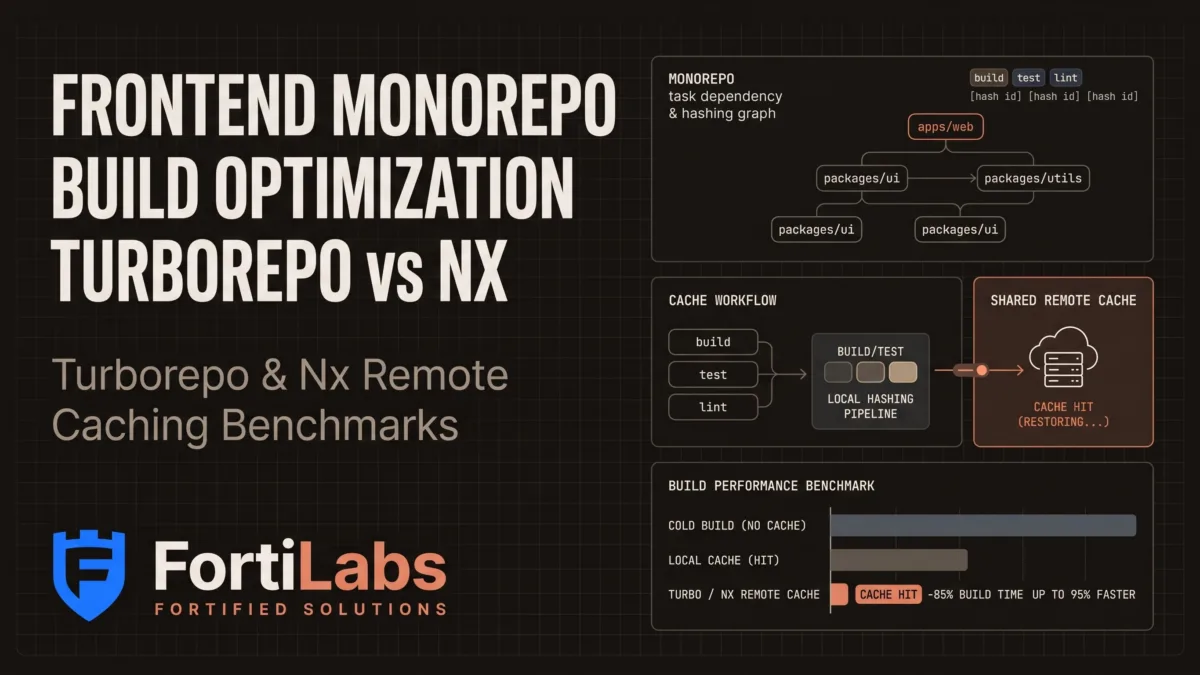
Turborepo and Nx address this problem through task orchestration, dependency graphs, hashing, and local or remote caching. Both can make an existing JavaScript or TypeScript workspace significantly more efficient. Their differences become more important when the repository grows, CI becomes distributed, cache correctness matters, or engineering teams need more sophisticated project-level controls.
Short answer: Turborepo is an attractive choice for teams that want a relatively lightweight task runner with straightforward configuration and remote caching. Nx is generally the stronger option when a monorepo needs deeper project-graph analysis, inferred tasks, configurable affected execution, distributed CI, and more extensive cache controls. Neither tool guarantees faster builds without correct task boundaries, inputs, outputs, and benchmarking.
1. Why frontend monorepo builds become slow
A typical TypeScript monorepo contains several applications and shared packages. For example:
apps/
  web/
  admin/
  docs/
  mobile/

packages/
  ui/
  design-tokens/
  eslint-config/
  tsconfig/
  api-client/
  shared-utils/
The applications depend on shared packages. The web application may consume the UI design system, design tokens, shared utilities, and generated API client. The admin application may depend on many of the same packages.
This structure creates a dependency graph. If a shared package changes, the build system needs to determine which downstream tasks may be affected. But if an unrelated documentation package changes, rebuilding every application is unnecessary.
The cost of repeated work
- Repeated compilation: unchanged packages are compiled again on different CI machines.
- Unnecessary testing: unrelated applications run tests after changes that cannot affect them.
- Dependency installation: multiple CI jobs download and install overlapping dependencies.
- Artifact transfer: large build outputs are uploaded and downloaded repeatedly.
- Graph calculation: the tooling spends time understanding project relationships and task dependencies.
- Configuration drift: scripts and cache inputs become inconsistent across packages.
Remote caching addresses repeated computation, while affected execution reduces the amount of work selected in the first place. These are complementary optimizations, not interchangeable features.
Important distinction: a cache hit means a task’s previous output can be reused. An affected command decides whether a task should enter the execution plan at all. A well-designed pipeline needs both.
2. How Turborepo and Nx approach build orchestration
Both tools can run existing package scripts, coordinate dependencies between tasks, and restore cached outputs. You do not necessarily need to replace Vite, Next.js, TypeScript, Vitest, ESLint, or your package manager to adopt either system.
Turborepo: package-oriented task orchestration
Turborepo is a high-performance build system focused on JavaScript and TypeScript monorepos. It builds a package graph from the workspace structure and uses a task graph to determine execution order.
Its central configuration is turbo.json. Developers define task relationships, cache behavior, outputs, environment variables, and other inputs. Turborepo then schedules eligible tasks and restores previous results when their hashes match.
For example, a task configuration can express that an application’s build depends on the builds of its internal workspace packages:
{
  "$schema": "https://turborepo.dev/schema.json",
  "tasks": {
    "build": {
      "dependsOn": ["^build"],
      "outputs": ["dist/**", ".next/**"]
    },
    "test": {
      "dependsOn": ["^build"],
      "outputs": ["coverage/**"]
    },
    "lint": {
      "outputs": []
    },
    "dev": {
      "cache": false,
      "persistent": true
    }
  }
}
The ^build dependency means that the corresponding build task in a package’s internal dependencies must run or be restored before the current package’s build.
Turborepo’s appeal is its relatively focused configuration model. Teams can introduce it into an existing package-manager workspace without adopting an entirely new project-management approach.
Nx: project graph and extensible build system
Nx takes a broader approach. It maintains a project graph, calculates dependencies, and uses that graph to plan tasks, select affected projects, and coordinate caching.
Projects can be discovered from workspace configuration, project files, package manifests, and Nx plugins. Plugins for tools such as Vite, Jest, Playwright, and TypeScript can infer tasks and their relevant outputs from existing configuration.
A simplified workspace-level configuration might look like this:
{
  "namedInputs": {
    "sharedGlobals": [
      "{workspaceRoot}/tsconfig.base.json"
    ],
    "default": [
      "{projectRoot}/**/*",
      "sharedGlobals"
    ],
    "production": [
      "default",
      "!{projectRoot}/**/*.spec.ts",
      "!{projectRoot}/**/*.test.ts"
    ]
  },
  "targetDefaults": {
    "build": {
      "dependsOn": ["^build"],
      "inputs": [
        "production",
        "^production"
      ],
      "cache": true
    }
  }
}
This example defines reusable input groups and makes the build depend on the production inputs of its dependencies. It is illustrative: actual project configuration and inferred plugin defaults should be inspected before overriding them.
Nx can also maintain a background daemon that watches workspace changes and updates project graph information incrementally. This is particularly useful during repeated local commands in large workspaces.
At a glance
| Capability | Turborepo | Nx |
|---|---|---|
| Primary model | Package and task graphs | Project and task graphs |
| Configuration | Central and package-level turbo configuration | Workspace, project, target, and plugin configuration |
| Task discovery | Package scripts and explicit task definitions | Package scripts, explicit targets, and inferred plugin targets |
| Remote cache | Vercel Remote Cache or compatible custom server | Nx Cloud or compatible self-hosted server |
| Affected execution | --affected and package filters |
nx affected and project filters |
| Distributed CI | Task orchestration with external CI parallelism | Nx Cloud distributed task execution and other CI approaches |
| Broader ecosystem | Focused JavaScript and TypeScript workflows | JavaScript, TypeScript, and additional supported technologies |
3. Dependency graph calculation and performance
A build system cannot efficiently execute a monorepo without understanding its dependencies. Graph calculation determines which projects exist, which projects depend on each other, and which task relationships must be respected.
Turborepo’s package graph
Turborepo builds its package graph from the package manager’s workspace dependency relationships. It then constructs a task graph using the dependencies expressed in turbo.json.
This is a relatively direct model for repositories where package manifests and explicit task configuration accurately represent the build system. Developers can inspect the graph with:
turbo run build --graphThe task graph is useful for understanding why one package’s build waits for another task, and whether the configured dependency chain matches the intended architecture.
Nx’s project graph
Nx analyzes workspace configuration, package relationships, source-code references, and supported project metadata to construct a project graph. It can also infer additional relationships through plugins.
Graph exploration is available through:
nx graphThe Nx daemon watches workspace changes and retains graph data in memory. Instead of recalculating everything for every local command, it can update the graph incrementally as files change.
Which graph calculation is faster?
There is no defensible universal winner. Graph calculation depends on:
- Number of projects and workspace packages
- Number and complexity of dependency relationships
- TypeScript path aliases and project references
- Framework and build-tool configuration
- Plugin inference and custom project-graph extensions
- Cold versus warm execution
- Filesystem performance and operating system
- Daemon availability and repository state
For a small package-oriented repository, Turborepo’s simpler model may be more than sufficient. In a large workspace with many project types, inferred tasks, and complex dependency relationships, Nx offers more graph-aware functionality.
However, Nx’s broader graph analysis is not automatically faster. Additional project discovery and plugin work can add overhead. Its daemon can reduce repeated local graph computation, but CI often starts in a clean environment and needs a separate cold-start measurement.
Benchmarking rule: measure cold graph creation and warm incremental graph updates separately. Comparing a warm Nx daemon against a cold Turborepo process—or the reverse—does not establish a fair performance winner.
4. Task hashing and cache correctness
Remote caching is only useful when the build system can determine whether a previous task result is safe to reuse. That decision is based on a task hash: a fingerprint of the inputs that influence the task’s output.
If an input changes but the hash does not, the system may restore a stale artifact. If irrelevant inputs are included, the hash changes unnecessarily and the cache misses even when the output would have been identical.
How Turborepo calculates task hashes
Turborepo calculates global and task-specific hashes. Relevant factors include task configuration, package files, lockfile information, source inputs, environment variables, and task arguments.
For example, a task that depends on a public API URL must account for that environment variable if changing it can change the generated application output.
{
  "tasks": {
    "build": {
      "dependsOn": ["^build"],
      "outputs": ["dist/**"],
      "env": [
        "PUBLIC_API_URL"
      ]
    }
  }
}
Do not add every environment variable indiscriminately. Include values that actually affect the task’s output. Secrets should not be printed into logs or placed in cached artifacts. Use pass-through configuration only when a value reaches the task but does not influence its output.
Turborepo also supports global environment and dependency configuration, which is useful for workspace-wide build inputs.
How Nx calculates task hashes
Nx hashes task inputs such as project source files, dependency-project files, workspace configuration, external dependency versions, command arguments, runtime values, and environment variables when configured.
Its named inputs allow teams to reuse input definitions across projects. For example, a production build can exclude test files while test tasks continue to include them.
{
  "namedInputs": {
    "default": [
      "{projectRoot}/**/*"
    ],
    "production": [
      "default",
      "!{projectRoot}/**/*.spec.ts",
      "!{projectRoot}/**/*.test.ts"
    ]
  },
  "targetDefaults": {
    "build": {
      "inputs": [
        "production",
        "^production"
      ],
      "cache": true
    }
  }
}
For environment-dependent tasks, inputs can also include environment variables or runtime commands. For example, changing a public API URL or Node.js runtime version can invalidate a task when that change affects its output.
Accuracy versus cache hit rate
There are two important failure patterns:
- False cache hit: a required input is missing from the hash, so the system restores an outdated result.
- Unnecessary cache miss: irrelevant files or values are included, so a task reruns even though its output would not change.
For example, suppose a shared UI package contains components, Storybook stories, tests, and documentation. If a production application build hashes every file indiscriminately, changing a Markdown document may invalidate the UI build and downstream applications.
Excluding irrelevant files improves reuse, but excluding a file that affects production output creates a correctness problem. The right goal is not the highest possible cache-hit percentage; it is the highest safe reuse rate.
Nx Ultracache and input tracing
Nx Cloud offers Ultracache functionality that can record the files tasks actually read and write in supported CI workflows. This can reveal undeclared dependencies and help improve input accuracy.
This is especially relevant for tasks that read files outside their obvious project directory. It does not eliminate the need to understand environment variables, external services, nondeterministic inputs, or task side effects.
Build tasks should be deterministic: the same declared inputs should produce the same outputs. A task that downloads changing external data, reads an untracked file, or embeds the current timestamp needs special treatment before it is safe to cache.
5. Remote cache configuration and infrastructure
A local cache only benefits the machine that created it. CI machines are frequently ephemeral, and developers do not automatically share their local build artifacts. Remote caching solves this by allowing trusted machines to reuse task outputs generated elsewhere.
Turborepo with Vercel Remote Cache
Turborepo’s default managed remote-cache integration is Vercel Remote Cache. It can be used even when the application itself is not hosted on Vercel.
A typical developer setup uses:
pnpm dlx turbo login
pnpm dlx turbo link
For external CI, the required credentials are supplied through environment variables:
TURBO_TOKEN=your-ci-token
TURBO_TEAM=your-team-slug
Keep these values in your CI secret manager. Never commit access tokens to turbo.json, application code, or public repository configuration.
Vercel documents fair-use upload and artifact-request limits by plan, and its managed cache automatically expires artifacts after a retention period. Check the current limits for your plan rather than assuming unlimited storage or traffic.
Self-hosting a Turborepo remote cache
Turborepo supports compatible remote-cache servers that implement its Remote Cache API. This allows organizations to build their own cache service or use a community implementation.
An important architectural detail: an S3 bucket by itself is not automatically a complete Turborepo remote cache. You need an HTTP service that implements the required API, authenticates clients, and stores or retrieves artifacts using the expected content-addressable identifiers.
An S3-compatible object store can serve as the artifact storage layer behind that service. The service still needs to handle authorization, artifact uploads, downloads, metadata, and integrity verification.
Nx Cloud remote caching
Nx Cloud is the managed remote-cache and CI platform designed for Nx workspaces. A typical setup starts with:
npx nx@latest connectIt provides shared task results across developers and CI machines, along with additional capabilities such as distributed task execution and CI analytics depending on the plan and configuration.
Nx checks the local cache before using the remote cache. If the remote service becomes unavailable, local cache hits can still be used and uncached tasks can run normally.
Self-hosting an Nx cache
Nx provides an OpenAPI specification that can be used to implement a compatible self-hosted remote-cache server. This is an option for teams that want more control over infrastructure and storage.
As with Turborepo, this is not equivalent to simply pointing Nx at an arbitrary S3 bucket. The cache service must implement the required protocol and security behavior. Nx Enterprise also offers dedicated and on-premise options for organizations with specific infrastructure requirements.
Managed versus self-hosted cache infrastructure
| Consideration | Managed cache | Self-hosted cache with object storage |
|---|---|---|
| Setup | Provider account and authentication | API service, storage, networking, and authentication |
| Operations | Provider maintains cache infrastructure | Your team maintains the service and storage |
| Data location | Depends on provider and plan | Can be selected within your infrastructure design |
| Scaling | Managed within provider limits | Capacity and scaling are your responsibility |
| Access control | Provider-supported users and tokens | Must be implemented and audited correctly |
| Cost model | Plan, usage, and service limits | Compute, storage, transfer, monitoring, and maintenance |
| Best fit | Teams prioritizing low operational overhead | Teams with compliance, residency, or infrastructure requirements |
Self-hosting is not automatically cheaper. Large cache artifacts can generate significant object-storage requests and network transfer. You also need to account for cache-service availability, backups, retention, authentication, and engineering time.
6. Affected commands and partial CI execution
Remote caching avoids repeating computations, but a good monorepo pipeline should also avoid selecting unrelated projects in the first place. Affected execution analyzes source-control changes and project dependencies to determine which tasks need attention.
Turborepo: –affected and package filters
Turborepo supports the --affected option:
turbo run build lint test --affectedBy default, this compares the current branch against main using Git history. It identifies changed packages and the relevant dependent packages for the requested tasks.
For example, if a change is limited to a documentation package that is not a dependency of the web application, the web application’s build does not necessarily need to run.
Shallow Git checkouts can break affected detection because the comparison commit may not exist locally. Ensure CI fetches the required base history and uses the intended comparison branch.
Nx: nx affected
Nx offers affected execution through:
nx affected -t build
nx affected -t lint test
It compares the Git changes against a base and uses the project graph to select affected projects and their required tasks.
A common CI pattern is:
nx affected -t build lint test \
  --base=origin/main \
  --head=HEAD
The actual base reference should be set to the correct target branch for the pull request. CI must also fetch enough Git history for Nx to calculate the comparison accurately.
Why shared design systems require careful affected analysis
Consider this dependency chain:
design-tokens
      |
      v
ui-components
      |
      +--------> web-app
      |
      +--------> admin-app
      |
      +--------> docs-site

api-schema
      |
      v
api-client
      |
      +--------> web-app
      |
      +--------> admin-app
If a design token changes, applications consuming the design system may need to rebuild. If an API schema changes, applications using the generated client may need new builds and tests. But a change to an unrelated documentation-only file should not trigger every package.
The quality of this result depends on the accuracy of the dependency graph. Missing package dependencies, incorrect TypeScript aliases, generated files outside tracked inputs, or incomplete project configuration can cause affected analysis to select too little work or too much.
Affected execution and remote caching work together
Suppose an application depends on a shared UI package and the UI package has not changed. A change to the application’s own source may select its build task, while the unchanged UI build is restored from cache.
Conversely, when a shared package changes, the dependent applications may become affected. Their builds may need to run because the dependency output has changed. The cache still helps by restoring unaffected dependencies and unrelated tasks.
For large repositories, reducing the number of selected tasks can also reduce remote artifact transfers. Restoring fewer cached tasks may be faster than restoring a large set of unnecessary cache hits.
7. Remote cache security: integrity, tokens, and cache poisoning
A remote cache is not just a performance optimization. It is a distribution mechanism for executable build artifacts. If an attacker can write malicious output under a cache key that a trusted build later restores, the attack can affect developer machines or CI pipelines.
This is commonly called cache poisoning.
Protect cache writes from untrusted pull requests
A safe default is to distinguish trusted and untrusted CI contexts:
- Protected branches receive credentials that can read and write the shared trusted cache.
- Untrusted pull requests receive read-only access to the shared cache.
- Results produced by untrusted runs are isolated instead of being allowed to overwrite shared trusted entries.
- Local developer credentials should follow the organization’s access policy.
Nx Cloud security controls
Nx documents read-only and read-write access tokens, immutable cache entries, workspace access controls, and end-to-end encryption options.
Its recommended model is to use read-write tokens only in trusted environments such as protected branches. Untrusted branches can read the shared cache while writing to isolated execution-specific cache storage.
Nx Cloud also documents protections against cache-poisoning scenarios associated with CREEP (CVE-2025-36852). These protections depend on correctly configuring token scopes and CI isolation; merely connecting a repository to Nx Cloud does not remove every security responsibility.
Turborepo artifact signatures
Turborepo supports HMAC-SHA256 signatures for remote-cache artifacts. With signatures enabled, a client can verify an artifact’s integrity and authenticity using a shared signing secret. An artifact that fails verification is treated as a cache miss.
{
  "remoteCache": {
    "signature": true
  }
}
Provide the signing key through the protected environment variable TURBO_REMOTE_CACHE_SIGNATURE_KEY. Do not store the secret in the repository or expose it to untrusted pull-request jobs.
Artifact signatures help detect unauthorized modification, but they are not a substitute for branch isolation, strong authentication, or access controls. A trusted signing key exposed to an untrusted job can undermine the protection.
Security checklist for either tool
- Never expose shared read-write cache credentials to untrusted pull requests.
- Use short-lived or revocable credentials where supported.
- Restrict artifact access by workspace, team, or repository.
- Protect cache signing and encryption keys as production secrets.
- Do not print credentials or sensitive environment values into task logs.
- Review which files are included in cache outputs.
- Apply retention policies to reduce unnecessary artifact exposure.
- Verify the provenance of artifacts used in release pipelines.
- For highly sensitive releases, consider a fresh uncached build in a protected environment.
Security principle: a cache hit is only trustworthy when both the cache key and the artifact’s origin can be trusted. Fast builds are not worth executing an artifact that an untrusted contributor could have supplied.
8. How to benchmark Turborepo vs Nx fairly
There is no single benchmark number that establishes which tool is faster for every frontend monorepo. The result depends heavily on repository topology, cache state, task definitions, artifact sizes, hardware, network conditions, and CI configuration.
Some publicly available third-party tests report substantial differences between Nx and Turborepo. For example, a January 2025 community benchmark reported faster cache-restoration results for Nx in its particular GitHub Actions test environment. However, that is a result for that benchmark’s workload and methodology, not proof that Nx is universally faster for every repository.
Vendor-published performance claims should also be treated as workload-specific. The best comparison is a controlled test using your own package graph, tasks, and representative pull requests.
Benchmark the scenarios that matter
| Scenario | What it measures | What to record |
|---|---|---|
| Cold graph calculation | Initial workspace analysis | Graph generation time and memory |
| Warm graph calculation | Incremental local updates | Graph update time and daemon behavior |
| Cold full build | Execution without reusable artifacts | Total duration and CPU utilization |
| Local cache hit | Reuse on the same machine | Lookup and restoration time |
| Remote cache hit | Reuse across CI or developers | Download time, artifact size, and total duration |
| Single-package change | Incremental execution | Selected tasks and cache misses |
| Shared UI change | Dependency propagation | Dependent applications and task count |
| Configuration change | Global invalidation behavior | Unexpected cache misses |
| Concurrent CI jobs | Shared-cache performance under load | Throughput, transfer latency, and contention |
Use the same monorepo workload
A representative benchmark workspace should contain:
- At least two frontend applications using a shared component library
- A shared design-token package
- A TypeScript API client and generated types
- Shared lint and TypeScript configuration packages
- Production builds, type checks, unit tests, and lint tasks
- Realistic dependency chains rather than isolated packages
Run the same underlying build tools and scripts under both systems. Do not give one tool a simpler task graph, different build outputs, or a larger CI machine.
Control the benchmark environment
- Pin Node.js, package-manager, lockfile, and build-tool versions.
- Use the same machine type, CPU limits, memory, and operating system.
- Separate dependency installation time from task execution time.
- Use equivalent cold-cache and warm-cache conditions.
- Keep remote cache regions and network conditions consistent.
- Repeat each scenario several times and report median and p95 results.
- Record task counts, cache hit rates, bytes transferred, and total wall-clock time.
- Verify build outputs before accepting a faster result.
Calculate real CI improvement
Use the following calculation:
CI time saved (%) = ((baseline duration − optimized duration) ÷ baseline duration) × 100.
For example, reducing a pipeline from 20 minutes to 8 minutes represents a 60% reduction in wall-clock duration. This is an illustrative calculation, not a benchmark result for either product.
Also measure engineering and infrastructure cost. A pipeline that saves three minutes but requires a complex custom cache service may not be a better overall solution for a small team.
Do not confuse cache restoration with build execution
A warm cache benchmark measures how quickly artifacts can be located and restored. It does not measure the time required to compile a large application after a shared dependency changes.
For a meaningful result, publish at least four figures separately: cold build time, warm local cache time, warm remote cache time, and affected CI time after a representative change.
9. Developer onboarding and maintenance
Build-system performance is only part of the decision. A tool also needs to fit the team’s daily workflow. Complicated configuration, unclear cache misses, and inconsistent local and CI behavior can reduce adoption even when the underlying engine is fast.
Turborepo onboarding
Turborepo is generally straightforward for teams already using npm, pnpm, or Yarn workspaces. Developers can begin with existing package scripts, add a root turbo.json, define task dependencies, and connect to a remote cache.
The main maintenance responsibility is keeping task configuration accurate. Developers need to understand which files, environment variables, package dependencies, and outputs affect each task.
For teams with a relatively conventional JavaScript monorepo, that focused model can make onboarding easier.
Nx onboarding
Nx has more concepts to learn: projects, targets, plugins, named inputs, project graph relationships, affected execution, and Nx Cloud integration.
That additional structure can be valuable in larger repositories. Inferred tasks can reduce repetitive configuration, while graph exploration and project-level tooling help developers understand how changes propagate through the workspace.
However, teams should avoid adopting every Nx feature immediately. A gradual introduction—starting with project discovery, caching, and affected execution—can make the transition easier.
Developer experience comparison
| Area | Turborepo | Nx |
|---|---|---|
| Initial setup | Usually lightweight for package workspaces | More workspace concepts, with optional incremental adoption |
| Configuration style | Central task-oriented configuration | Workspace and project-level configuration with plugins |
| Task discovery | Explicit package scripts and task definitions | Explicit definitions and inferred plugin tasks |
| Graph visibility | Task graph inspection | Project graph and task graph exploration |
| Scaling complexity | Requires disciplined package and task configuration | More built-in workspace and CI capabilities, with more concepts |
| Typical fit | Teams prioritizing a focused task runner | Teams managing a broader, more complex development platform |
10. Which tool should you choose?
Choose Turborepo when:
- Your repository is primarily a JavaScript or TypeScript package workspace.
- You want task orchestration and remote caching without a broader project-management layer.
- Your dependency relationships can be represented cleanly through package manifests and task configuration.
- Your CI requirements are well served by package filtering and affected execution.
- Your team prefers minimal configuration and an uncomplicated onboarding path.
Choose Nx when:
- Your monorepo contains many interconnected applications and shared packages.
- You need deeper project graph analysis and affected project selection.
- You want plugin-based task inference for tools such as Vite, Jest, and Playwright.
- You need reusable input definitions and more extensive cache controls.
- You want distributed CI capabilities and broader workspace management.
- You manage multiple technology stacks within the same repository.
What about an existing Turborepo workspace?
Do not migrate to Nx simply because a comparison article or benchmark claims it is faster. First inspect your current task graph, cache hit rate, input definitions, artifact sizes, and affected CI behavior.
If most build time is spent compiling genuinely changed packages, a different task runner may not solve the underlying bottleneck. Improving dependency boundaries, reducing unnecessary build outputs, and splitting expensive tasks may provide a larger benefit.
Likewise, a team using Nx should not replace it with Turborepo solely to reduce configuration. The migration may remove useful project-graph, plugin, and CI functionality.
Final verdict: Turborepo is a compelling choice for focused, package-oriented JavaScript and TypeScript monorepos. Nx is a stronger fit when the repository needs a more comprehensive project graph, configurable task inputs, plugin inference, and advanced CI orchestration. The best-performing system is the one that correctly identifies affected work, safely reuses deterministic outputs, and minimizes total CI wall-clock time without creating unnecessary operational complexity.
11. Frequently asked questions
Is Nx faster than Turborepo?
Not universally. Performance depends on repository size, graph complexity, task configuration, cache state, artifact transfer, and CI hardware. Nx provides additional graph and CI capabilities, while Turborepo offers a focused task-running model. Benchmark both with the same workload before choosing.
What is the difference between remote caching and affected builds?
Remote caching restores the results of tasks that have already run with identical inputs. Affected execution determines which projects and tasks need to be considered after a change. Using both reduces unnecessary work and repeated computation.
Can Turborepo and Nx use an S3 bucket for remote caching?
Both support self-hosted remote-cache architectures, but an S3 bucket alone is not a complete cache service. You need a compatible HTTP API implementation that handles artifact storage, retrieval, authentication, and the required cache protocol. S3 can serve as the underlying object store.
Does Turborepo support affected builds?
Yes. Turborepo supports turbo run build --affected and package filtering. Affected execution relies on Git history and the package dependency graph, so CI must fetch the correct base commit and enough history.
Does Nx automatically detect affected projects?
Yes. Nx uses its project graph and source-control changes to determine which projects are affected. Its results depend on correct project discovery, dependency relationships, configuration, and the Git comparison range.
What causes unnecessary remote cache misses?
Common causes include broad file inputs, unrelated configuration changes, environment-variable changes, lockfile changes, inconsistent runtime versions, and incorrect task boundaries. Reviewing task hashes and input definitions helps identify unnecessary invalidation.
Can remote caching introduce security vulnerabilities?
Yes. If untrusted contributors can write artifacts into a cache used by protected builds, they may attempt cache poisoning. Use scoped credentials, read-only access for untrusted jobs, isolated writes, and artifact integrity protections.
Should every monorepo task be cached?
No. Cache deterministic tasks whose outputs depend on declared inputs. Persistent development servers, tasks with uncontrolled external side effects, and tests that depend on changing external services should not be cached without a carefully designed strategy.
Which tool is better for a shared React design system?
Both can manage shared React components and dependent applications. Turborepo works well when package dependencies and task relationships are straightforward. Nx can be particularly useful when the design system is part of a larger workspace with many applications, plugins, project-level boundaries, and advanced affected CI requirements.
How should I measure monorepo build performance?
Measure cold and warm graph calculation, full build time, local cache restoration, remote cache restoration, affected CI execution, cache-hit rate, artifact transfer size, and p95 pipeline duration. Keep the workload and hardware identical for both tools.
References and further reading
- Turborepo: Package and Task Graphs — package relationships and task dependencies.
- Turborepo: Caching — task hashes, inputs, outputs, and cache behavior.
- Turborepo: Remote Caching — managed and custom remote-cache infrastructure.
- Turborepo: Run Reference — affected execution and task filters.
- Turborepo: Remote Cache API — self-hosted cache protocol.
- Nx: How Nx Works — project graph and task execution.
- Nx: Nx Daemon — incremental project graph updates.
- Nx: Configure Inputs for Task Caching — cache inputs and task correctness.
- Nx: Remote Caching — cache configuration and security.
- Nx: Cache Security — token access, cache poisoning, and encryption.
- Nx: Self-hosted Remote Cache — custom cache-server implementation.
- Nx: Nx vs Turborepo — feature and architecture comparison.
- Vercel: Remote Caching — managed cache usage and plan limits.
- Community Monorepo Benchmarks — third-party benchmark methodology and results.