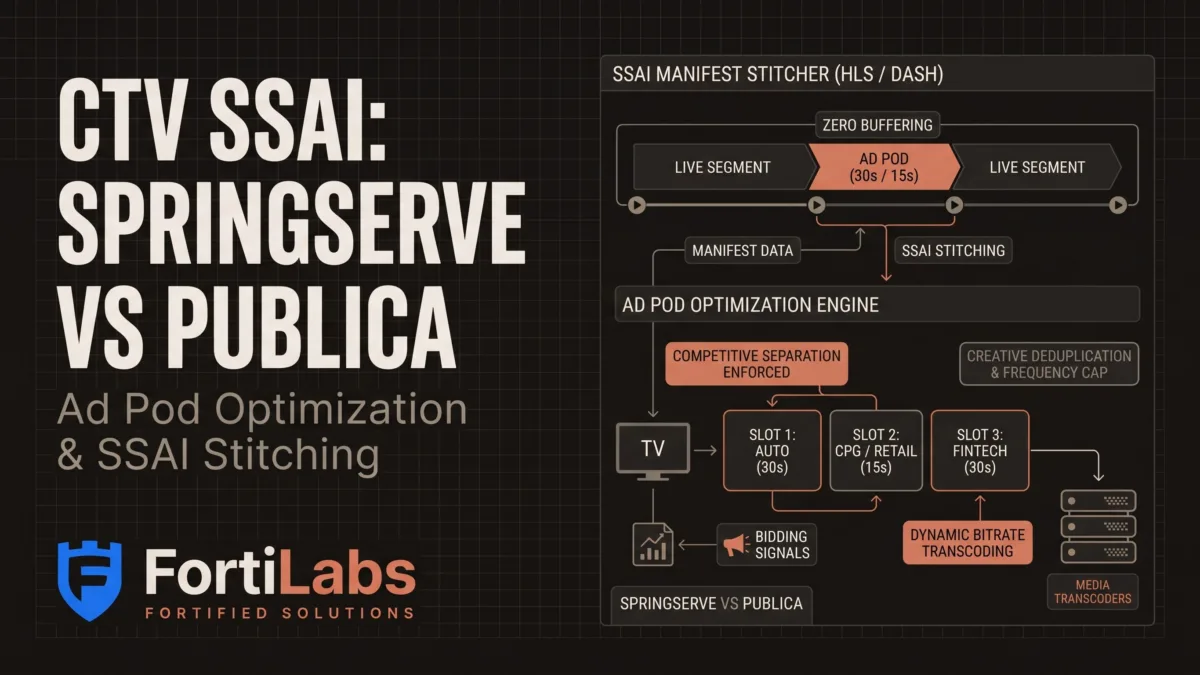
Connected TV (CTV), over-the-top (OTT) applications and Free Ad-Supported Streaming TV (FAST) channels need more than a conventional video ad server. They need an infrastructure capable of selecting multiple advertisements for a commercial break, enforcing advertiser separation, managing frequency across viewing sessions and inserting correctly encoded creatives into adaptive HLS or MPEG-DASH streams.
Short answer: Server-Side Ad Insertion (SSAI) combines advertisements and program content into a continuous streaming experience, while Client-Side Ad Insertion (CSAI) delegates ad playback to the application player. SpringServe offers configurable ad pod decisioning, demand management, deduplication controls and frequency-cap integrations, but its documented SSAI workflow uses a separate stitching service to transcode and insert the returned creatives. Publica positions its CTV ad server as an integrated solution with unified auctions, ad pod optimization and SSAI.
Engineering takeaway: Do not select an ad server based only on auction yield or advertised SSAI capabilities. Evaluate the entire pipeline: cue-point accuracy, VAST response quality, pod duration, creative transcoding, HLS/DASH rendition alignment, cross-device identity, tracking beacons and playback recovery. The ad server decides what should play; the insertion architecture must make sure it actually plays correctly.
1. Why does CTV need specialized ad insertion?
CTV advertising brings the commercial-break experience of traditional television into internet-delivered video. However, the infrastructure underneath an OTT application is different from a traditional broadcast system.
A FAST channel may distribute a continuous live-style schedule, while an AVOD application may deliver on-demand episodes with personalized commercial breaks. Both environments need advertising systems that can make decisions for individual viewing sessions without disrupting the underlying video stream.
Consider a viewer watching a 30-minute program with two commercial breaks. Each break might contain several advertising slots. The platform must select eligible campaigns, respect the available duration, prevent prohibited competitors from appearing together, apply frequency rules and return a playable sequence of creatives.
It must also ensure that the advertisements fit the technical requirements of the stream. An ad selected by the auction is not useful if its video codec, resolution, audio configuration or segment structure causes a playback failure.
What makes programmatic CTV different?
- Long-form playback: Viewers expect commercial breaks to behave like television, without disruptive transitions or unexpected playback interruptions.
- Multiple ad slots: A commercial break can contain several advertisements with different durations and priorities.
- Competitive separation: Competing brands should not appear consecutively or together when advertiser rules prohibit it.
- Frequency management: Advertisers need to control repeated exposure across episodes, sessions and supported devices.
- Adaptive streaming: Ads must work with the HLS or DASH rendition ladder and the stream’s timing and packaging requirements.
- Programmatic demand: Multiple SSPs, exchanges, direct campaigns and guaranteed deals may compete for the same ad opportunity.
For FAST operators, the challenge is especially important because ad breaks can occur at scheduled points in a continuous channel. Missing a cue point, returning the wrong pod duration or failing to stitch a creative can disrupt both monetization and the viewing experience.
Useful technical background: IAB Tech Lab and its CTV Programmatic Guide.
2. SSAI vs CSAI: What changes when advertisements are stitched into the stream?
The main difference between SSAI and CSAI is where advertisements are inserted and who controls playback transitions.
How does Client-Side Ad Insertion work?
With Client-Side Ad Insertion, the application player requests advertisements from an ad server and manages the transition between program content and advertising.
A typical CSAI workflow looks like this:
- The player reaches an advertising cue point or scheduled break.
- The application requests an ad from a VAST-compatible ad server.
- The player parses the VAST response and selects the playable creative.
- The player switches from the program stream to the advertisement.
- The ad plays in the application, which sends the required tracking events.
- The player returns to the program stream after the commercial break.
This approach gives the application direct control over ad playback and can support client-side interactive functionality. However, the player must handle ad loading, creative compatibility, transitions and tracking correctly.
If the ad asset takes too long to load, the player may show a spinner, pause playback or fail to start the commercial. Switching between content and advertising can also introduce additional buffering if the assets are not prepared or cached appropriately.
How does Server-Side Ad Insertion work?
SSAI moves much of the insertion work to the server. Instead of requiring the application to switch between separate content and advertisement players, an SSAI service manipulates the delivered stream or manifest so that the viewer receives a continuous sequence containing both.
A typical SSAI workflow is:
- The streaming platform receives or identifies an advertising opportunity.
- The SSAI service sends an ad request to a VAST-compatible decisioning server.
- The ad server evaluates eligible demand and constructs the advertising pod.
- The SSAI service retrieves the selected creative assets.
- Creatives are validated, conditioned or transcoded into compatible streaming renditions.
- The service stitches ad segments into the HLS playlist or DASH manifest.
- The player continues playback using the resulting stream and reports the required ad events.
The application typically experiences the advertisement as part of the same playback session. However, SSAI still requires player integration for session handling, ad metadata, tracking and sometimes overlays or companion UI.
SSAI vs CSAI: technical comparison
| Technical factor | SSAI | CSAI |
|---|---|---|
| Insertion location | Server-side manifest or stream processing | Application or video player |
| Playback transition | Continuous stitched stream when correctly implemented | Player switches between content and ad playback |
| Creative preparation | Usually handled by the insertion pipeline | Player must support the selected creative format |
| Buffering risks | Manifest, segment, CDN and rendition issues | Ad loading, player transitions and asset compatibility |
| Player integration | Session, metadata and tracking integration still required | Ad requests, playback scheduling and tracking required |
| Ad blocking | Generally harder to identify through ordinary ad-request blocking | Separate ad requests can be more visible to blockers |
| Interactive formats | Some client-dependent formats require additional support | Generally more flexible for player-rendered interactions |
| Best fit | CTV, FAST and long-form streaming experiences | Player-controlled environments and interactive advertising |
Does SSAI eliminate buffering?
No. SSAI can reduce playback interruptions associated with switching between separate content and ad players, but it does not guarantee a buffer-free experience.
Buffering can still occur when:
- The SSAI service returns a manifest containing incorrect or unavailable segment URLs.
- An ad creative has not been transcoded into a compatible rendition.
- Ad and content segment boundaries do not align correctly.
- The CDN cannot deliver the selected segments quickly enough.
- The player encounters discontinuities, timestamp errors or incompatible codec configurations.
- The ad break takes longer to prepare than the available prefetch window.
SSAI shifts complexity from the client to the streaming infrastructure. It does not remove that complexity.
Technical references: AWS Elemental MediaTailor, Android Media3 ad insertion and BytePlus ad insertion architecture.
3. How does programmatic ad podding work?
An ad pod is a sequence of advertisements grouped into one commercial break. Instead of making a single ad decision, the ad-serving system must construct a sequence that satisfies the publisher’s duration, advertiser, targeting and delivery rules.
For example, a FAST channel might provide a 120-second commercial break with four available slots. The ad server could return:
Illustrative 120-second commercial break
30 sec
30 sec
30 sec
30 sec
Four selected creatives must fit the available break duration and satisfy the pod’s decisioning rules.
The ad server may receive several eligible bids, direct campaigns and priority rules. It must select advertisements that maximize the publisher’s yield without violating campaign commitments or creating a poor viewer experience.
What does an ad pod decisioning engine evaluate?
- Pod duration: The total length of the available commercial break.
- Slot duration: The allowed duration for each individual advertisement.
- Campaign priority: Guaranteed and direct-sold commitments, priority tiers and programmatic demand.
- Bid value: The revenue opportunity associated with each eligible advertisement.
- Competitive separation: Restrictions preventing competing brands from appearing together.
- Creative deduplication: Rules preventing the same creative or advertiser from appearing repeatedly within a pod.
- Frequency caps: Restrictions on how often a viewer receives the same campaign or advertisement.
- Creative compatibility: Whether the selected asset can be played in the target streaming environment.
What is the difference between an ad server and an SSAI stitcher?
This distinction is critical when comparing SpringServe and Publica.
An ad server evaluates demand, applies campaign rules and returns a VAST response or another ad decision. An SSAI service retrieves the selected video assets, prepares them for streaming and modifies the manifest or stream to insert them.
Some platforms combine these capabilities. Others use a separate ad server and insertion provider. The responsibility for transcoding, manifest manipulation, segment delivery and playback recovery must be identified explicitly.
SpringServe’s own Ad Pods documentation describes this separation: SpringServe builds the pod and returns VAST to the SSAI vendor, which then transcodes the assets and stitches them into the HLS or DASH stream.
4. SpringServe: configurable ad pod decisioning and demand management
SpringServe is a video ad-serving platform designed for publishers and streaming inventory. Its capabilities include demand management, video ad decisioning, ad pod configuration, frequency controls and optimization.
For streaming operators, one of its important strengths is the ability to configure ad pods rather than treating every advertising opportunity as an isolated single-ad request.
How does SpringServe construct an ad pod?
SpringServe documents custom and dynamic ad pod configurations. A publisher can configure a maximum pod duration and define the number of ad slots, with a documented limit of up to ten slots for the relevant pod configuration.
Dynamic pod logic can select eligible advertisements that fit within the configured duration. Custom pod configurations provide more control over the expected slots and their requirements.
Its documented advanced settings include:
- Unfilled Slot Opt-Out: Controls whether an empty VAST response is returned when demand cannot fill the pod.
- Duplicate Creatives: Controls whether duplicate creatives are allowed in the pod response.
- Advertiser Domain Targeting: Supports advertiser-domain restrictions and related deduplication behavior.
- Waterfall Build: Allows demand waterfalls to be configured across the entire pod or individually for each slot.
- Slot Positioning: Supports ordering rules such as first, middle and last positions, or numeric slot ordering for custom pods.
These controls matter when a publisher wants to prioritize certain demand sources, protect premium slot positions or avoid filling a break with repeated advertisements from the same advertiser.
How does SpringServe work with an external SSAI provider?
SpringServe’s documented SSAI workflow describes an integration in which the insertion provider manages the content source and cue points, then calls SpringServe for advertising decisions.
- The player requests a stream from the SSAI provider.
- The SSAI service identifies an upcoming ad marker in the HLS or DASH content.
- The service calls SpringServe’s VAST endpoint.
- SpringServe evaluates eligible demand partners and follows supported VAST wrappers.
- SpringServe fills the pod according to targeting, duration and configured tiers.
- SpringServe includes the relevant tracking beacons and returns the VAST response.
- The external SSAI provider retrieves the assets, transcodes them and stitches them into the stream.
This architecture allows the publisher to use SpringServe for ad decisioning while selecting an SSAI provider suited to its streaming infrastructure.
For example, SpringServe’s documentation illustrates the workflow using AWS Elemental MediaTailor as the SSAI service. That is an architectural example, not a requirement to use MediaTailor.
SpringServe frequency capping
SpringServe documents frequency-cap settings that can use SpringServe or a third-party provider. Rules can be configured using time periods such as minutes, hours and days, with impression or request limits per user.
It also documents Global Frequency Cap Pixels for connecting advertising exposure across linear TV and digital campaigns. The feature supports IP-based or device-ID-based approaches, depending on the configured pixel type and the identifiers supplied.
This is useful when an advertiser wants to coordinate exposure across different delivery systems that would otherwise operate independently.
However, a shared frequency-cap identifier is not automatically a universal identity graph. Accurate cross-device frequency management depends on identifier availability, identity resolution, consent, match rates and the integration between the participating systems.
SpringServe’s main strengths
- Configurable ad pod construction and duration controls.
- Slot-level and pod-level demand waterfall options.
- Creative and advertiser-domain deduplication controls.
- Frequency-cap configuration and documented global cap pixel options.
- Ability to integrate with a separate SSAI provider.
- Flexibility to select an insertion architecture independently of ad decisioning.
What should engineers verify?
SpringServe’s separation between decisioning and insertion provides flexibility, but it also creates integration responsibilities. The streaming team must confirm which provider owns transcoding, manifest manipulation, CDN delivery, ad tracking and playback error handling.
Ask for a complete integration diagram and confirm how the system behaves when a VAST response contains an unsupported creative, a wrapper timeout or a pod that cannot be filled.
Official documentation:
5. Publica: integrated CTV ad serving, unified auctions and SSAI
Publica is a CTV-focused advertising platform designed for broadcasters, television manufacturers and AVOD streaming services.
Its product positioning combines ad serving, campaign management, audience targeting, programmatic demand and Server-Side Ad Insertion. Publica also promotes an OTT unified auction that allows publishers to manage competition between direct demand and multiple programmatic sources.
What makes Publica relevant to CTV publishers?
Traditional digital ad-serving systems are not always designed around television-style commercial breaks. Publica positions its platform around the operational requirements of CTV, including ad pod optimization, advertiser separation and frequency management.
Its product materials describe a combination of:
- CTV ad serving: Campaign management and delivery controls designed for streaming inventory.
- Unified auctions: Competition between programmatic SSP demand and direct campaigns.
- Audience targeting: First- and third-party audience segmentation capabilities.
- Ad pod optimization: Pod-level decisioning and advertising experience controls.
- Server-Side Ad Insertion: An SSAI offering designed for programmatic streaming delivery.
- Reporting: Auction and advertising delivery visibility through the platform’s reporting tools.
How does Publica’s ad pod optimization work?
Publica describes its ad podding capabilities as supporting competitive separation, frequency management and the selection of non-duplicate, non-competitive advertisements within live and VOD advertising breaks.
For example, a broadcaster could configure its commercial-break rules to prevent competing automobile brands from appearing back-to-back. The platform can also support advertiser-specific requirements around pod positions and frequency.
Publica’s published product positioning includes pod-level and session-level frequency controls. This is particularly relevant for streaming applications where the same viewer may encounter several commercial breaks during one viewing session.
How does Publica’s unified auction fit into the architecture?
Publica’s unified auction is designed to coordinate eligible demand sources rather than treating each source as a completely isolated waterfall. This can help publishers compare direct campaigns and programmatic demand within a controlled decisioning framework.
For publishers, the key evaluation is whether the auction respects guaranteed campaign commitments, slot requirements, competitive exclusions and pod-duration constraints while optimizing the revenue of the entire break.
A higher individual bid is not automatically the best pod decision. A campaign may be ineligible because of a category conflict, frequency limit or creative-duration constraint.
Publica’s SSAI positioning
Publica markets SSAI as part of its CTV advertising platform. This can reduce the number of separate vendors a publisher needs to coordinate across decisioning and insertion.
However, an integrated product claim should not replace a technical architecture review. Buyers should establish exactly which components Publica operates, which components are delivered through partners, and how creative preparation, transcoding, manifest generation, CDN delivery and tracking are handled.
Public product information does not establish every implementation detail for all HLS and DASH profiles or every device platform. Those details should be confirmed in the technical integration specification.
Publica’s main strengths
- CTV-focused ad-serving and campaign management.
- Unified auction positioning across direct and programmatic demand.
- Pod-level advertising controls and competitive separation.
- Session-level frequency management capabilities.
- Integrated SSAI product positioning.
- Audience targeting and CTV monetization workflows.
What should engineers verify?
Request a technical walkthrough of the full stream-delivery path. Confirm whether SSAI is native to the selected deployment, how ad assets are transcoded, which HLS and DASH profiles are supported, how manifest discontinuities are handled and what happens when a creative cannot be inserted.
Also ask for pod-level logs showing why each creative was selected or rejected. Without this information, it can be difficult to distinguish an auction problem from a frequency-cap, creative-compatibility or stitching failure.
Official references:
6. SpringServe vs Publica: Which platform is better for CTV ad pod optimization?
Both platforms address important CTV monetization requirements, but their publicly documented positioning emphasizes different architectural approaches.
SpringServe documents configurable pod decisioning and an integration model in which an external SSAI service performs creative transcoding and stream stitching. Publica promotes a CTV platform that combines ad serving, unified auctions, ad pod optimization and SSAI.
| Capability | SpringServe | Publica |
|---|---|---|
| Primary positioning | Video ad server and monetization platform | CTV advertising platform |
| Ad pod decisioning | Custom and dynamic ad pod configurations | CTV ad pod optimization |
| Demand management | Demand partners, waterfalls and slot-level controls | Unified auction positioning for direct and programmatic demand |
| Competitive separation | Advertiser-domain and creative deduplication controls | Advertiser separation and non-competitive pod positioning |
| Frequency management | Frequency caps and documented global cap pixel options | Pod-level and session-level frequency management positioning |
| SSAI architecture | Documented workflow with a separate SSAI provider | Integrated SSAI product positioning |
| Creative transcoding | Documented as the responsibility of the SSAI provider in the example workflow | Confirm the exact transcoding and rendition workflow in the deployment specification |
| HLS/DASH integration | Documented through the external SSAI integration workflow | Confirm supported protocols, profiles and manifest behavior for the selected product |
| Architecture flexibility | Can pair ad decisioning with a separately selected stitcher | Designed around a more integrated CTV platform approach |
When should you evaluate SpringServe?
SpringServe is worth evaluating when your engineering team wants configurable ad pod decisioning and the flexibility to select or retain a separate SSAI provider.
This can be useful if your existing streaming architecture already uses a manifest manipulator, CDN and transcoding pipeline that you do not want to replace. You can evaluate the ad server independently from the insertion layer.
However, that modularity means your team must manage integration boundaries, vendor responsibilities, error handling and observability across more than one component.
When should you evaluate Publica?
Publica is worth evaluating when you want a CTV-focused platform that brings ad serving, unified auctions, pod controls and SSAI into a more integrated offering.
This may simplify vendor coordination for publishers that are building or consolidating their CTV monetization stack.
However, integration does not automatically mean every streaming requirement is supported. Confirm the actual manifest, transcoding, CDN, identity and player capabilities for your devices and delivery environments.
Which is the better choice for FAST channels?
There is no universal winner. A FAST operator should prioritize:
- Reliable SCTE-35 cue handling and commercial-break timing.
- Consistent ad pod duration and slot filling.
- Advertiser and category separation across the break.
- Frequency management across viewing sessions.
- Creative transcoding and rendition alignment.
- Low-latency manifest generation and reliable CDN delivery.
- Impression tracking and auction-level reporting.
Run a proof of concept using actual FAST channel markers, representative device platforms, multiple demand sources and real creative assets. A successful desktop demonstration is not proof that a platform can reliably handle a production FAST channel.
7. How does competitive separation prevent back-to-back car commercials?
Competitive separation prevents advertisements from competing brands or categories from appearing together in the same commercial break, according to the publisher’s configured rules.
Imagine a streaming application with two automobile advertisers:
- Brand A: 30-second vehicle advertisement.
- Brand B: 30-second vehicle advertisement.
If the publisher’s policy prohibits competing automobile advertisers from appearing in the same pod, the ad server must not simply choose both creatives because they have the highest individual bids.
Instead, it must evaluate category restrictions while constructing the full pod.
How should the ad server enforce category separation?
- Assign each creative and advertiser a consistent brand or competitive category identifier.
- Evaluate the advertiser and category information before selecting a slot.
- Compare the candidate with previously selected advertisements in the current pod.
- Reject candidates that violate the publisher’s competitive-separation rules.
- Select the next eligible creative while respecting duration and priority constraints.
For example, if Brand A has already won the first slot, Brand B may be rejected from the second slot because both belong to the same restricted competitive category.
Why is advertiser-domain deduplication not enough?
Advertiser-domain deduplication can prevent repeated advertisements associated with the same advertiser domain, but competitive separation may require a broader classification system.
Two automobile manufacturers can use completely different domains while still belonging to the same competitive category. Conversely, two campaigns from the same advertiser may be allowed to run together if the publisher’s policy permits it.
For reliable category separation, the ad server needs structured advertiser identities, category metadata and rules that operate across the entire pod.
What should publishers test?
- Can two different brands in the same restricted category appear in one pod?
- Can a single advertiser appear twice with different creatives?
- Can the same advertiser appear in separate pods during one viewing session?
- Do exclusions apply across all demand sources, including direct campaigns and programmatic bidders?
- What happens when every remaining candidate violates the separation policy?
- Can the system reserve first or last pod positions without bypassing separation rules?
SpringServe documents advertiser-domain and creative deduplication controls. Publica describes competitive separation as part of its CTV ad pod optimization. Buyers should test the exact category-mapping and rule-precedence behavior in their selected deployments rather than assuming that similarly named features operate identically.
8. How does cross-device frequency capping work in CTV?
Frequency capping limits how many times an advertisement or campaign can be shown to the same viewer or recognized household during a defined period.
For example, an advertiser may want to limit a viewer to three impressions per day. Without frequency controls, a viewer could encounter the same advertisement repeatedly across multiple episodes, streaming sessions or applications.
Why is cross-device frequency capping difficult?
Streaming applications operate across different devices and environments. A viewer may watch the same service on a television, mobile device and web browser, while each application can use different identifiers.
Without a shared identity mechanism, each device may appear to be a separate viewer. The same campaign could therefore exceed the advertiser’s intended frequency limit.
Cross-device frequency management requires some form of identifier coordination or privacy-compliant identity resolution. Depending on the deployment, this may involve:
- Consented first-party account identifiers.
- Publisher-controlled household identifiers.
- Device identifiers available under applicable platform policies.
- Approved identity or data collaboration partners.
- IP-based signals where permitted, with appropriate limitations.
IP addresses are not reliable universal household identities. Shared networks, dynamic addressing, carrier-grade NAT and privacy features can create false matches or missed matches.
Pod-level vs session-level frequency caps
| Cap type | What it controls | Example |
|---|---|---|
| Creative-level | Repeated delivery of the same creative | Do not show the same video twice in one break |
| Pod-level | Exposure within a single commercial break | Allow one impression per advertiser in a pod |
| Session-level | Exposure during one viewing session | Limit a campaign to two impressions per session |
| Daily | Exposure across a defined day | Limit a campaign to three impressions per day |
| Cross-device | Exposure across recognized devices or households | Coordinate frequency across TV and mobile |
SpringServe frequency-cap capabilities
SpringServe documents frequency-cap settings with impression or request limits per user and selectable time periods. It also documents Global Frequency Cap Pixels for coordinating exposure across linear and digital campaigns using IP or device identifiers.
This is a useful option when advertisers need to connect exposure across separate campaign delivery systems. However, the publisher must confirm which identifiers are passed, how they are matched and which systems share the resulting cap state.
Publica frequency-cap positioning
Publica describes pod-level and session-level frequency management as part of its CTV ad pod optimization capabilities.
This can be valuable for applications where the ad server controls multiple breaks within one viewing session. For cross-device campaign limits, however, the publisher should confirm the available identity integrations and whether the cap is enforced across different applications and devices.
What should a cross-device cap architecture include?
- Define the frequency scope: creative, campaign, advertiser, household or another approved entity.
- Determine which identifiers are available from each device and application.
- Apply the appropriate consent and privacy requirements.
- Resolve identifiers through a supported identity mechanism where permitted.
- Share frequency state between participating ad-serving systems.
- Update the cap after an eligible impression event.
- Define behavior when an identifier is missing or cannot be matched.
Do not promise a household-level cap if the system only has device-level identifiers. Measure identity match coverage and report unmatched traffic separately.
Additional reading: Amazon Ads frequency capping guide and SpringServe Global Frequency Cap Pixels.
9. Creative transcoding: Why must ads match HLS and DASH renditions?
Ad selection is only one part of successful SSAI. The selected creative must also be prepared for the streaming format and playback environment.
Most adaptive streaming services provide multiple video renditions. A viewer with a strong connection may receive a higher-resolution stream, while a viewer on a slower connection receives a lower-bitrate rendition.
If the advertisement is available only in an incompatible format or a single unsuitable rendition, the transition can cause playback failures or a visible quality change.
What is creative transcoding?
Creative transcoding converts an advertising video into one or more output formats suitable for the target streaming environment.
Depending on the platform and delivery requirements, this can involve:
- Changing the video codec or profile.
- Generating multiple resolutions and bitrates.
- Aligning frame rates and aspect ratios.
- Normalizing audio codec, sample rate and channel configuration.
- Generating HLS or DASH-compatible segments.
- Preparing compatible manifests or media playlists.
- Validating duration, timestamps and segment boundaries.
How does adaptive bitrate alignment work?
Adaptive bitrate streaming allows the player to switch between different video renditions based on available bandwidth, device capability and playback conditions.
For a smooth ad break, the ad assets should have compatible rendition characteristics and timing. The SSAI system must make the selected advertisement available in the formats required by the stream’s delivery ladder.
For example, a content stream might offer several H.264 renditions. The insertion system may need to generate corresponding ad renditions so that the player can move between content and advertising without an incompatible format or disruptive quality change.
The exact output ladder depends on the device ecosystem, encoding profiles, frame rates, audio formats and streaming service requirements. There is no universal bitrate ladder that fits every CTV application.
HLS and DASH implementation considerations
| Area | HLS | MPEG-DASH |
|---|---|---|
| Manifest | Master and media playlists | MPD manifest |
| Media packaging | MPEG-TS or fragmented MP4, depending on profile | Typically fragmented MP4 or another supported DASH media format |
| Ad insertion | Playlist and segment manipulation | Manifest periods and segment references |
| Timing | Playlist durations, timestamps and discontinuity handling | Period timing, presentation timestamps and segment alignment |
| Validation | Playlist consistency and segment availability | MPD validity, period continuity and segment availability |
What causes poor ad transitions?
- Codec mismatch: The advertisement uses a format the target device or player cannot decode.
- Rendition mismatch: The ad has insufficient or incompatible bitrate variants.
- Timestamp discontinuity: The ad and content segments do not transition correctly.
- Audio mismatch: Different sample rates, channel layouts or codec configurations cause an audible or playback problem.
- Segment duration problems: Incorrect segment timing creates gaps, overlaps or unexpected break lengths.
- Manifest errors: Invalid playlist or MPD references prevent the player from retrieving the selected creative.
SpringServe vs Publica: who owns transcoding?
In SpringServe’s documented example workflow, the external SSAI provider receives the VAST response, transcodes the selected assets and stitches them into HLS or DASH. This means the publisher must evaluate both SpringServe and the selected insertion provider.
Publica markets an integrated SSAI offering. However, engineers should still request the exact transcoding architecture, supported codecs, rendition profiles, packaging behavior and operational ownership for their deployment.
Ask both providers for a demonstration using the publisher’s actual content ladder and a representative sample of advertising creatives. A successful VAST response is not proof that the resulting stream is technically compatible.
Useful technical references: Apple HTTP Live Streaming resources, DASH Industry Forum and Google’s live DAI Pod Serving API.
10. Reference architecture for an OTT or FAST ad insertion pipeline
A production CTV monetization architecture should separate content preparation, ad decisioning, creative processing and playback delivery into clearly defined responsibilities.
Example SSAI workflow
- Live or VOD content: The streaming origin supplies the program content.
- Ad signaling: SCTE-35 or another supported cue mechanism identifies the commercial-break opportunity.
- Session initialization: The player or application creates a session and passes supported viewer, device and content context.
- Ad decisioning: The ad server evaluates demand, targeting, pod duration, separation and frequency rules.
- Creative retrieval: The insertion service resolves the VAST response and obtains the selected assets.
- Creative conditioning: The service validates and transcodes creatives into compatible output renditions.
- Manifest manipulation: HLS playlists or DASH manifests are updated to include the selected ad segments.
- CDN delivery: The player receives the personalized stream and retrieves the content and ad segments.
- Measurement: Server-side and supported client-side events report delivery and playback milestones.
Example system responsibilities
| Component | Primary responsibility | Operational checks |
|---|---|---|
| Content origin | Deliver program video and ad markers | Marker accuracy and content availability |
| Ad server | Select eligible ads and construct the pod | Demand, duration, separation and frequency rules |
| SSAI service | Retrieve, prepare and stitch ad assets | Transcoding, manifests and segment continuity |
| CDN | Deliver content and advertising segments | Availability, cache behavior and delivery latency |
| CTV application | Play the personalized stream | Session handling, playback and ad metadata |
| Measurement system | Collect ad delivery and playback events | Beacon accuracy and event reconciliation |
How should the system handle ad markers?
Live streaming workflows commonly use SCTE-35 signaling to identify advertising opportunities. The streaming pipeline must preserve or translate those signals into the appropriate HLS or DASH representation for the insertion service.
For live streams, cue-out and cue-in timing must be handled consistently. The available commercial-break duration should be passed to the ad decisioning system so it can select a pod that fits the actual opportunity.
If the pod is shorter than the break, the platform needs a defined filler or return-to-content policy. If the pod is longer than the available break, the system needs a truncation or rejection policy that does not create overlapping content or incorrect tracking.
Why should ad decisioning and stitching be observable separately?
When a viewer reports that an advertisement did not play, the cause may be in several different systems:
- The ad server returned an empty or invalid VAST response.
- The selected creative was not available.
- The transcoding service failed to generate a compatible rendition.
- The manifest manipulator generated an invalid playlist or MPD.
- The CDN returned an error or delayed segment delivery.
- The player encountered a decoding or timeline discontinuity.
Each system should expose correlation identifiers so that an operator can trace one playback session from the original ad opportunity through the auction, creative preparation, manifest generation and final tracking events.
11. How should engineers test CTV ad pod optimization?
A platform demonstration is not enough to validate a production SSAI implementation. The proof of concept should include real content, representative creatives, multiple demand sources, actual cue points and the devices used by the streaming service’s audience.
Ad pod decisioning tests
- Verify that the returned pod never exceeds the available break duration.
- Test different creative lengths and slot configurations.
- Confirm that direct campaigns and programmatic demand follow the intended priority rules.
- Test advertiser-domain and category-level competitive separation.
- Verify that duplicate creatives are handled according to policy.
- Simulate insufficient demand and confirm the expected unfilled-slot behavior.
SSAI and playback tests
- Test pre-roll, mid-roll and any supported post-roll scenarios.
- Test live and VOD content separately.
- Verify SCTE-35 cue-out and cue-in handling.
- Check HLS and DASH manifest correctness.
- Validate segment boundaries, timestamps and discontinuities.
- Test all required codecs, resolutions, bitrates and audio configurations.
- Simulate missing creatives, VAST timeouts and transcoding failures.
- Test recovery behavior when the SSAI service or CDN becomes unavailable.
Frequency and competitive-separation tests
- Show the same creative twice in one pod and verify the configured restriction.
- Show competing brands in consecutive slots and verify category separation.
- Play multiple episodes in one session and verify session-level caps.
- Test the same account across different supported devices.
- Test anonymous sessions and missing identifiers.
- Verify behavior when identity matching is unavailable.
Operational metrics to monitor
| Metric | What it measures | Why it matters |
|---|---|---|
| Ad decision latency | Time required to return an ad decision | Helps identify auction or VAST response delays |
| Pod fill rate | Share of available pod inventory filled by eligible ads | Measures monetization efficiency |
| Pod duration accuracy | Difference between requested and returned break duration | Protects content continuity and break timing |
| Creative compatibility rate | Share of selected creatives successfully prepared for delivery | Identifies transcoding and format issues |
| Manifest error rate | Share of generated manifests that fail validation or delivery | Identifies insertion problems |
| Ad playback start rate | Share of selected ads that actually start playback | Separates decisions from successful delivery |
| Ad transition rebuffering | Buffering around content-to-ad and ad-to-content transitions | Measures viewer experience |
| Beacon reconciliation | Agreement between expected and observed ad events | Improves reporting and billing accuracy |
| Frequency-cap match rate | Share of eligible impressions matched to a frequency identity | Reveals identity coverage limitations |
| Competitive-rule violations | Instances where prohibited advertisers appear together | Measures compliance with pod policies |
What should a production acceptance test include?
Set explicit acceptance criteria before deployment. For example, define acceptable ad decision latency, maximum manifest-generation time, creative compatibility requirements, pod-duration tolerance, playback error limits and beacon reconciliation expectations.
Measure results across representative devices and network conditions. A platform that performs well on one modern television device may behave differently on older smart TVs or lower-bandwidth connections.
Do not use a single average latency number to describe the whole system. Measure decisioning, transcoding, manifest generation and segment delivery independently, then inspect tail latency and failure rates.
12. Choosing the right CTV ad insertion architecture
SSAI is an important building block for modern CTV and FAST monetization because it can deliver advertisements as part of a continuous streaming experience. But the quality of that experience depends on more than inserting an ad into a manifest.
SpringServe offers configurable ad pod decisioning, demand waterfalls, deduplication controls and frequency-cap options. Its documented integration model allows publishers to pair the ad server with a separate SSAI provider responsible for creative transcoding and stream stitching.
Publica positions itself as a more integrated CTV advertising platform, combining unified auctions, ad pod optimization, campaign management and SSAI. It deserves evaluation when a publisher wants to consolidate more of its CTV monetization workflow.
For streaming engineers, the final decision should come down to the actual deployment architecture. Confirm who controls each stage, how identity and frequency state are shared, how competing advertisers are separated, and whether every selected creative can be delivered correctly across the HLS or DASH rendition ladder.
The best CTV ad server is not simply the one that wins the most auctions. It is the one that constructs a compliant, correctly timed and technically playable commercial break while protecting both publisher revenue and the viewer experience.
Frequently asked questions
What is Server-Side Ad Insertion (SSAI)?
SSAI is an advertising insertion method in which a server prepares a personalized video stream containing both program content and advertisements. It typically manipulates HLS playlists or DASH manifests so that the player receives a continuous playback experience.
What is the difference between SSAI and CSAI?
SSAI inserts advertisements into the stream on the server side, while CSAI relies on the application player to request and play advertisements separately from the main content. SSAI can reduce transition interruptions, while CSAI offers more direct player-side control over interactive ad experiences.
Does SSAI eliminate video buffering?
No. SSAI can reduce buffering associated with switching between separate content and ad playback, but problems with transcoding, segment delivery, manifest generation, CDN performance and codec compatibility can still cause buffering.
What is an ad pod in CTV advertising?
An ad pod is a sequence of advertisements grouped into one commercial break. The ad server must select eligible creatives that fit the available duration while respecting campaign priority, frequency caps, duplicate restrictions and competitive separation rules.
What is the difference between SpringServe and Publica?
SpringServe documents configurable video ad pod decisioning and integrations with external SSAI providers. Publica positions its CTV platform around unified auctions, ad pod optimization and an integrated SSAI offering. Compare the complete deployed architecture rather than only the ad-server feature list.
Does SpringServe provide SSAI?
SpringServe documents an SSAI integration workflow in which it returns a VAST ad decision to a separate SSAI provider. That provider retrieves, transcodes and stitches the selected creatives into the HLS or DASH stream. Confirm the exact components included in your deployment.
How does competitive separation work in ad pods?
Competitive separation prevents advertisers in restricted categories from appearing together in the same commercial break or prohibited sequence. The ad server evaluates advertiser and category metadata while constructing the pod, rejecting candidates that violate the publisher’s rules.
What is the difference between pod-level and session-level frequency capping?
Pod-level frequency capping controls repeated exposure within one commercial break. Session-level capping limits exposure across multiple breaks during one viewing session. Cross-device frequency management requires additional identifier coordination or privacy-compliant identity resolution.
Why must CTV advertisements be transcoded?
Advertisements must be compatible with the target streaming environment. Transcoding can generate the required codecs, resolutions, bitrates, audio formats and streaming segments so that creatives can be inserted into the HLS or DASH rendition ladder.
Can SSAI support both HLS and DASH?
Yes, SSAI architectures can support both HLS and MPEG-DASH, but actual compatibility depends on the insertion service, device ecosystem, packaging configuration and supported media profiles. Verify each protocol and rendition in the vendor’s technical documentation.
What is a unified auction in CTV advertising?
A unified auction coordinates eligible demand sources, such as direct campaigns and programmatic SSPs, within a publisher-controlled decisioning process. It can help compare demand opportunities while preserving campaign priorities, pod constraints and advertiser separation.
How should a FAST channel operator choose an SSAI provider?
Evaluate cue-point accuracy, ad pod duration, creative transcoding, HLS/DASH compatibility, manifest latency, CDN delivery, playback recovery, tracking accuracy and operational visibility. Test the system with real live-stream markers and the devices used by your audience.
Editorial note: Product capabilities and integration details can change. This comparison uses publicly available vendor documentation and product information. It is not a controlled performance benchmark. Confirm supported features, service responsibilities and technical specifications with SpringServe and Publica before deployment.