ADTECH · PROGRAMMATIC MONETIZATION
Client-Side Prebid.js vs Prebid Server: Latency, Match Rates, and Yield Trade-Offs
Header bidding gives publishers more control over programmatic demand, but every additional bidder introduces another network request, timeout risk, and potential performance cost. Prebid.js runs auctions from the browser, while Prebid Server moves bidder execution to server-side infrastructure. This guide explains how the two models affect auction latency, user identity, browser performance, revenue yield, hybrid demand routing, and Google Ad Manager integration.
Why header bidding architecture matters
Programmatic publishers rarely depend on a single demand source. An impression may have opportunities to compete across multiple supply-side platforms (SSPs), ad exchanges, and demand partners. Header bidding allows publishers to collect bids from multiple sources before making the final ad-server decision.
Prebid provides an open-source framework for coordinating these auctions. Its two principal web auction models are client-side Prebid.js and server-side Prebid Server (PBS).
The architectural decision affects more than where the auction executes. It influences:
- Latency: How long the publisher waits before requesting the final ad decision.
- Browser performance: How much JavaScript execution and network activity occurs on the user’s device.
- Identity availability: Whether demand partners receive usable user identifiers.
- Bid participation: Which demand partners can respond within the auction window.
- Revenue yield: How frequently eligible demand competes and how much publishers earn per impression.
- Infrastructure: Whether the publisher needs to operate or pay for additional auction infrastructure.
A server-side auction can reduce browser workload while introducing different network and identity constraints. A client-side auction can offer direct browser-based bidder connectivity while increasing page-side execution and request overhead.
The objective is not to move every bidder to one execution model. It is to find the combination that produces the best net monetization outcome without degrading the user experience.
How client-side Prebid.js works
Prebid.js is a JavaScript header bidding library that executes within the publisher’s browser. It coordinates demand partner adapters, sends bid requests, collects responses, applies auction rules, and exposes winning bid information to the ad server.
Client-side auction sequence
- The browser loads the publisher’s Prebid.js build and configured bidder adapters.
- Prebid.js initializes ad units, consent information, identity modules, and auction settings.
- It sends bid requests directly from the browser to participating demand partners.
- Bid responses return to the browser and are processed by Prebid.js.
- Prebid.js selects eligible bids and prepares ad-server targeting key-values.
- Google Ad Manager or another ad server evaluates the available demand and selects an ad.
A simplified sequence looks like this:
Publisher page
      |
      v
  Prebid.js
      |
      +------> SSP / Exchange A
      |
      +------> SSP / Exchange B
      |
      +------> SSP / Exchange C
      |
      +------> SSP / Exchange D
      |
      v
  Collect eligible bids
      |
      v
  Generate ad-server targeting
      |
      v
  Google Ad Manager
      |
      v
  Select and render creative
Why publishers use client-side bidding
The browser can communicate directly with bidder endpoints and participate in the user-sync processes that establish bidder-specific identity mappings. Prebid.js also supports User ID modules and first-party data integrations.
This can make client-side bidding attractive when identity availability and bidder-specific browser capabilities materially affect demand participation.
Its main advantages include:
- Direct browser-to-bidder requests.
- Access to supported browser-side identity modules and user-sync mechanisms.
- Bidder-specific targeting and configuration options.
- Established integration with Google Ad Manager.
- Extensive adapter and analytics ecosystem.
- Relatively straightforward debugging through browser network tools.
The cost of running auctions in the browser
Every client-side bidder can introduce additional requests, response processing, and potentially identity synchronization activity. The cost is not limited to the size of the Prebid.js library.
The complete performance footprint can include:
- The Prebid.js core and selected bidder adapters.
- Identity and consent-management modules.
- Direct bidder network requests.
- Bid-response processing and targeting generation.
- Creative rendering and additional ad-related scripts.
These operations compete with other browser tasks. On slower mobile devices, extensive auction activity and JavaScript execution can contribute to main-thread pressure, delayed interactions, and worse Interaction to Next Paint (INP).
This does not mean every client-side auction causes poor INP. The impact depends on the number of bidders, implementation, network conditions, page architecture, and how efficiently the auction is scheduled.
How Prebid Server works
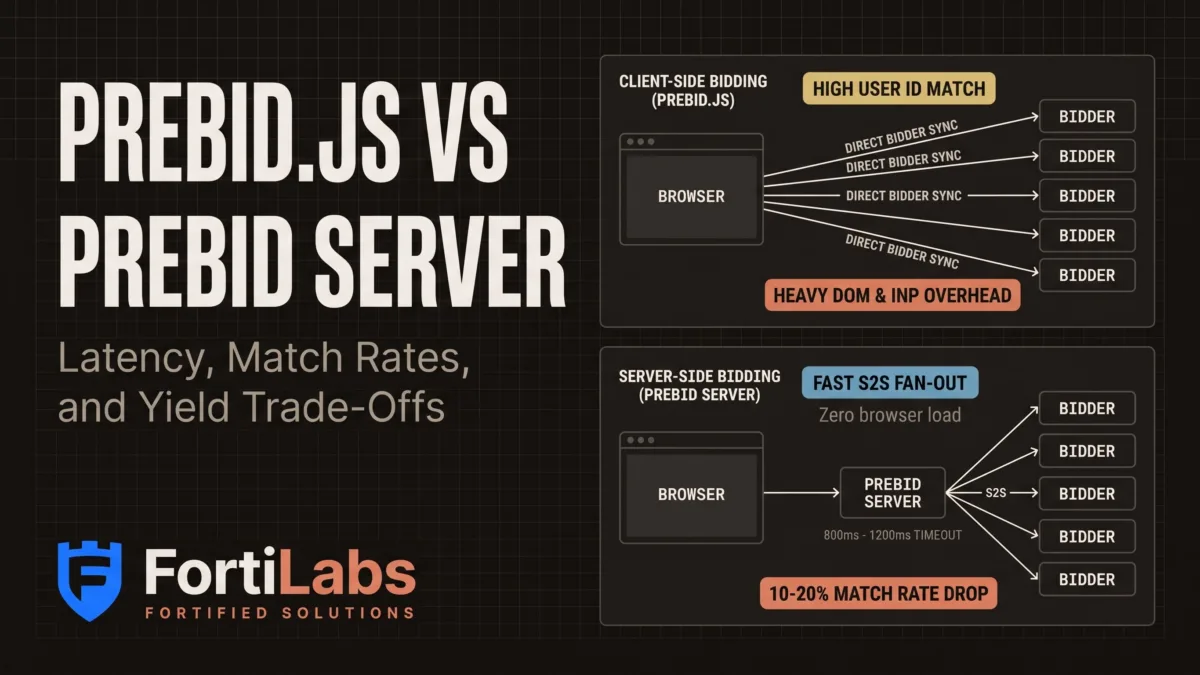
Prebid Server moves bidder execution away from the user’s browser. Instead of contacting every demand partner directly, the browser sends an auction request to a Prebid Server endpoint. The server then coordinates participating server-side bidder adapters and returns eligible bids.
Server-side auction sequence
- The publisher page initializes Prebid.js and its server-side configuration.
- Prebid.js sends an auction request to the configured Prebid Server endpoint.
- Prebid Server validates and enriches the request.
- It fans out requests to configured server-side bidder adapters.
- Bid responses are collected until the auction deadline or timeout.
- Prebid Server returns the eligible results to Prebid.js.
- Prebid.js prepares targeting for the ad server.
- The ad server makes the final ad-selection decision.
Publisher page
      |
      v
  Prebid.js
      |
      | One server-side auction request
      v
  Prebid Server
      |
      +------> SSP / Exchange A
      |
      +------> SSP / Exchange B
      |
      +------> SSP / Exchange C
      |
      +------> SSP / Exchange D
      |
      v
  Collect eligible bids
      |
      v
  Return auction response
      |
      v
  Prebid.js
      |
      v
  Google Ad Manager
      |
      v
  Select and render creative
Why server-side bidding can improve efficiency
The browser no longer needs to execute every participating bidder adapter or make a separate direct auction request to every SSP. Prebid Server can coordinate multiple bidder calls from its own infrastructure.
The server-side model can therefore:
- Reduce the number of direct bidder requests initiated by the browser.
- Move bidder-specific request processing away from the user’s device.
- Support a larger demand set without loading every bidder adapter into the page.
- Centralize request validation, privacy enforcement, and auction configuration.
- Support additional environments such as mobile applications, AMP, and server-side web integrations.
Prebid Server supports a substantial set of server-side bidder adapters, but actual demand participation depends on the adapters enabled by the selected server host and the commercial agreements with demand partners.
Server-side does not mean zero browser load
This distinction is essential when evaluating the performance benefit. A web implementation using Prebid Server through Prebid.js still needs browser-side code to initiate the auction, transmit relevant request information, receive the response, and communicate with the ad server.
The Prebid Server cookie-sync workflow can also involve browser requests and redirects. What moves off-device is the execution of bidder adapters and much of the demand fan-out—not the entire ad auction lifecycle.
A server-side architecture can reduce browser workload, but it does not eliminate the need to measure JavaScript, network activity, and ad-rendering performance.
Auction latency and browser performance
Latency is often the first reason publishers consider Prebid Server. However, comparing only the number of browser requests can produce an incomplete picture.
Client-side bidding makes multiple direct network calls from the browser. Server-side bidding replaces much of that fan-out with a request to the Prebid Server endpoint, followed by server-to-server communication with the demand partners.
Both models have to account for network travel time, bidder response time, processing, auction deadlines, and the final ad-server request.
Latency differences
| Factor | Client-side Prebid.js | Prebid Server |
|---|---|---|
| Browser requests | Direct requests to participating bidders. | Typically one auction request to PBS for the server-side bidder group. |
| Bidder execution | Bidder adapters execute in the browser. | Bidder adapters execute on server infrastructure. |
| Browser processing | More adapter and response-processing work as client demand grows. | Reduced bidder-specific browser execution. |
| Network path | Browser to individual demand endpoints. | Browser to PBS, then PBS to demand endpoints. |
| Identity handling | Direct browser-side user-sync opportunities. | PBS cookie sync, stored identifiers, and permitted forwarded identity signals. |
| Infrastructure dependency | Publisher page and bidder endpoint availability. | PBS host availability, bidder endpoints, and browser connectivity to PBS. |
Why fewer browser requests do not guarantee a faster auction
A server-side request introduces an additional network hop between the browser and the auction server. If the PBS endpoint is geographically distant, overloaded, or poorly connected to bidder infrastructure, the auction can become slower rather than faster.
Conversely, a well-positioned PBS deployment can make parallel bidder communication efficient and reduce the number of separate browser connections competing for resources.
Publishers should measure the full path:
- Browser auction initiation time.
- Browser-to-PBS request and response time.
- Server-side bidder response distribution.
- Timeout and no-bid rates.
- Time from auction initiation to ad-server request.
- Time until the creative becomes visible.
Browser performance and INP
Moving bidder fan-out to PBS can reduce browser-side work, particularly when a publisher previously loaded many bidder adapters. This may improve the main-thread budget available for content rendering and user interactions.
However, a faster auction does not automatically translate into better INP. The publisher still needs to account for Prebid.js core execution, GPT activity, creative rendering, third-party scripts, and other interactive elements.
A useful performance strategy is to measure ad auction activity alongside real-user performance data. Do not assume that reducing the number of bidder adapters alone will produce a measurable improvement in INP.
User identity and match-rate trade-offs
User identity is one of the most important differences between client-side and server-side header bidding. Demand partners may use bidder-specific identifiers to recognize returning users, apply frequency controls, understand audience signals, and improve bid relevance.
A match rate generally describes how often a bidder can associate an incoming opportunity with an identifier it recognizes. The exact calculation varies by bidder and reporting system.
Why client-side identity can be valuable
Client-side Prebid.js can run supported User ID modules and initiate bidder-specific user-sync requests from the browser. These mechanisms can establish or refresh identity mappings between the publisher’s environment and demand partners.
Depending on the identity solution, the page may provide first-party identifiers or extended IDs that can be passed to eligible bidders.
This can improve addressability when the bidder can access the relevant identifier and the user has granted the required permissions.
How Prebid Server handles user identity
Prebid Server supports its own cookie-sync mechanism. Its /cookie_sync endpoint can return bidder-specific sync instructions, allowing the browser to participate in establishing identity mappings that PBS can subsequently use during server-side auctions.
Prebid.js can also send extended identity information through the request. Prebid Server supports receiving Extended IDs (EIDs) and forwarding permitted identity signals to participating server-side bidders.
This means server-side bidding does not inherently eliminate user identity. The result depends on the identity solution, sync history, consent, browser restrictions, and whether the bidder can use the identifier received.
Why match rates can decline after moving bidders server-side
- Bidder-specific browser synchronization may not have completed.
- The PBS cookie may not contain the bidder’s current identifier.
- Browser privacy controls can restrict or block certain synchronization methods.
- Consent signals may prevent identifiers from being created or forwarded.
- Some bidder adapters may support different identity features on the client and server.
- Existing client-side first-party identity integrations may not have been carried over correctly.
These factors can affect match rates and bid participation, but the impact is not a fixed percentage.
A claimed 10–20% reduction should be treated as a benchmark hypothesis to test against actual bidder-level data. It is not a universal Prebid Server penalty. Some publishers may see a larger decline, others a smaller one, and some may see little measurable difference after configuring identity and cookie synchronization correctly.
Identity comparison
| Identity factor | Client-side | Server-side |
|---|---|---|
| Browser user-sync access | Directly available through supported adapter workflows. | Can be coordinated through PBS cookie-sync requests. |
| First-party IDs | Can be created or read through supported modules and integrations. | Can be forwarded as permitted EIDs and other supported signals. |
| Bidder-specific IDs | May be available through direct bidder synchronization. | May be available through PBS’s stored UID mappings. |
| Privacy restrictions | Apply to identity access and synchronization. | Apply to identity access, synchronization, and forwarded data. |
| Match-rate outcome | Depends on browser availability and sync success. | Depends on PBS sync, forwarded IDs, and bidder compatibility. |
Identity optimization strategies
- Preserve supported first-party identity signals when routing demand to PBS.
- Configure the PBS cookie-sync endpoint and monitor its results.
- Review bidder-specific identity requirements before migrating adapters.
- Use the appropriate User ID modules and EID forwarding configuration.
- Apply consent and privacy controls consistently across client and server demand.
- Measure match rate by bidder, browser, region, and consent status.
A strong identity implementation must respect the user’s privacy choices. Publishers should never attempt to restore match rates by bypassing consent signals or browser privacy protections.
Revenue yield: faster auctions versus addressable demand
The revenue impact of header bidding architecture is not determined by auction speed alone. It depends on how many eligible bidders participate, the quality of their demand, identity availability, response rates, and whether bids arrive before the ad-server decision.
A publisher can improve latency and still lose revenue if valuable demand stops responding. Equally, adding more client-side bidders may increase competition but reduce the value of the overall user experience if the auction delays content or causes excessive timeouts.
How client-side bidding can support yield
- Direct browser communication can support established bidder-specific identity workflows.
- Demand partners can compete with access to permitted browser-side identity signals.
- Publishers can maintain detailed bidder-level configuration and analytics.
- Premium bidders can participate without relying on an additional PBS hop.
How server-side bidding can support yield
- More bidders can be evaluated without adding every bidder adapter to the browser build.
- Server-side infrastructure can coordinate demand requests in parallel.
- Reduced browser workload can improve the page’s performance budget.
- Additional demand partners can be tested without proportionally increasing browser-side adapter execution.
Do not confuse bid count with revenue
A larger bidder list does not necessarily produce higher publisher revenue. Low-quality demand, duplicated supply paths, inconsistent bidder fees, or bidders that rarely respond can create complexity without meaningful yield improvement.
Publishers should compare:
- Net revenue per thousand eligible impressions.
- Bid response and no-bid rates.
- Bidder win rate and competition frequency.
- Timeout and late-response rates.
- Average and distribution of winning CPMs.
- Identity match rate and addressable impression share.
- Ad rendering success and viewability.
- Page performance and user engagement.
The most useful metric is not simply the highest returned CPM. It is the incremental net revenue achieved after accounting for latency, fees, infrastructure, ad quality, and user experience.
Designing a hybrid Prebid architecture
Many publishers do not need to choose between fully client-side and fully server-side header bidding. A hybrid configuration allows selected demand partners to execute directly in the browser while other partners participate through Prebid Server.
This is often a practical starting point for publishers with a few high-value partners that benefit from direct browser-side identity and a longer tail of demand that can be routed server-side.
Example: four client-side bidders and server-side long-tail demand
Imagine a publisher with twelve demand partners:
- Four premium partners have strong direct browser demand and valuable identity integrations.
- Eight additional partners provide useful incremental competition but do not all need their own browser-side adapters.
A hybrid architecture could route the four premium partners through client-side adapters and the remaining eight through PBS.
                         Publisher page
                               |
                               v
                            Prebid.js
                               |
              +----------------+----------------+
              |                                 |
              v                                 v
       Client-side bidders                 PBS adapter
              |                                 |
       +------+------+                 +--------+--------+
       |      |      |                 |        |        |
      SSP A  SSP B  SSP C             SSP E    SSP F    SSP G
              |
             SSP D
                                                |
                                               SSP H
                                                |
                                               SSP I
                                                |
                                               SSP J
                                                |
                                               SSP K
                                                |
                                               SSP L
              |                                 |
              +----------------+----------------+
                               |
                               v
                         Auction results
                               |
                               v
                         Google Ad Manager
The four client-side bidders are an example, not a universal optimal number. Prebid’s own guidance suggests beginning with a relatively small client-side demand set and testing the trade-off between demand quality and page latency. The correct split should be based on measured publisher results.
Illustrative hybrid configuration
A simplified configuration might look like this:
pbjs.setConfig({
  bidderTimeout: 1000,

  s2sConfig: {
    enabled: true,
    accountId: "YOUR_ACCOUNT_ID",
    endpoint: "https://YOUR-PREBID-SERVER/openrtb2/auction",
    syncEndpoint: "https://YOUR-PREBID-SERVER/cookie_sync",

    bidders: [
      "bidderE",
      "bidderF",
      "bidderG",
      "bidderH",
      "bidderI",
      "bidderJ",
      "bidderK",
      "bidderL"
    ],

    timeout: 700,
    maxBids: 1
  }
});
The publisher’s client-side ad-unit configuration includes the four selected client-side bidders. The server-side bidder list is configured separately in s2sConfig.
This is an illustrative routing example, not a complete production configuration. It assumes the selected server-side bidder adapters are supported by the PBS host, the account and endpoint are valid, and the relevant consent, identity, currency, and media-type settings have been configured.
Important: avoid duplicate bidder routing
A bidder should not accidentally participate in both the client-side and server-side groups for the same auction. Prebid’s S2S configuration documentation specifies that the same bidder cannot be assigned to multiple S2S configurations, and routing must be designed to avoid unintended duplicate participation across execution paths.
Duplicate demand can distort bid competition, increase request volume, and create confusing reporting. Maintain a clear routing map and verify the actual bidder requests in auction analytics.
How to choose the client-side bidders
The strongest candidates are not necessarily the bidders with the highest average CPM in a historical report. Evaluate each partner using a combination of:
- Incremental net revenue contribution.
- Identity match rate and usable addressability.
- Bid response rate and timeout frequency.
- Average and p95 response latency.
- Demand quality and creative performance.
- Incremental browser-side execution cost.
- Support for the publisher’s media types and privacy configuration.
Keep high-value partners client-side only when the incremental yield or identity benefit justifies the browser cost. Move partners with weaker incremental value to PBS, or remove them if they do not contribute meaningful competition.
Auction timeout optimization: finding the revenue-performance balance
The auction timeout determines how long Prebid waits for eligible bids before proceeding with the ad-server request. If the timeout is too short, potentially valuable bids are excluded. If it is too long, the ad request is delayed and the publisher risks hurting the user experience.
There is no universally correct timeout. A range such as 800–1,200 milliseconds can be a useful experimental starting point for some web publishers, but it should not be treated as a Prebid default or a guaranteed revenue optimum.
How to select a starting timeout
A publisher should consider:
- Typical user network conditions and device capabilities.
- Bidder response-time distributions rather than average latency alone.
- How much revenue is contributed by late-arriving bids.
- Page engagement and how quickly users leave or scroll.
- Whether the auction runs before or after important page content is rendered.
- Direct-sold demand and the publisher’s ad-server priorities.
Client-side timeout versus PBS timeout
A hybrid auction has more than one timeout to coordinate. The outer Prebid.js auction timeout controls the time available to collect results before proceeding to the ad server. The PBS timeout controls the time allocated to server-side bidder requests.
The PBS timeout should be lower than the outer auction timeout so there is time for the request to travel to PBS, for PBS to collect bids, and for its response to return to the browser.
Prebid documentation describes a common starting relationship in which the PBS timeout is around 50–75% of the overall auction timeout, depending on network conditions. The default S2S timeout behavior also uses a value based on the configured bidder timeout, subject to a maximum.
Illustrative timeout configuration
pbjs.setConfig({
  bidderTimeout: 1000,

  s2sConfig: {
    enabled: true,
    accountId: "YOUR_ACCOUNT_ID",
    endpoint: "https://YOUR-PBS-ENDPOINT/openrtb2/auction",
    syncEndpoint: "https://YOUR-PBS-ENDPOINT/cookie_sync",
    bidders: [
      "bidderE",
      "bidderF",
      "bidderG"
    ],
    timeout: 700
  }
});
In this example, the overall auction window is 1,000 milliseconds and the PBS bidder window is 700 milliseconds. This leaves a nominal buffer for the PBS request and response path. Actual timeout adjustment and network overhead still need to be monitored.
Run a timeout experiment
| Test group | Outer auction timeout | PBS timeout | Purpose |
|---|---|---|---|
| A | 800 ms | 500 ms | Test lower latency and the impact of excluded late bids. |
| B | 1,000 ms | 700 ms | Test a balanced starting configuration. |
| C | 1,200 ms | 850 ms | Test whether additional auction time generates enough incremental yield. |
These are example test cells, not recommended settings for every publisher. Run experiments against comparable traffic segments and measure the revenue contribution of bids that arrive between each timeout threshold.
A timeout that increases gross CPM but delays ad delivery or reduces viewability may not improve net publisher revenue.
Bid caching and auction refresh strategies
Caching can reduce unnecessary repeated demand calls, but publishers need to distinguish between reusing a previously returned bid and caching a creative for later rendering.
Prebid.js bid caching
Prebid.js includes an optional bid-cache mechanism. When enabled, eligible bids can be reconsidered for the same ad unit during the same page view, subject to their time-to-live (TTL) and usage status.
This can be useful for certain refresh and dynamic ad-unit scenarios. It is not a general-purpose cache that preserves bids across page loads or guarantees that every cached bid remains eligible.
pbjs.setConfig({
  useBidCache: true
});
Prebid’s bid-cache behavior is deliberately limited. It considers the ad unit, current page context, bid TTL, and whether a bid has already been used or rendered.
Why careless bid reuse can damage yield
- A cached bid may be stale relative to the current auction conditions.
- Market prices and buyer demand can change between auctions.
- A bid may have expired or already been used.
- Reusing bids incorrectly can produce misleading analytics.
- Long-running single-page applications can accumulate bid objects in memory.
Prebid Server caching is a different mechanism
Prebid Server can use Prebid Cache for specific use cases, including storing VAST XML or creative-related responses that need to be referenced by a cache URL. This is not equivalent to treating every server-side bid as a reusable cached price for a future impression.
Publishers should design video and display caching according to the media format, rendering requirements, bid TTL, and ad-server integration.
Recommended refresh strategy
- Use fresh auctions when the impression represents a materially new opportunity.
- Only reuse eligible bids within their documented TTL and scope.
- Track bid age and distinguish cached from newly returned bids.
- Follow publisher and ad-server refresh policies.
- Apply frequency and viewability requirements consistently.
- Avoid extending bid reuse simply to reduce auction requests.
Google Ad Manager: line items, key-values, and price granularity
Prebid collects bids, but the ad server still needs a way to evaluate those bids against direct-sold campaigns, other programmatic demand, and house inventory.
In a traditional Google Ad Manager integration, Prebid passes bid information as key-value pairs attached to the ad request. GAM uses the matching targeting criteria to select a compatible Prebid line item and creative.
Important Prebid key-values
| Key | Purpose | Example |
|---|---|---|
hb_pb |
Price bucket used for ad-server targeting. | 1.50 |
hb_adid |
Identifies the bid and helps the Prebid Universal Creative render it. | Bid identifier |
hb_bidder |
Identifies the bidder associated with the bid. | bidderA |
hb_size |
Identifies the applicable creative size for supported media types. | 300x250 |
hb_format |
Identifies the media format in applicable setups. | banner |
Top Price versus Send All Bids
Prebid supports different ways to expose bids to the ad server. Two important configurations are Send Top Price and Send All Bids.
- Send Top Price: The highest eligible Prebid bid is exposed through the general targeting keys, such as
hb_pb. - Send All Bids: Bidder-specific keys can be exposed, allowing the ad server to identify and report individual demand partners using bidder-specific targeting.
The Send All Bids model can provide more detailed bidder-level reporting and competition visibility, but it can require substantially more line items and orders. Send Top Price is generally simpler to maintain.
Configuring GAM line items
- Define the Prebid key-values in GAM under Inventory and Key-Values.
- Choose the applicable price granularity configuration in Prebid.
- Create line items that target the corresponding price buckets.
- Use appropriate line-item types and priorities so header bidding can compete correctly with other demand.
- Attach the appropriate Prebid Universal Creative or media-specific rendering creative.
- Verify that the line item targets the correct price and bidder key-values.
- Test actual bid targeting and creative rendering before scaling traffic.
Example: price bucket targeting
Suppose Prebid returns a bid with a price bucket of $1.50. The browser may send:
hb_pb=1.50
hb_adid=123456
hb_bidder=bidderA
hb_size=300x250
In a Send Top Price setup, the GAM line item can target the general hb_pb key. In a Send All Bids setup, the corresponding bidder-specific price key may be hb_pb_bidderA, depending on the configured bidder code and key naming.
Price granularity must match the line-item configuration. Prebid’s predefined price granularities use two decimal places. For example, a bucket of 1.50 must be matched with the same precision rather than 1.5.
Line-item scaling and automation
Manual line-item creation can become operationally expensive when multiple bidders, media types, and price buckets are involved. Prebid provides a Line Item Manager that can help generate GAM line items and reduce repetitive configuration errors.
Publishers should also consider GAM’s line-item limits when using Send All Bids. The number of orders and line items can grow quickly as bidder count and price granularity increase.
Always validate the final GAM configuration against the current Prebid documentation and the publisher’s actual ad-server setup.
Measuring latency, match rates, and revenue
A reliable Prebid architecture decision requires a controlled experiment. Comparing a client-side implementation from one month with a server-side implementation from a different month can produce misleading results because demand, seasonality, geography, traffic composition, and buyer budgets change.
Build a fair A/B test
- Choose comparable inventory and traffic segments.
- Keep ad sizes, placements, refresh rules, and GAM configuration consistent.
- Route selected demand partners through client-side or server-side paths.
- Preserve consent and identity settings as closely as possible.
- Run the experiment long enough to capture weekday, weekend, and demand variation.
- Monitor bidder-level performance, not only aggregate CPM.
- Compare net revenue alongside page performance and delivery metrics.
Metrics to monitor
| Metric | Why it matters |
|---|---|
| Auction duration | Shows how long the auction takes before results are ready. |
| Bidder response time | Identifies slow or inconsistent demand partners. |
| Timeout rate | Shows how frequently bidders miss the auction deadline. |
| Bid response rate | Measures the proportion of requests that receive eligible responses. |
| Identity match rate | Shows how frequently bidders can associate an opportunity with usable identity. |
| Net revenue per thousand impressions | Measures the commercial outcome after relevant costs and fees. |
| Browser JavaScript execution | Shows how much client-side work the auction adds. |
| INP and LCP | Connects ad technology changes to user experience. |
| Viewability | Helps establish whether faster or slower ad delivery affects visible impressions. |
Compare the economics, not just gross CPM
A useful revenue calculation should account for the net value of each auction path:
Incremental net yield =
  Incremental programmatic revenue
  - Additional infrastructure costs
  - Additional vendor or hosting costs
  - Incremental operational costs
  - Measurable revenue loss from reduced demand participation
Keep the calculation consistent across test groups. Include relevant SSP fees and technology costs where available, and avoid treating the highest bid as equivalent to the publisher’s realized net revenue.
Example experiment report
Publisher / Inventory segment:
Experiment period:
Traffic allocation:
Geography:
Device mix:
Consent distribution:

Client-side demand:
Server-side demand:
Hybrid demand:

Average auction duration:
p75 / p95 auction duration:
Bidder timeout rate:
Bid response rate:
Identity match rate:
Browser JS execution:
INP:
LCP:
Net revenue per 1,000 eligible impressions:
Viewability:
Ad rendering success:

Result:
Winning architecture:
Caveats:
Follow-up test:
The winning configuration is the one that improves net yield without unacceptable degradation in page performance, ad quality, or operational reliability.
Client-side Prebid.js vs Prebid Server: which should publishers choose?
Choose client-side Prebid.js when identity and direct demand matter most
Client-side bidding is a strong starting point when the publisher has a small, high-value demand set, benefits from direct browser-side identity integrations, and can comfortably manage the auction workload without compromising page performance.
It is particularly useful when premium demand partners have meaningful identity or adapter functionality that is not fully available through their server-side integrations.
Choose Prebid Server when browser overhead is the bigger constraint
PBS is attractive when the publisher wants to reduce the number of bidder adapters and direct auction requests running in the browser, coordinate more demand partners through server infrastructure, or support environments where client-side execution is limited.
The publisher must still operate or select a reliable PBS host, configure identity synchronization, monitor bidder performance, and account for the additional network hop.
Choose a hybrid architecture when demand quality varies
A hybrid model is often the most practical starting point for established publishers. Keep the highest-value partners client-side when direct identity and incremental yield justify the cost. Route suitable long-tail partners through PBS to reduce browser-side demand execution.
| Publisher requirement | Suggested starting point | Reason |
|---|---|---|
| Small premium bidder set | Client-side | Direct demand and identity can justify browser execution. |
| Large demand set with browser constraints | Prebid Server | Moves bidder execution to server infrastructure. |
| Premium and long-tail demand mix | Hybrid | Balances direct browser demand with server-side bidder fan-out. |
| High identity sensitivity | Client-side or carefully tested hybrid | Preserves valuable browser identity workflows where needed. |
| Mobile app or non-browser inventory | Prebid Server or appropriate Prebid SDK integration | Supports environments beyond ordinary web-page auctions. |
| Limited infrastructure resources | Client-side or managed PBS | Avoids operating an unnecessary server-side auction stack. |
Final recommendation
Do not migrate every bidder to Prebid Server simply because server-side auctions appear faster. First identify the demand partners that create the greatest browser-side cost and determine whether they retain their identity and yield contribution when routed through PBS.
For many established publishers, the strongest architecture is a measured hybrid: a small group of high-value client-side bidders, with suitable long-tail demand routed through Prebid Server. Tune timeouts against real response distributions, preserve privacy-compliant identity signals, and compare net revenue per thousand eligible impressions rather than optimizing CPM or latency in isolation.
Production implementation checklist
- Audit current bidder-level response times, match rates, and incremental revenue.
- Review the client-side Prebid.js build and remove unused bidder adapters.
- Identify which bidders provide meaningful value through direct browser execution.
- Verify that every proposed server-side bidder is supported by the PBS host.
- Configure PBS account, auction endpoint, and cookie-sync endpoint correctly.
- Preserve permitted identity signals and Extended IDs where supported.
- Ensure consent and privacy enforcement are consistent across both auction paths.
- Prevent unintended duplicate bidder participation.
- Set PBS timeout below the outer auction timeout.
- Test timeout variations against bidder-level response distributions.
- Validate bid caching and TTL behavior for each media type.
- Verify GAM key-values, price granularity, line items, and creative rendering.
- Monitor browser JavaScript, INP, LCP, and auction duration.
- Compare net revenue, not only gross CPM or bid count.
- Roll out changes gradually and retain a reliable rollback configuration.
Frequently asked questions
Is Prebid Server faster than Prebid.js?
Prebid Server can reduce browser-side auction work by moving bidder execution to server infrastructure. However, the additional network hop to PBS and its processing time can affect overall latency. The faster option depends on the publisher’s network, server location, bidder endpoints, and timeout configuration.
Does Prebid Server eliminate JavaScript from the browser?
No. A web implementation using Prebid.js still needs browser-side code to initiate the PBS auction, process its response, and communicate with the ad server. Server-side bidding moves bidder execution and much of the demand fan-out away from the user’s device.
Does server-side header bidding reduce user ID match rates by 10–20%?
There is no universal 10–20% reduction. The impact depends on bidder-specific cookie synchronization, first-party identity, forwarded Extended IDs, consent, browser restrictions, and the server-side adapter. Publishers should measure match rates for each bidder before and after migration.
Can Prebid Server use user IDs generated by Prebid.js?
Yes, where supported and permitted. Prebid Server can receive Extended IDs through the auction request and can maintain bidder-specific identity mappings through its cookie-sync workflow. Privacy and consent controls determine which signals can be forwarded.
Should publishers use four client-side bidders and move the rest to PBS?
Four is a useful example for testing, not a universal optimum. Start with the bidders that provide the strongest incremental net revenue and identity benefits, then evaluate the remaining demand through PBS. The correct number depends on the inventory, audience, and bidder performance.
What is a good Prebid auction timeout?
A range of 800–1,200 milliseconds can be tested as an initial operating range on some web properties, but there is no universally optimal value. Compare bid response distributions, late-bid revenue, ad delivery time, and user experience to find the right setting.
Should the PBS timeout equal the Prebid.js auction timeout?
No. The PBS timeout should generally be lower than the outer Prebid.js auction timeout. This leaves time for the browser-to-server request, PBS processing, and the response to return before the ad-server decision.
Can client-side and server-side bidders run in the same Prebid auction?
Yes. A hybrid implementation can use direct client-side adapters for selected bidders and the Prebid Server adapter for a separate group of server-side bidders. Routing must be configured carefully to avoid unintended duplicate bidder participation.
Does Prebid.js cache bids automatically?
Bid caching is an optional Prebid.js feature. When enabled, eligible bids can be reconsidered within a limited page-view and ad-unit scope, subject to their TTL and usage status. It should not be treated as a general cross-session bid cache.
How does Prebid integrate with Google Ad Manager?
Prebid sends bid information through key-values such as hb_pb and hb_adid. GAM line items target the appropriate price buckets and use compatible creatives to render eligible Prebid bids. Correct price precision, targeting, and line-item configuration are essential.
What is the difference between Send Top Price and Send All Bids?
Send Top Price exposes the highest eligible bid through general Prebid targeting keys. Send All Bids exposes bidder-specific values, which can provide more detailed reporting but requires additional GAM line items and configuration.
Which architecture produces the highest publisher revenue?
Neither architecture guarantees higher revenue. The result depends on demand quality, identity availability, bidder response rates, timeouts, fees, and user experience. A controlled experiment measuring net revenue per thousand eligible impressions is the most reliable way to decide.
Technical references
The following primary documentation provides implementation details for Prebid.js, Prebid Server, identity synchronization, GAM integration, and auction timeout configuration.
- Prebid — Introduction to Header Bidding
- Prebid — Prebid.js Overview
- Prebid — Prebid Server Overview
- Prebid — Prebid Server Adapter
- Prebid — Auction Timeouts
- Prebid — User Identity
- Prebid — Prebid Server Cookie Sync
- Prebid — Publisher Configuration Reference
- Prebid — Key-Value Targeting
- Prebid — Line Item Considerations
- Prebid — Google Ad Manager Step-by-Step Setup
- Prebid — Developer FAQ
- Prebid — Prebid Server FAQ
- web.dev — Interaction to Next Paint